What should you look for in a keyboard for a café table?
Start with the space available on the table and the device you use. Then decide whether comfortable typing is your main priority, or whether you also want to navigate without a separate mouse.
| What to consider |
What to look for |
Who is this important for? |
| Packed size and table space |
Compare the dimensions when folded and unfolded, and leave room for your screen. |
If I’m carrying the keyboard in a small bag and want to use it at a compact café table, the key is finding the right balance between portability and a practical unfolded size. Around 31% of consumers put packed size first. |
| Connectivity and switching between devices |
Check compatibility, the number of connection channels and whether your device can use any receiver supplied. |
If you update notes on a phone, tablet or computer, it helps to be able to switch easily between devices. Around 31% of consumers give switching between devices top priority. |
| Longer typing sessions |
Consider the keyboard layout and how the keyboard and screen sit together on the table. |
For longer quotes or correspondence, I wouldn’t focus on a small packed size alone. I’d also consider how the keys feel and whether my working posture is comfortable. Around 23% of consumers prioritise longer typing sessions. |
| Navigating files |
Check whether a touchpad works with your device and whether the layout suits tasks such as entering numbers. |
If I want to review drawings and estimates in detail, pointer control can be useful alongside typing. Just check that the extra feature works with my device. Around 15% of consumers give file navigation top priority. |
Joybuy products
This selection includes keyboard accessories for specific iPad models, as well as compact or foldable keyboards for mobile use. Check compatibility and the layout of the version that suits your device.
 Image unavailable
Apple Magic Keyboard for iPad Pro 13-Inch (M4)
For typing and pointer control with a compatible iPad Pro.
The description lists a trackpad, 14 function keys and a USB-C pass-through port. Check that this keyboard is compatible with your iPad Pro model.
Joybuy
 Image unavailable
Trust Lyra Keyboard Mouse Included Office RF Wireless + Bluetooth QWERTY US English Blue
A compact keyboard and mouse for anyone who wants to switch between multiple devices.
The description lists two Bluetooth channels and a USB receiver for up to three devices. Check that your device supports the connection you choose and has a suitable port for the receiver.
Joybuy
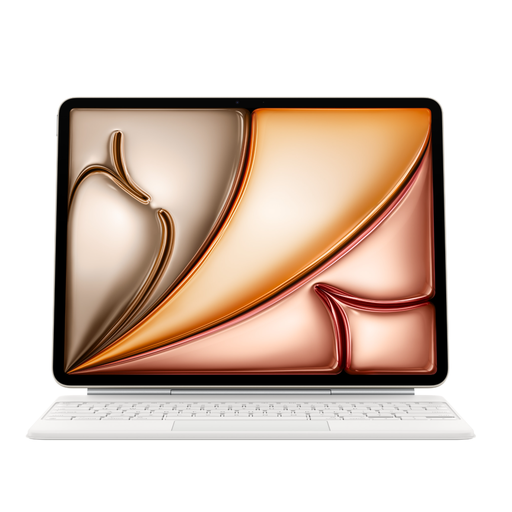 Image unavailable
Apple Magic Keyboard for iPad Air 13-Inch (M3) - US English - White
For typing and navigation on a compatible iPad Air 13-inch (M3).
The description lists a trackpad, 14 function keys and a USB-C pass-through port. Before buying, check that the model and keyboard layout are compatible with your iPad.
Joybuy
 Image unavailable
Voxis B033
A foldable keyboard with an integrated touchpad for anyone who wants to combine typing and pointer control.
The description lists 63 keys and a folded size of 152 × 97 × 12 mm, as well as support for iOS, Android and Windows. Check that the touchpad and keyboard layout are suitable for your device.
Joybuy
 Image unavailable
Voxis HL-BOX1
A foldable Bluetooth keyboard with a touchpad for typing and navigating on the go.
The description lists 64 keys and support for iOS, Android and Windows. The stated folded size is 157,5 × 98 × 15,8 mm; check compatibility with your device.
Joybuy
Frequently asked questions
How do I pair a keyboard for my renovation notes?
First, check the operating system and connection method supported by the version you’ve chosen. Trust lists two Bluetooth channels and a USB receiver for the Lyra; Samsung describes Bluetooth pairing for the Trio 500. A receiver will only work with a suitable port.
Will a built-in touchpad work with my phone or iPad?
Not necessarily. The iClever IC-BK08 manual states that touchpad support is unavailable on iPhone and describes an additional AssistiveTouch setting for iPad. Check support for your device before choosing a model for this feature.
Do I need to charge the keyboard or replace its batteries?
It depends on the model. Trust describes the Lyra as rechargeable; Logitech Support lists two replaceable CR2032 coin-cell batteries for the Keys-To-Go 2. Check the manual for the version you’ve chosen before replacing the batteries.
What returns and warranty rights apply in the Netherlands?
According to the Dutch government, consumers buying online from a business generally have 14 days to change their mind. If a product is faulty, you’re entitled to a product that works as it should, with no fixed statutory warranty period; the seller is your point of contact. For a business purchase, whether consumer law applies depends on the circumstances, as KVK explains.
Are there workplace rules if I spend a long time working on renovation plans?
According to Arboportaal, rules on workstations apply to employees who work with a screen for more than 2 hours a day; in these cases, the screen and keyboard must not be attached to each other. Whether the rules apply depends on the working situation, and they are not a general purchasing requirement for every café visitor.


