
Planner at a shared table
You work on renovation notes in different places and want to keep room for documents and a mouse. Arboportaal notes that a narrow keyboard can leave space to position your mouse closer to your body.


For renovation planning at a shared workspace, a compact keyboard is a sensible choice if you regularly type notes and want to keep some table space free. Choose an extra-slim model if easy storage is your priority, or a foldable model with a numeric keypad if you often enter figures and have enough room to use it when open. Check the connection and keyboard layout before you buy; a claim that a keyboard is quiet is not the same as a comparative noise test.
You work on renovation notes in different places and want to keep room for documents and a mouse. Arboportaal notes that a narrow keyboard can leave space to position your mouse closer to your body.
For example, you switch between a laptop and a tablet and want to know in advance which connection and keyboard layout will work with both. Models may differ in their Bluetooth and USB receiver options.
You regularly enter quantities and figures, and need to weigh up having a numeric keypad against the space the keyboard takes up on the table.
First work out how much room you have while typing, then weigh up storage, number entry and the connection to your device.
Choose this if: you regularly type project notes and can carry a full-length keyboard.
Bear in mind: it takes up more storage space than an extra-slim model. In RTINGS.com's comparison, the Logitech Pebble Keys 2 K380s received more favourable ratings for typing quality and key spacing than the Logitech Keys-To-Go 2; this applies to those two models.
Choose this if: a flat pack in your bag and protection in transit matter more than doing a lot of typing.
Bear in mind: in RTINGS.com's comparison, the Keys-To-Go 2's keys were closer together and its typing quality was rated less favourably than the Pebble Keys 2 K380s.
Choose this if: you often enter figures or quantities and want a keyboard that stores away neatly.
Bear in mind: according to ProtoArc, the XK01 is 386.39 mm wide when open, so measure your workspace. Claims about quiet typing and hinge durability come from the manufacturer and are not based on an independent comparison.
| What to consider | What to look for | Who is this important for? |
|---|---|---|
| Table space and portability | Compare the dimensions both in use and in storage with your workspace and bag. | If I work at a shared table, I want to keep room for documents and a mouse. Around 33% of consumers are mainly concerned with table space and portability. |
| Connection | Check Bluetooth support, available USB ports and whether a receiver is included. | If you switch between a laptop and tablet, you’ll want the keyboard to connect to the devices you use. Around 27% of consumers say this connection is their top priority. |
| Keys and number entry | Check the exact layout, whether it has a numeric keypad and whether it includes the navigation keys you need. | A numeric keypad can be useful if you enter lots of figures or quantities, while you’ll also want to check key spacing if you type longer notes. Around 20% of consumers mainly consider layout and number entry. |
| Key noise | If it’s a deciding factor, assess the sound during normal typing; a manufacturer’s claim is not a comparison. | If I work alongside other people, I want to be considerate about typing noise. Around 20% of consumers prioritise quiet typing in a shared space. |
A foldable keyboard with a numeric keypad can still take up a lot of table space when in use. ProtoArc lists the XK01 as 386.39 mm wide when open.
Measure the space where you’ll actually type and compare it with the keyboard’s open dimensions.
Connections vary by model: some combine Bluetooth with a USB receiver, while others offer a different connection option.
Check the connection, your device’s ports and the accessories included with the exact version.
Manufacturer descriptions of the models discussed do not provide directly comparable noise measurements.
Consider key noise alongside layout and typing feel; try the keyboard for yourself if sound is important to your decision.
The Government of the Netherlands states that there is no fixed statutory warranty period in the Netherlands. If a product is faulty, the seller must provide a solution.
Keep your proof of purchase and distinguish between your statutory rights and any additional manufacturer or seller warranty.
The Pebble Keys 2 K380s is a compact model for switching between devices; in RTINGS.com's comparison, the Keys-To-Go 2 is the smaller option with a protective cover.
According to Trust, the compact Lyra combines two Bluetooth connections with a USB receiver.
According to CHERRY, the KW 7100 MINI BT has three Bluetooth channels and comes with a carry case. The KW 9200 MINI also offers a receiver and a wired connection, among other options.
ProtoArc describes the XK01 as a foldable keyboard with a numeric keypad, for people who want a compact option for storage and need to enter figures.
JLab describes the GO Wireless Keyboard as a compact model with two Bluetooth channels and a USB receiver.
This selection includes wired and wireless keyboards, including models for compatible tablets. Check the connection, layout and device compatibility for each version.
 No image available
The TKL layout could suit you if you want to keep room for a mouse at a shared table and have a USB port available.
Wired; designed for PC and PS5. The stated layout is US QWERTY.
 No image available
This wireless keyboard is an option if you enter renovation notes on a compatible 11-inch iPad Pro model.
Stated compatibility is limited to 11-inch iPad Pro models with an M5 or M4 chip.
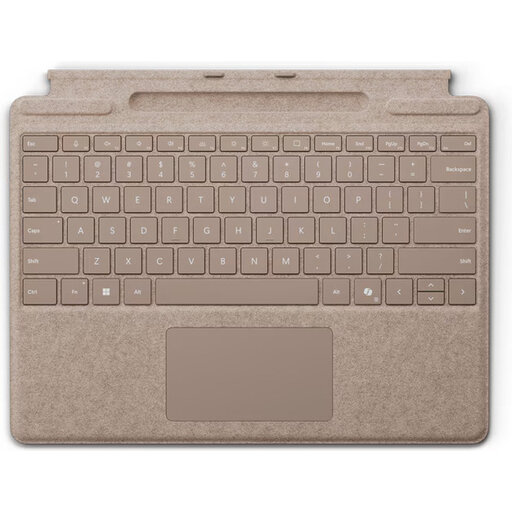 No image available
This version could suit you if you plan your projects on a compatible Surface Pro device.
The layout is QWERTY. Stated compatibility includes Surface Pro 8, 9, 10 and 11.
 No image available
A keyboard case could work well for planning on the move if you use the stated iPad Pro 13-inch (M4).
This version is designed for the iPad Pro 13-inch (M4).
 No image available
The compact layout could be useful if you want to keep room at a shared table and need several connection options.
The title specifies tri-mode connectivity and a US QWERTY layout.
Assess the workspace each time and leave room for your mouse and documents. Arboportaal notes that a narrow keyboard can leave space to position your mouse closer to your body; this is not proof that any one model prevents physical discomfort.
First check which connections each device supports. According to Trust, the Lyra has a USB receiver and two Bluetooth connections; according to CHERRY, the KW 7100 MINI BT uses three Bluetooth channels and has no receiver. Then follow the pairing instructions for the version you choose.
It depends on the model. Trust describes the Lyra as rechargeable, while JLab lists two AAA batteries for the GO Wireless Keyboard. Check the details and included accessories for the exact version.
According to the Government of the Netherlands, when buying remotely you generally have a 14-day cooling-off period, although exceptions may apply. If a product is faulty, the seller is responsible for providing a solution. There is no fixed two-year statutory warranty period in the Netherlands.
The rules described by Arboportaal apply to employees who work at a screen for more than two hours a day: the screen and keyboard must not be attached to each other. When using a laptop, it must be possible to use a separate screen or keyboard. The employer may make an exception in certain circumstances, provided health and safety are protected.