
Editor between appointments
You often take the keyboard out of your bag to make quick edits on a tablet or phone. In that case, a compact design and protection for the keys may be important. Logitech lists an integrated cover for the Keys-To-Go 2.


Choose based on how often you carry the keyboard with you and how much text you edit at each stop. A slim model with a keyboard cover may suit quick edits on the go; for longer sessions, it’s more important to consider the layout and how much room you have to type. Also check that the connection, layout and power supply suit your devices and how you plan to use the keyboard.
You often take the keyboard out of your bag to make quick edits on a tablet or phone. In that case, a compact design and protection for the keys may be important. Logitech lists an integrated cover for the Keys-To-Go 2.
You regularly update longer recipes at a table, so you’ll want to consider the keyboard layout and screen position. Trust and ProtoArc list models with features you can compare for this kind of use, such as adjustable feet or a numeric keypad.
For example, you might start on a tablet and continue later on a computer. In that case, the available connection options and the ability to switch between devices are useful criteria to consider. Logitech and Trust describe models with multi-device options.
| What to consider | What should you look for? | Who is it important for? |
|---|---|---|
| Easy to carry and store | Compare the packed size, any key protection and how much space the keyboard needs when unfolded. | If I often put the keyboard in my bag between appointments, I want to know how much room it takes up and how it sits when open. Around 36% of consumers prioritise portability above all else. |
| Comfortable recipe editing | Check the physical keyboard layout, which keys you need and how much space you have in your usual work area. | When I update longer recipes or ingredient lists, I want to check in advance that the layout suits the way I type. Around 29% of consumers prioritise comfortable typing and text editing. |
| Connecting to devices | Check compatibility with your device, Bluetooth and any USB connection, as well as how many devices you want to pair. | If I switch between my phone, tablet and computer, I want to know which connections my devices actually support. Around 21% of consumers prioritise device compatibility and switching between devices. |
| Power on the go | Check whether the model is rechargeable or uses disposable batteries, and which cable or spare batteries you’ll need. | If I don’t want to keep thinking about charging or replacing batteries between appointments, I compare the different power requirements before choosing. Around 14% of consumers base their choice mainly on the power supply. |
Bluetooth and a USB receiver are different connection options. Which one you can use depends on the connections and compatibility of your phone, tablet or computer.
Before buying, check the exact model and connection method against the devices you want to type on.
A keyboard may take up very little room when folded, but still need a usable surface when you’re typing.
Compare both its folded dimensions and the space it takes up when unfolded with your bag and the places where you edit recipes.
Different versions of the same product can vary. For example, the Trust Lyra version reviewed has a US QWERTY layout; the Keys-To-Go 2 is available in both universal and Apple versions.
Check the layout of the exact version, especially if you often enter symbols and quantities.
The Keys-To-Go 2 is designed to be easy to carry, with a cover; the Pebble Keys 2 K380s is a compact, non-foldable alternative.
The Lyra is a compact model with Bluetooth and USB receiver options; the Nado II is another compact Bluetooth model.
The XK01 is a tri-fold model that combines a compact folded design with a full-size layout and numeric keypad when unfolded.
The E9310M is a slim keyboard with Bluetooth and a 2.4 GHz receiver, offering an alternative to a smaller travel-sized model.
This selection ranges from foldable keyboards for use on the go to keyboards designed for a specific tablet or a larger workspace. Focus on device compatibility, keyboard layout and how much room you have in your bag and when typing.
 Image unavailable
A foldable option to take with you when you want to edit text on a phone or tablet.
The product description lists a magnetic stand, scissor keys, Bluetooth, a rechargeable battery and the ability to switch between up to three devices.
 Image unavailable
A compact keyboard and mouse for anyone who wants to switch between devices and is happy with a US QWERTY layout.
The product information lists Bluetooth and a USB receiver, scissor keys, adjustable feet and a rechargeable battery. The specified keyboard layout is US QWERTY.
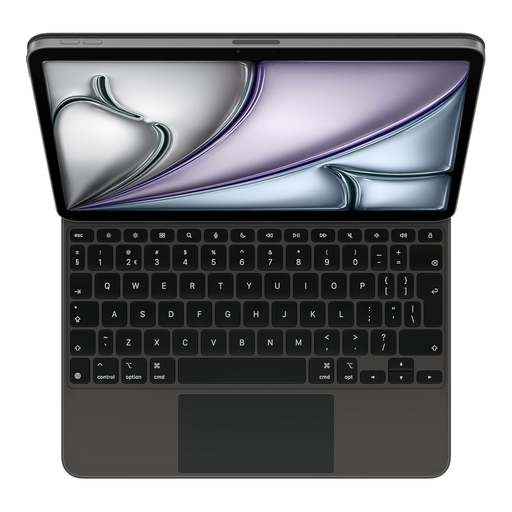 Image unavailable
A keyboard for editing text with the specific iPad Air 11-inch (M3) named in the product title.
The product information lists a Dutch keyboard layout, an integrated trackpad, function keys, adjustable viewing angles and a protective cover. Check that your tablet matches the specified version.
 Image unavailable
A foldable model for anyone who wants to edit text on a tablet, smartphone or computer and use a touchpad at the same time.
The product information lists 63 keys, an integrated touchpad, a rechargeable battery and support for iOS, Android and Windows.
 Image unavailable
A full-size keyboard for entering ingredients and quantities at a workstation; it needs more room than a compact travel-sized model.
The product information lists dimensions of 440 × 130 × 25 mm, a weight of 550 g, a numeric keypad and a US QWERTY layout. It also lists a USB receiver and three Bluetooth channels for up to four devices.
It depends on your devices and the version of the keyboard. Logitech says the universal Keys-To-Go 2 supports several mobile and computer operating systems and can connect to up to three devices; Trust lists Bluetooth and a USB receiver for the Lyra. Check that the connections suit your devices.
Make sure your screen and keyboard are positioned comfortably for the length of time you’ll be working. Arboportaal explains that for employees who work at a screen for more than two hours a day, the screen and keyboard must not be attached to each other; when using a laptop, it must be possible to use a separate screen or keyboard. This workplace requirement is not a general product specification for every buyer.
Check whether the exact version is rechargeable or uses disposable batteries. Trust lists the Lyra as rechargeable; Rapoo specifies two AAA batteries for the E9310M. Follow the manual for your chosen model when charging, using and maintaining it. Stated battery life is not a like-for-like comparison based on real-world testing.
For a consumer purchase covered by Dutch law, you have statutory rights if a product is faulty. According to the Dutch government, there is no fixed statutory guarantee period, and you should contact the seller about a faulty product. For distance purchases, you usually have a 14-day cooling-off period. Don’t assume the same consumer rules apply to a business purchase for client work.
Radio equipment sold in the EU must meet the applicable European requirements. The Dutch Authority for Digital Infrastructure states that the manufacturer applies a CE mark when the radio equipment meets all the requirements; this does not verify a specific version.