
Traveller with limited workspace
Views drawings on a mobile device and wants to type short notes without carrying a full-size keyboard. Logitech and ProtoArc describe compact or foldable options for this kind of use.


Choose based on what you’ll be doing while you’re out and about. A compact standalone keyboard may be enough for short notes, while an integrated trackpad or a compatible keyboard case could be useful if you regularly use a pointer. Before buying, check that your device and drawing app support the input you need, that the keyboard layout suits you and that the setup won’t take up too much room when unfolded.
Views drawings on a mobile device and wants to type short notes without carrying a full-size keyboard. Logitech and ProtoArc describe compact or foldable options for this kind of use.
Often navigates between details or comments and wants to check whether an integrated trackpad works with their drawing app. ProtoArc describes a model with a trackpad, although performance also depends on the device and app.
Uses more than one device while travelling and wants to choose the right connection, keyboard layout and switching features. Logitech, Keychron and Samsung describe different connection and device-switching options.
First, decide whether you’ll mainly be typing short notes or also using a pointer to navigate drawings. Then compare the setup in use, compatibility and practical requirements for travelling.
| What to consider | What should you check? | Who might value this more? |
|---|---|---|
| Portability and space | Compare the size for carrying with the space the keyboard and screen take up together when you’re working. | If I’m viewing drawings in a confined space, I want a keyboard I can take with me without making the unfolded setup impractical. Around 28% of consumers put portability first. |
| Pointer control | Check whether your app supports the panning, zooming and selection actions you need with the trackpad. | If you often point out details, you’ll want to know whether the trackpad is genuinely useful in the app you use. Around 22% of consumers prioritise pointer control. |
| Compatibility and layout | Check the exact device, connection and physical keyboard layout; a keyboard case may be model-specific. | If I switch between devices or need keys in fixed positions, I want to know in advance whether the connection and layout will work for me. Around 22% of consumers put compatibility first. |
| Quiet typing | Consider the keys and the surface you’ll use them on; a description such as ‘quiet’ isn’t a sound measurement. | If you’re typing alongside other passengers, consider the noise and the rules of your travel environment. Around 17% of consumers prioritise quiet typing. |
| Power | Check whether the model uses batteries, needs charging or draws power through a compatible device connection. | If I don’t want to have to find somewhere to charge while travelling, I check how the keyboard is powered. Around 11% of consumers consider power their top priority. |
Operating system support for a pointer doesn’t mean that every drawing action will work in every app. Autodesk notes that two-finger panning in AutoCAD LT 2026 isn’t supported on all touchpad hardware.
Try panning, zooming and selecting with your own device and app before making trackpad control a deciding factor.
Apple’s Magic Keyboard Folio is designed for a specific iPad model and uses the Smart Connector.
Check the exact iPad model and whether it’s compatible with the specific case.
A small folded size doesn’t tell you how much room the keyboard takes up next to the screen when you’re working.
Compare the unfolded setup with the space where you plan to view your drawings.
The Keys-To-Go 2 and Pebble Keys 2 K380s are compact standalone keyboards, with different features focused on portability and switching between devices.
The XK01 TP is a foldable keyboard with an integrated trackpad, for anyone who wants to combine typing and pointer control.
The Smart Keyboard Trio 500 is a compact option for anyone who wants to switch between paired devices.
The Magic Keyboard Folio for iPad (10th generation) combines a keyboard, stand and trackpad for compatible devices.
The B1 Pro is a compact option for anyone considering different connection methods.
This selection includes Apple keyboard cases with trackpads for specific devices, as well as foldable Voxis keyboards with touchpads for typing and pointer control on the go.
 No image available
For typing and pointer control with a compatible iPad Pro 13-inch (M4); check that this is the exact model you use.
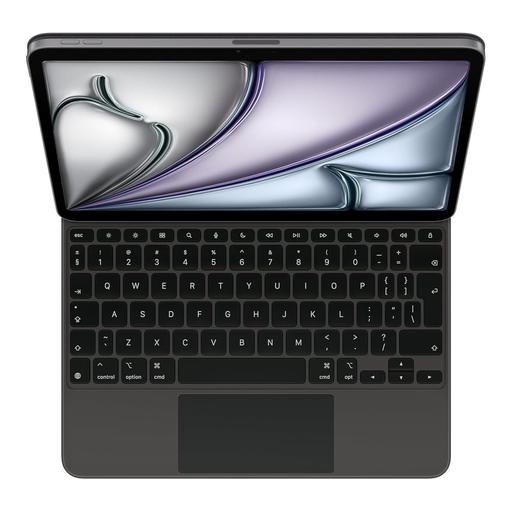 No image available
For typing and pointer control with a compatible iPad Air 13-inch (M3); also check that the US English layout suits you.
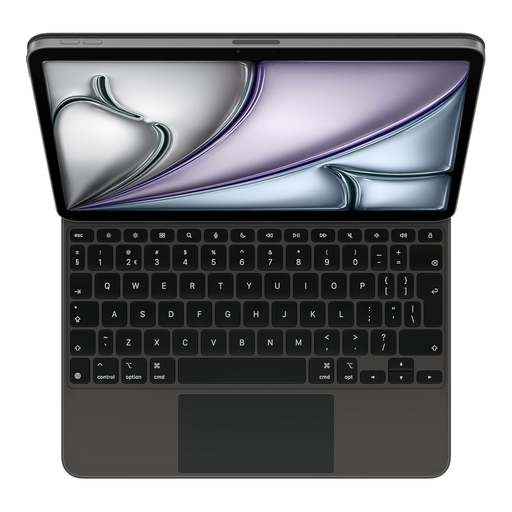 No image available
For typing and pointer control with a compatible iPad Air 11-inch (M3); check that the Dutch layout suits your preferences.
 No image available
For typing and pointer control on a compatible device without a separate mouse; bear in mind how much room the keyboard takes up when unfolded.
 No image available
For typing and pointer control on a mobile device; compare the space it needs with the area where you plan to view your drawings.
No. If you mainly type short notes, your current device’s touch controls may be enough. If you want to use a trackpad, test the actions you need in your own app: Autodesk notes that two-finger panning in AutoCAD LT 2026 doesn’t work with all touchpad hardware.
The connection method varies by model. Logitech says to pair the Pebble Keys 2 K380s through your Bluetooth settings and switch devices using Easy-Switch. With the Magic Keyboard Folio for iPad (10th generation), the Smart Connector handles the connection and power. Follow the instructions for your exact version.
Check the charge before you set off and take the recommended charging cable with you. If you have charging or pairing problems with the XK01 TP, ProtoArc recommends checking the charge and connection, and pairing it again if needed.
Consumer purchases are covered by the statutory guarantee. According to the Government of the Netherlands, you’re entitled to a product that works properly, and the seller must provide a solution if there’s a problem. A manufacturer’s guarantee is an extra benefit and doesn’t replace these rights.
The Dutch Authority for Digital Infrastructure outlines the requirements for wireless equipment placed on the European market, including CE marking. Check the marking on the specific version; a product description alone doesn’t confirm that an individual item on sale meets the requirements.