First, choose a keyboard that connects to the device you use to organise your photos, and check that the photos are available offline on that device; a keyboard won’t store or import them. For long typing sessions, the layout and typing comfort matter more, while a compact model with protective features may be a better choice if space in your bag is your priority. Also consider how your tablet or laptop is powered, and which connections you’ll need for a card reader or storage.
Who is this relevant for?
Tablet user with photos on a memory card
You want to select photos on a tablet or import them from a memory card. First, check how your tablet can access the photos, then make sure the Bluetooth connection and keyboard layout suit your device. Apple Support explains how to import photos to an iPad using a suitable adapter, card reader or direct connection.
Organising an archive without access to a power socket
You want to keep working away from mains power. Compare replaceable batteries with a rechargeable keyboard, and bear in mind the battery in your tablet or laptop too. Logitech specifies two AAA batteries for the Pebble Keys 2 K380s; Trust describes the Lyra as rechargeable.
Traveller who types lots of captions
You take your kit with you, but also type names and captions. It’s worth weighing up size and protection against key spacing and typing comfort. In a comparison of the Pebble Keys 2 K380s and Keys-To-Go 2, RTINGS described the former as less cramped to type on and the latter as smaller.
What should you look for when choosing?
First, check that your device and photos are accessible offline. Then weigh up power, typing comfort and portability.
| What to consider |
What to look for |
Who is this most relevant for? |
| Device and photos |
Check the operating system, connection and physical keyboard layout. Separately, find out how to import photos from a memory card, camera or drive. |
If you want to organise photos on a tablet, first make sure both the keyboard and photo source fit the way you work; around 33% of consumers say device compatibility and access to photos are their main concerns. |
| Power |
Check whether the exact model uses batteries or needs charging, and keep an eye on the battery level of your main device. |
If there’s no power socket nearby, you’ll want to know what to charge or bring with you in advance; around 27% of consumers prioritise an uninterrupted power supply. |
| Extended typing |
Pay attention to key spacing, key shape and the layout of the characters you use most often. |
If you enter lots of file names and captions, you’ll want a layout that’s comfortable to type on for longer periods; around 20% of consumers say this is their main purchasing concern. |
| Size and protection |
Compare the dimensions and protection with the space available in your bag and at your workspace. |
If you take your keyboard, tablet and possibly a card reader with you, you’ll want everything to fit without making the keyboard awkward to use; around 20% of consumers mainly consider portability and protection. |
Common pitfalls
-
Assuming the keyboard battery will power your whole setup
A keyboard with batteries or its own rechargeable battery won’t keep your tablet or laptop charged. A rechargeable model may also need charging beforehand.
Check the power type of the exact keyboard, and plan for the power needs of your main device too.
-
Choosing a USB receiver without checking the ports you need for photos
A receiver or cable may take up a port you need for a card reader or storage device.
Work out in advance which devices need to be connected at the same time. Bluetooth can free up a USB port if your equipment supports it.
-
Assuming all photos are available offline at full resolution
With the ‘Optimise iPhone Storage’ setting in iCloud Photos, originals may be stored in iCloud. Changes and deletions may also sync with other devices, as Apple explains.
Check which photos are stored locally and make a recent, separate backup before moving or deleting files. VeiligInternetten also recommends keeping a recent backup of your files.
-
Choosing based only on ‘compact’ or ‘QWERTY’
It can take time to get used to the shorter key spacing on a small keyboard, especially if you type a lot. The physical layout may also differ from the selected hardware keyboard language, so characters may appear differently.
Check the exact version, key spacing and selected keyboard language on the device you’ll be using.
Brands to consider
Logitech
The Pebble Keys 2 K380s is designed for switching between Bluetooth devices; according to Logitech, the Keys-To-Go 2 has an integrated protective cover.
- Logitech says the Pebble Keys 2 K380s can switch between three devices.
- In a comparison of these two models, RTINGS found the Pebble Keys 2 less cramped to type on; the Keys-To-Go 2 is smaller. This assessment applies to these models.
Trust
Trust describes the Lyra as a compact, rechargeable keyboard with Bluetooth and a USB receiver.
- According to Trust, the Lyra can connect to devices using its USB receiver and two Bluetooth connections.
- If you’re working without a power socket, a rechargeable battery needs to have enough charge beforehand.
CHERRY
CHERRY lists Bluetooth, a receiver connection and a wired connection for the KW 9200 MINI.
- The manufacturer describes two Bluetooth channels and a 2.4 GHz receiver channel, as well as wired use.
- This compact model has no numeric keypad, and wired use requires a free port.
Apple
The Dutch-layout Magic Keyboard (USB-C) is an option if you use a compatible Apple device. Apple lists the keyboard’s system requirements.
- Apple Support explains how to import photos to an iPad using a suitable adapter, card reader or direct connection.
- A keyboard doesn’t import or store photos; check the requirements for your device.
Joybuy products
This selection includes keyboards for mobile or wireless photo archiving. Check the connection, keyboard layout and power requirements for each model against your device and how you plan to use it.
 No image available
NAXSIR foldable Bluetooth keyboard with magnetic stand, grey
The foldable design and magnetic stand for a phone or tablet are made for mobile use.
Rechargeable; charge the keyboard beforehand if you’re going to use it without a power socket. The product name specifies an aluminium casing and quiet keys.
View at Joybuy
 No image available
AJAZZ AK820 MAX 75% mechanical keyboard
The product name lists Bluetooth, 2.4G and wired USB-C mode as connection options.
The battery capacity is listed as 8000 mAh and the layout as US QWERTY. Check that the physical layout suits the characters you enter; capacity alone doesn’t tell you how long the battery will last.
View at Joybuy
 No image available
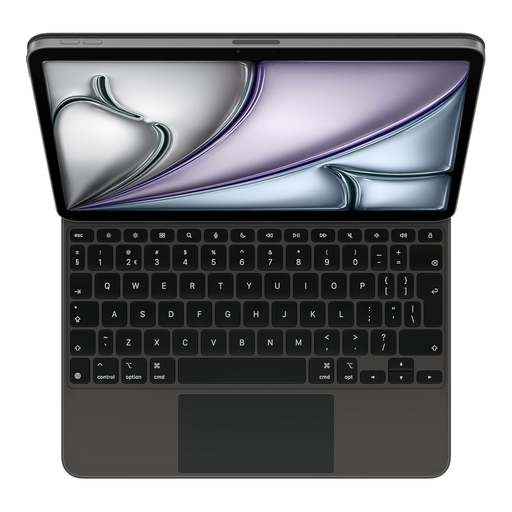
Apple Magic Keyboard for iPad Air 11-inch (M3), Dutch layout, black
This version is listed for the iPad Air 11-inch (M3) and has a Dutch keyboard layout.
Check that your device matches the version listed and that your photos are available locally before working offline.
View at Joybuy
 No image available
Voxis B033 foldable Bluetooth keyboard with touchpad
According to the product name, this foldable Bluetooth model with touchpad is designed for tablets, smartphones and computers.
Rechargeable; charge the keyboard beforehand if you’re working without a power socket. Also check that the connection and keyboard layout suit your device.
View at Joybuy
 No image available
Apple Magic Keyboard with USB and Bluetooth, Dutch QWERTY, black
The product name lists Bluetooth and USB, as well as a Dutch QWERTY layout.
Check that the physical layout suits your device and the characters you enter. Make sure the connection and power requirements work for you when there’s no power socket available.
View at Joybuy
Frequently asked questions
Can a keyboard organise my photos directly from an SD card?
No, you organise photos on a compatible main device. Apple Support explains how to import photos to an iPad using a suitable card reader, adapter or direct connection; check which method works with your device.
What should I prepare if I’m working without a power socket or internet?
Charge rechargeable devices beforehand, bring the right spare batteries if your keyboard uses them, and check that your photos are available locally. With ‘Optimise Storage’, Apple says originals may be stored in iCloud. Make a recent, separate backup before moving or deleting photos.
Why do different characters appear from the ones printed on the keys?
This can happen if the physical keyboard layout doesn’t match the selected hardware keyboard language. Check the keyboard language setting on your device; changing the device’s general language may not resolve the mismatch.
Can I organise a private photo archive containing identifiable people?
The Dutch Data Protection Authority describes an exception for personal or household use when photos remain private or are shared only within a very limited circle. You can’t automatically rely on this exception for wider publication or business use.


