What should you consider when choosing?
First, decide what matters most for your lesson planning. Then check the connection and layout of the specific model you’re considering.
| What to consider |
What should you check? |
Who is this important for? |
| Typing noise |
Where possible, compare the noise made by the exact model and ask about the rules at your workspace. |
I want to type without disturbing people in a quiet space; around 28% of consumers prioritise typing noise. |
| Pack size and desk space |
Compare the packed size with the dimensions when in use, and check whether a case or bag is included. |
When I take my keyboard with me, I want it to be easy to pack away while still leaving enough room to work; around 22% of consumers prioritise pack size. |
| Connection and compatibility |
Check the operating system, Bluetooth support and, if it uses a receiver, whether a suitable USB port is available. |
I want the keyboard to work with my own laptop or tablet, even if another model is smaller; around 22% of consumers prioritise device connectivity. |
| Layout for longer texts |
Consider key spacing, key shape and the keys you need for your lesson materials. |
For longer lesson plans, I prefer a familiar layout to the smallest possible pack size; around 17% of consumers prioritise typing layout. |
| Power |
Check whether the exact model is rechargeable or uses disposable batteries, and bring the right charging option if needed. |
I don’t want to run out of power during a work session; around 11% of consumers prioritise power. |
Brands to compare
These brands offer models suited to working on the go. The features and limitations below apply to the product ranges mentioned, not automatically to every model from each brand.
Logitech
The Pebble Keys 2 K380s is a compact option, while the Keys-To-Go 2 is a slim keyboard with an integrated key cover.
- RTINGS.com describes the typing action of the K380s as very quiet.
- The test notes that the K380s’ key spacing may feel cramped. The cover and device support of the Keys-To-Go 2 are product features listed by Logitech, not an independent noise assessment.
Trust
According to Trust, the Lyra combines Bluetooth with a USB receiver, while the Nado II is a compact Bluetooth model.
- Trust states that the Lyra has a rechargeable battery and supports two Bluetooth connections as well as a USB receiver.
- The claim that the Nado II is quiet comes from Trust. For the Lyra, check that your device has a suitable port for the receiver.
CHERRY
The KW 7100 MINI BT is designed for compact working with Bluetooth and, according to CHERRY, comes with a carry case.
- CHERRY specifies three Bluetooth channels and scissor-switch keys.
- According to CHERRY, this model connects without a dongle. No independent noise assessment of this model is available here; also check the layout of the version you choose.
ProtoArc
According to ProtoArc, the XKM01 is a folding keyboard and mouse set with a number pad.
- The manufacturer describes the XKM01 as a model with 105 keys and a number pad.
- The manufacturer’s product information is not an independent typing or noise test. Check the layout of the specific version and whether the keyboard fits on your desk when unfolded.
Portable keyboards at Joybuy
This selection includes compact keyboards, a folding model and options designed for specific devices. For each model, check that the layout, connection and device compatibility suit your lesson planning.
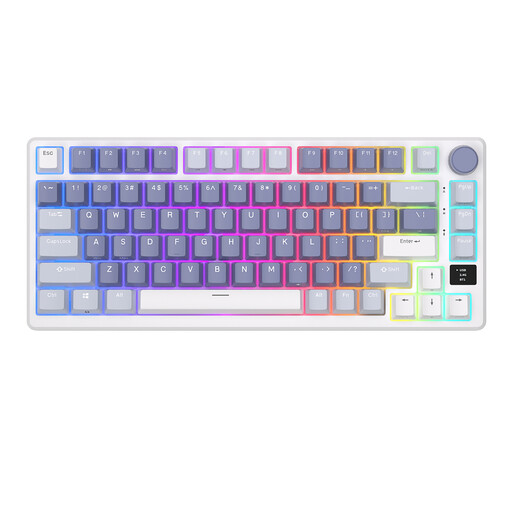 Image unavailable
RK ROYAL KLUDGE M75 Ocean Blue, 75% layout, 81 keys
An option to compare if you’re looking for a compact layout and a choice of connection types.
The product name specifies a 75% layout with 81 keys and 2.4G, USB-C and Bluetooth connectivity. Mechanical keys, an OLED display and a volume knob are also listed.
View at Joybuy
 Image unavailable
Voxis B033 folding Bluetooth keyboard with touchpad
A folding option if you want to take your keyboard with you and use it with a tablet, phone or computer.
The description lists 63 keys, Bluetooth and support for iOS, Android and Windows. Its stated folded dimensions are 152 × 97 × 12 mm and it weighs 0,3 kg.
View at Joybuy
 Image unavailable
Apple Magic Keyboard for iPad Air 11-inch M3, Dutch layout, white
A device-specific option if you type lesson materials on a compatible iPad Air.
The product name specifies a Dutch keyboard layout and a version for the iPad Air 11-inch M3. Check that it matches your iPad model.
View at Joybuy
 Image unavailable
HP 725 wireless multi-device keyboard
An option to compare if you want to switch between multiple devices while preparing your lessons.
The description lists two Bluetooth connections, a 2.4GHz dongle and USB-C charging. The keyboard is described as full-size (100%), so bear its larger layout in mind when carrying it.
View at Joybuy
 Image unavailable
MageGee TS91 wired keyboard, 60% layout, 61 keys, US layout, white
A compact layout to compare if you’re happy to use a wired connection while working.
The product name specifies a 60% layout, 61 keys and a US layout. The description lists a wired connection; check that the layout suits your lesson materials.
View at Joybuy
Frequently asked questions
How do you choose a keyboard for a quiet library space?
Start with a typing action you find acceptable and check the rules for the specific space. RTINGS.com describes the Logitech Pebble Keys 2 K380s as very quiet, but libraries may have designated quiet study areas. That test of one model doesn’t give general permission to use a keyboard there.
How do you connect a keyboard to a tablet or laptop?
Use a connection supported by both the exact keyboard model and your device. According to CHERRY, the KW 7100 MINI BT pairs via Bluetooth without a dongle; Trust also lists a USB receiver for the Lyra. Check in advance that pairing is possible and that your device has the required port.
What power does a portable keyboard need when you’re out and about?
Check whether your version is rechargeable or uses disposable batteries. Trust lists a rechargeable battery for the Lyra, while RTINGS.com’s independent test specifies two AAA batteries for the Pebble Keys 2 K380s. If needed, bring the right charging option or spare batteries.
What rights do you have when shopping online in the Netherlands?
For eligible distance purchases, the Dutch government generally provides a 14-day cooling-off period. Products must also conform to the sales agreement; the Netherlands does not have a fixed statutory warranty period. If there’s a fault, contact the seller.
What product rules apply to a wireless keyboard in the Netherlands?
According to the European Commission, radio equipment placed on the EU market is covered by the Radio Equipment Directive. Where EU product rules require CE marking, it indicates that the manufacturer declares the product meets the applicable requirements. Check the information for the specific version.


