
Traveller with a tablet or phone
Mostly writes up short observations and wants a keyboard that’s easy to take along. Logitech describes the Keys-To-Go 2 as suitable for use with tablets and phones, among other devices.


For short notes on a tablet or phone, a compact size and compatibility with your operating system are important considerations. For longer reports, a comfortable workstation matters more than having the smallest possible keyboard. Also check the keyboard layout and connection, and make sure you can position the screen and keyboard comfortably on the hotel desk.
Mostly writes up short observations and wants a keyboard that’s easy to take along. Logitech describes the Keys-To-Go 2 as suitable for use with tablets and phones, among other devices.
Types in one place for longer and needs to consider the keyboard, screen and sitting position together. Arboportaal recommends reviewing your workstation when you work in a different location.
Combines prose with lots of number entry, so may want to consider a numeric keypad. Rapoo states that the E9310M has 99 keys; check whether its layout suits the way you enter data.
First, think about how long you’ll be writing and which device you’ll take with you. Then compare the dimensions, connection and layout of the exact model.
| What to consider | What to look for | Who is this most important for? |
|---|---|---|
| Size and protection | Compare the dimensions with your bag and check whether the keys are covered during transport. Logitech lists a protective cover for the Keys-To-Go 2. | If I’m taking my phone or tablet and want to use as little space as possible, a compact size comes first; around 31% of consumers prioritise a compact keyboard. |
| Typing space and workstation | Consider the keys and available space alongside the position of the screen. Arboportaal recommends reviewing your workstation when working in a different location. | For longer reports, I want to be able to position the keyboard and screen comfortably on the desk; around 31% of consumers prioritise usable typing space and a practical workstation setup. |
| Connection and layout | For each model, check the supported operating system, whether it uses Bluetooth or requires a USB port, and its physical keyboard layout. | If I want to connect my own writing device or switch between devices, the connection and layout need to be right; around 23% of consumers prioritise device compatibility. |
| Number entry | Work out how many numbers you’ll enter and check whether the model has a numeric keypad and will fit in your bag and workspace. | If I’m entering lots of measurements, I don’t want to choose based on compact size alone; around 15% of consumers give number entry top priority. |
Trust sells both a standalone Lyra keyboard and a keyboard-and-mouse set. The series name alone doesn’t tell you what’s in the box.
A set may also include a mouse you don’t need.
Before buying, check the full model name and the listed contents of the box.
For longer periods of screen work, the screen position, available space and your posture all matter too. Arboportaal recommends reviewing your workstation when you’re in a new location.
Before a long writing session, check the desk, chair and position of your writing device.
The Dutch Government states that the Netherlands has no fixed statutory warranty period. A manufacturer’s warranty is not the same as your statutory rights if a product does not meet the terms of the agreement.
Keep your proof of purchase and consider any extended warranty separately from your statutory rights.
The Keys-To-Go 2 and Pebble Keys 2 K380s are compact options with different features and ways to switch between devices.
The standalone Lyra Compact Wireless Keyboard is a compact option with Bluetooth and a USB receiver.
The E9310M is worth considering if you need to type and enter numbers, and have room for a larger keyboard in your luggage.
This selection ranges from foldable Bluetooth keyboards for mobile use to other wireless layouts and a keyboard-and-mouse set. For each model, compare the stated layout and connection with your writing device and the space available to you.
 Image unavailable
A foldable model to consider if you have limited space in your bag and want to type on a phone or tablet.
The product name mentions Bluetooth, a rechargeable design and a magnetic stand. The product information lists 63 keys, so check whether the layout suits the way you type.
 Image unavailable
An option if you’re looking for a more compact layout and the physical US QWERTY layout suits the way you work.
The product name lists Bluetooth, 2.4GHz and USB-C connection options. Check beforehand that the layout has the keys you need for your observations.
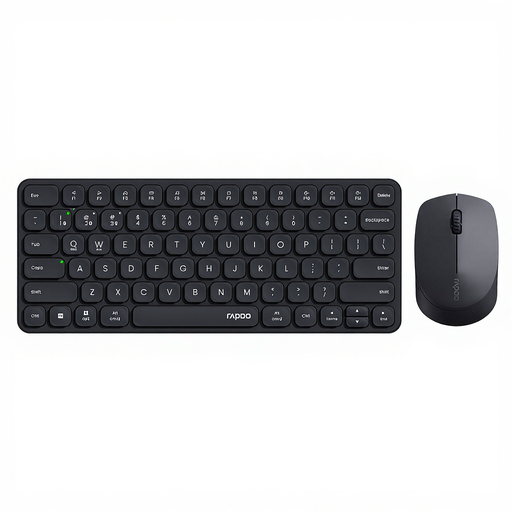 Image unavailable
Consider this set if you want to take a mouse as well as a keyboard; this isn’t a standalone keyboard.
The product name lists Bluetooth 5.0/4.0, 2.4GHz and support for four devices. The product description also mentions low-profile keys and quiet keystrokes.
 Image unavailable
A foldable keyboard with a touchpad to consider if you want a mobile setup.
The product name mentions Bluetooth and use with tablets, smartphones and computers. The product information lists a 63-key layout; check that it gives you enough room for your notes.
 Image unavailable
A model to consider if you’re looking for a roomier keyboard layout and have enough space to carry and set it up.
The product information lists a full-size QWERTY layout and Bluetooth. The specified version is QWERTY US; check that its physical layout suits your preferences.
Choose a connection supported by your writing device. The product information describes the Trust Lyra and Rapoo E9310M as having Bluetooth and a USB receiver. If you’re using a receiver, check that your device has a suitable USB port.
According to the Rapoo manual, hold down the chosen Fn and 1, 2 or 3 key combination for at least three seconds to activate Bluetooth pairing mode. Then complete the pairing process on your writing device.
Not always: the screen position, available space and your posture matter too. Arboportaal recommends assessing your workstation in a new location. For employees who work at a screen for more than two hours a day, Arboportaal describes requirements for keeping the screen and keyboard separate; this doesn’t apply as a general product specification for every buyer.
According to the Dutch Government, the Netherlands has no fixed statutory warranty period; if there’s a problem with a product, contact the seller. For many purchases made online from a business, a 14-day cooling-off period applies. Check the terms and any exceptions that apply to your order.