What should you look for?
First, decide which need matters most in your workspace. Then compare the key feel, size, connections and any cleaning requirements.
| What to consider |
What should you look for? |
Who is this most important for? |
| Quiet typing |
Check the key type and, if possible, try the keyboard on a similar surface to the one you’ll be using. |
If I’m writing alongside colleagues, I want to type quietly without choosing a key feel that feels unfamiliar; around 25% of consumers say quiet typing is their top purchasing priority. |
| Portability and setup |
Check the dimensions, weight, key protection and the space available for your screen and hands. |
When I move between writing areas, I want to carry my keyboard easily and use it on a small table; around 25% of consumers say portability is their top purchasing priority. |
| Connecting to your device |
Check Bluetooth availability, the ports available, the keyboard layout and whether you’re choosing a standalone keyboard or a set. |
If my work device requires specific connections or I switch between devices, I want to know in advance which connection method will work; around 19% of consumers put device connectivity first. |
| Longer writing sessions |
Consider the space available for your screen and mouse, and try the key feel if you do a lot of writing. |
For longer note-taking sessions, I want my keyboard and screen to fit comfortably in my workspace; around 19% of consumers say comfort during long writing sessions is their top purchasing priority. |
| Ease of cleaning |
Decide whether the keyboard will be used in the lab area in question, then check the exact model-and-cover combination and the cleaning instructions. |
If my lab protocol requires the keyboard to be cleaned, I want to choose a model that meets those requirements; around 12% of consumers say ease of cleaning is their top purchasing priority. |
Brands to consider
These brands offer options for different compact and lab-focused keyboard setups. The features listed apply to the product ranges described and do not, in themselves, indicate availability.
Logitech
The Keys-To-Go 2 Universal is designed for easy portability, with a built-in cover; the Pebble Keys 2 K380s is designed for compact Bluetooth use and switching between devices.
- Logitech says the Pebble Keys 2 K380s features Easy-Switch for three devices.
- A travel cover is not proof that it’s suitable as a cleaning cover for a lab area.
Trust
The Lyra is a compact, rechargeable keyboard option for devices with Bluetooth or a USB receiver.
- Trust describes two Bluetooth connections and a USB receiver for up to three devices.
- Check whether you’re choosing the standalone keyboard or a keyboard-and-mouse set, and whether the layout suits your work.
CHERRY
The KW 9200 MINI is a compact option for those who want a choice of connection methods.
- CHERRY says this model has Bluetooth channels, a 2.4 GHz connection and a wired channel.
- Check the layout of the model on offer and whether the required port is available.
R-Go Tools
The Compact Break is a compact keyboard option; a separate hygienic cover is also described for the Compact Break EU.
- R-Go describes a break indicator controlled by R-Go Break software.
- Don’t assume the wired US model and the cover for the EU model are compatible without checking the fit.
Man & Machine
The range includes keyboards for laboratories and other hygiene-sensitive working environments.
- The manufacturer describes cleaning options for products in its range.
- For each model, check whether the permitted cleaning method and products are compatible with your lab area’s protocol.
Keyboards at Joybuy
These product options include compact or portable keyboards and keyboard accessories for taking notes on compatible devices. Check the connection, keyboard layout and any model-specific limitations for each version.
 No image available
VoxorAI / Apple Magic Keyboard for iPad, black
The product title says it’s compatible with 11-inch iPad Pro models with an M4 or M5 chip and uses a wireless connection.
Check that your iPad is compatible with this specific model.
View at Joybuy
 No image available
AJAZZ AK820 MAX 75%
A mechanical keyboard with a 75% layout and US QWERTY, designed for those looking for a compact layout.
The listed connections are Bluetooth, 2.4 GHz and USB-C. Check in advance that the US layout suits the way you type.
View at Joybuy
 No image available
AJAZZ AK820 Pro 75%
The 75% layout is designed for a compact workspace. The title specifies a US QWERTY layout.
Connection options include wired, Bluetooth and 2.4 GHz; the description says it can be used with up to three devices. Check the layout and compatibility with your work device.
View at Joybuy
 No image available
Voxis B033 folding Bluetooth keyboard
This foldable model with touchpad is designed for mobile use with tablets, smartphones and computers.
The description lists Bluetooth, support for iOS, Android and Windows, and a weight of 0.3 kg. Check that your device’s operating system is supported.
View at Joybuy
 No image available
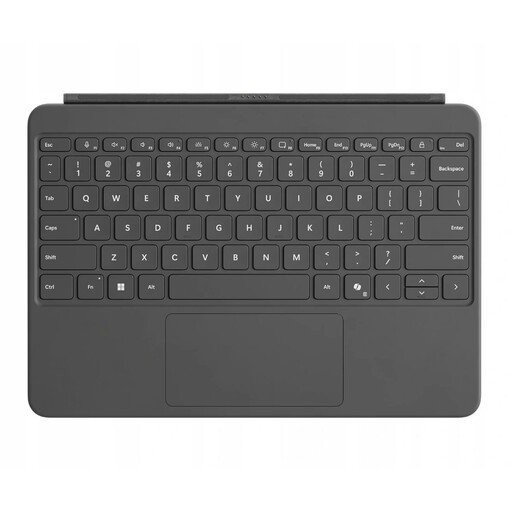
Microsoft Surface Pro Keyboard 12-inch QWERTY Platinum
This keyboard accessory is designed for the Surface Pro 12-inch and features a magnetic connection and touchpad.
Check that the connection is compatible with the exact Surface Pro model you use.
View at Joybuy
Frequently asked questions
How do you use a separate keyboard for longer laptop note-taking sessions?
Position the screen and keyboard so you can adjust them separately, and vary your posture. For employees who use a screen for more than two hours a day, Arboportaal sets out specific workstation requirements, including that the screen and keyboard must not be attached to each other.
Can you disinfect a standard portable keyboard in a lab area?
Don’t assume you can based on a travel cover or a general product description. First check the protocol for the area in question, then consult the cleaning instructions for the exact keyboard and any compatible cover.
What should you check when connecting to a shared work device?
Check which connections and USB ports are available and permitted, whether the model is compatible with the operating system, and which keyboard layout it comes with. Trust and CHERRY describe different connection options; remember to check your local IT policy too.
What rights do you have when buying a keyboard online in the Netherlands?
According to ACM ConsuWijzer, online consumer purchases usually come with a cooling-off period of up to 14 days after delivery, with some exceptions. You’re also covered by the legal guarantee; there is no single fixed statutory period for all products. What you can reasonably expect from a product depends, among other things, on the product itself and how it is used.


