What should you look for when choosing?
First choose between a standalone keyboard and a tablet case made for a specific model. Then compare how compact it is to pack and how much keyboard space you need.
Slim standalone Bluetooth keyboard
Best for: practising on different devices when you can place a separate keyboard on the desk.
Bear in mind: you may need a separate stand, and you’ll need to check compatibility and layout.
Foldable Bluetooth keyboard
Best for: people who want to pack their keyboard away compactly but need more key space when it’s unfolded.
Bear in mind: it may take up more desk space when unfolded; check the listed keyboard layout too.
Tablet case for a specific model
Best for: people with a compatible tablet who want to carry the keyboard and stand as one unit.
Bear in mind: cases aren’t universal, so check the full tablet model and the layout you want.
| What to consider |
What should you check? |
Who is this important for? |
| Compatibility |
For a standalone model, check which devices it supports; for a case, check the full tablet model. |
If I want to use vocabulary lists on my existing phone or tablet, the keyboard needs to work with it. Around 36% of consumers prioritise compatibility with their own device. |
| Packed size and key space |
Compare its size when packed and unfolded, and consider whether you’ll need a separate device stand. |
If I have limited luggage space but want to type comfortably at a desk, I weigh its packed size against the space available for keys when unfolded. Around 29% of consumers prioritise portability. |
| Layout and typing feel |
Check the keyboard layout supplied and where the characters you use often are; try the keyboard yourself if possible. |
If I’m entering lots of words while practising, I want a layout and keys that suit the way I type. Around 21% of consumers prioritise comfortable word entry. |
| All-in-one tablet setup |
Check the exact tablet and case models, and confirm that the stand, trackpad and layout are included with that version. |
If I want to set my compatible tablet on a desk with a keyboard attached, I’m looking for a case made specifically for that model. Around 14% of consumers prioritise an all-in-one tablet setup. |
Joybuy product picks
The Joybuy picks below focus on foldable Bluetooth keyboards and keyboard cases for specific tablets.
 No image available
NAXSIR foldable Bluetooth keyboard with magnetic stand, grey
A foldable option for practising on a phone or tablet with a detachable magnetic stand.
The product name mentions Bluetooth, rechargeable power and an aluminium casing. The description says it supports phones and tablets and can switch between up to three devices.
Joybuy
 No image available
Apple Magic Keyboard for iPad Pro 13-inch (M4), QWERTY
A keyboard case made for a specific model, for using a compatible iPad Pro as a fixed tablet workstation.
The product description mentions a detachable Dutch QWERTY keyboard, trackpad, adjustable viewing angles and a protective case. The title lists iPad Pro 13-inch (M4); check the exact iPad model, as the description refers to 11- and 13-inch iPad Pro models from 2024.
Joybuy
 No image available
Voxis B033 foldable Bluetooth keyboard with touchpad
A compact foldable option for typing on a phone, tablet or computer with a touchpad.
The description mentions Bluetooth and support for iOS, Android and Windows. When folded, the keyboard measures 152 × 97 × 12 mm; unfolded, it has 63 keys and a touchpad.
Joybuy
 No image available
Voxis HL-BOX1 foldable Bluetooth keyboard with touchpad
A foldable option for taking a keyboard with a touchpad along to use with a phone, tablet or computer.
The description mentions Bluetooth and support for iOS, Android and Windows. The model has 64 keys and a touchpad; when folded, it measures 157,5 × 98 × 15,8 mm.
Joybuy
 No image available
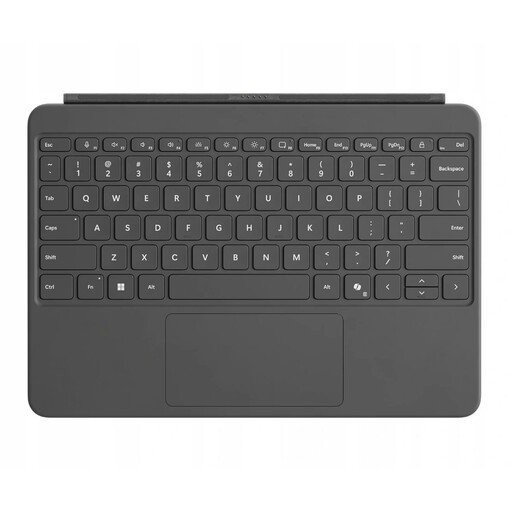
Microsoft Surface Pro Keyboard 12inch, QWERTY, Platinum
A keyboard case for typing vocabulary lists on a compatible Surface Pro when using it at a desk.
The description mentions a magnetic connection, trackpad and dynamic hinge for switching between tablet and laptop modes. Check compatibility with your exact Surface Pro model.
Joybuy
Frequently asked questions
How do I pair a standalone Bluetooth keyboard with an iPad?
Put the keyboard into discovery mode as described in its manual. On your iPad, open Settings, then Bluetooth, switch Bluetooth on and select the accessory when it appears. You may be asked to enter a code.
Will any keyboard case fit my tablet?
No, a keyboard case won’t necessarily fit every tablet. Apple lists the Magic Keyboard Folio for iPad (A16) and iPad (10th generation), while Samsung lists the EF-DX730UBEGWW reviewed for Galaxy Tab S11. Check your tablet’s full model number before buying.
What should I check for transport and care?
Follow the manufacturer’s guidance on carrying and cleaning the keyboard. According to Logitech, the built-in cover on the Logitech Keys-To-Go 2 protects the keys, but not your phone or tablet.
What are my rights when buying a keyboard online in the Netherlands?
For a standard online purchase as a consumer, you generally have a statutory cooling-off period of up to 14 days after delivery. Legal exceptions may apply. The seller is also responsible for the statutory guarantee if the product doesn’t meet what you can reasonably expect.
What product regulations apply to an electric or Bluetooth keyboard in the Netherlands?
The Netherlands’ Radiocommunications Agency states that electrical and electronic equipment must carry the correct CE marking, and that applicable European requirements apply to wireless equipment. Check the marking on the specific version; a retailer’s listing alone doesn’t confirm that the version has been checked.


