
Traveller with limited luggage space
You update slides on the go and want to bring a separate keyboard. It needs to fit in your bag when packed away, while still giving you enough room to work on the hotel desk.


For creating slides in a hotel room, an ultra-slim keyboard is best if saving space in your bag is your priority; a compact model is a better choice if you’ll be typing for longer, while a foldable model can give you extra keys when unfolded. Logitech describes the Keys-To-Go 2 as having a cover and the ability to switch between up to three devices. Trust and CHERRY list several connection options for their compact models, while ProtoArc specifies a numeric keypad for the XK01. Before buying, check the physical key layout, your device’s connections and the shortcuts used by your presentation app.
You update slides on the go and want to bring a separate keyboard. It needs to fit in your bag when packed away, while still giving you enough room to work on the hotel desk.
You switch between devices while preparing and want to know in advance whether Bluetooth, a USB receiver or a cable will work with each one.
You type for extended periods and may care more about the key layout and typing feel than having the smallest possible package. Backlighting may also be useful if you work in low light.
First compare the size in your bag and on your work surface. Then make sure the connection and key layout suit your device and presentation app.
| What to consider | What should you check? | Who should pay particular attention? |
|---|---|---|
| Size in your bag and on the desk | Compare the packed and unfolded dimensions with your bag and the available work surface. | If I have limited luggage space, I want to know how much room the keyboard takes up when travelling and when I’m working. Around 33% of consumers prioritise portability above all else. |
| Connection and key layout | Check Bluetooth support or the USB connection you need, as well as the exact layout and your app’s shortcuts. | If I switch between a tablet and laptop, I want the connection and keys to work with my devices and presentation app. Around 27% of consumers prioritise device compatibility. |
| Extended typing | Look at the type of keys and physical layout, and check whether backlighting matters for your working environment. | If I write a lot of text and speaker notes, I want keys that suit the way I type. Around 20% of consumers prioritise typing comfort above all else. |
| Power and keeping going | Check the battery type, charging cable and whether you can use your chosen model while it’s charging. | If I’m finishing my slides just before a presentation, I want to know in advance how to charge the keyboard or replace its batteries. Around 20% of consumers prioritise power options. |
When unfolded, a foldable keyboard may take up more desk space than you’d expect from its packed size.
Measure the space in your bag and the available work surface, then compare them with the keyboard’s dimensions in both configurations.
Keyboards may connect via Bluetooth, a USB receiver or a cable. These options don’t all require the same connection on your device.
Check the connections on your laptop or tablet before choosing how to connect.
If you’re relying on a USB receiver, you may need a compatible USB port or adapter.
The physical key layout can determine where characters appear and how key combinations work. Microsoft notes that PowerPoint shortcuts on iPad may differ from those in the desktop version.
Check the exact model and selected input language, and look up the shortcuts for your presentation app.
For this kind of choice, Logitech offers both a slim keyboard with a cover and a compact backlit model.
The Lyra is a compact option if you want to switch between devices.
According to CHERRY, the KW 9200 MINI offers several ways to connect.
The XK01 is a foldable option if you want to bring a numeric keypad.
These Joybuy products include foldable keyboards for travelling and keyboards designed for specific tablets or laptops. Check that each model is compatible with your device.
 Image unavailable
The tri-fold design is a handy option if you want a keyboard that packs away compactly.
The product name specifies Bluetooth and a touchpad, and lists tablets, smartphones and computers as compatible device types.
 Image unavailable
This foldable model comes with a case and is designed for anyone who wants to carry a keyboard compactly.
The product name specifies Bluetooth and a touchpad, and lists computers, mobile phones and tablets as compatible devices.
 Image unavailable
This device-specific option is designed for preparing slides on a compatible 11-inch iPad Pro model.
The product name specifies compatibility with 11-inch iPad Pro models with an M4 or M5 chip. Check that it matches your tablet.
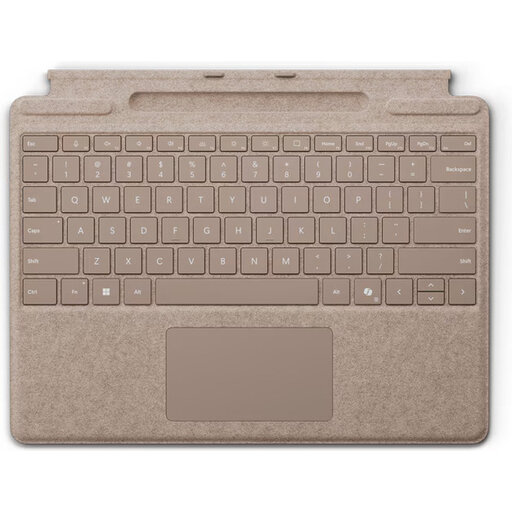 Image unavailable
This device-specific model is an option if you’re preparing slides on a compatible Surface Pro.
Check that your Surface Pro is one of the specified generations, from 8 to 11.
 Image unavailable
This device-specific option may suit you if you’re preparing slides on an iPad Air 11-inch M3.
The product name specifies a Dutch key layout. Check that it matches your iPad Air model.
Not always. Microsoft notes that navigation and shortcuts in PowerPoint for iPad may differ from those in the desktop version. Check the app’s commands and the key layout you’re using.
Before you set off, check how your chosen model is powered and whether you can keep working while it charges. Trust says the Lyra can be used while charging; CHERRY lists a cable for charging and data transfer for the KW 9200 MINI. Check that the cable and connection are right for your model.
According to ACM ConsuWijzer, online consumer purchases generally come with a statutory 14-day cooling-off period from delivery, although exceptions apply. Separately, you’re entitled to a product that performs as you could reasonably expect under normal use. The rules for faulty goods are separate from changing your mind.
The European Radio Equipment Directive sets a framework for placing radio equipment on the market. The framework alone doesn’t confirm whether a particular keyboard or listing complies with the rules.