What should you look for when choosing?
First check that the keyboard works with your device and app. Then match your typing needs to a size you can use both on the go and at your destination.
| What to consider |
What should you check? |
Who is this important for? |
| Device and connection |
Check that your operating system is supported and pair the keyboard before you set off. Test the keyboard layout in your own app, too. |
If I need my phone or tablet at the location, I don’t want to find out there that the connection or layout doesn’t work. Around 29% of consumers say compatibility is their top priority. |
| Typing descriptions |
Check the keyboard layout and, if possible, try typing into fields similar to the notes in your inventory. |
When I’m adding lots of descriptions, I want a layout that lets me enter longer text without a smaller format getting in the way. Around 29% of consumers prioritise text entry. |
| Pack size and workspace |
Compare the dimensions both for carrying and for use. Also check whether you need a tablet stand and how the keyboard is powered. |
If space is limited in my bag or on the table, I need to know whether the keyboard will fit when I’m using it. Portability is the top priority for around 24% of consumers. |
| Entering figures |
Check whether your inventory includes lots of numerical fields, and measure whether a version with a number pad will fit in your workspace. |
If I often enter quantities or values, a separate number pad may be useful. If I mainly enter text, the extra width may not be worth it. Around 18% of consumers say entering figures is their top priority. |
Keyboards at Joybuy
These product picks are for typing on a mobile device or tablet, and include both foldable models and versions designed for specific devices. Before setting off, check that the exact version works with your device and app.
 No image available
NAXSIR foldable Bluetooth keyboard with magnetic stand, grey
A foldable option for typing on your phone or tablet while you’re out and about. Check in advance that the keyboard layout suits the way you type.
The product name mentions a rechargeable battery, aluminium body and quiet keys.
Joybuy
 No image available
Voxis B033 foldable Bluetooth keyboard with touchpad
A foldable model with a touchpad for anyone who wants to use a pointer as well as type. Check that the touchpad and keyboard layout work with your device and inventory app.
The product description warns against excessive moisture, so bear that in mind when using it on the go.
Joybuy
 No image available
Voxis HL-BOX1 foldable keyboard with touchpad
A foldable model with a touchpad for combining typing and pointer control. Check that the connection and keyboard layout work with the device and app you use.
The product description warns against excessive moisture.
Joybuy
 No image available
VoxorAI / Apple Magic Keyboard for iPad, white
The product title specifies that this version is for 11-inch iPad Pro models with an M4 or M5 chip. Check that you have the exact iPad model before relying on it for your inventory.
Joybuy
 No image available
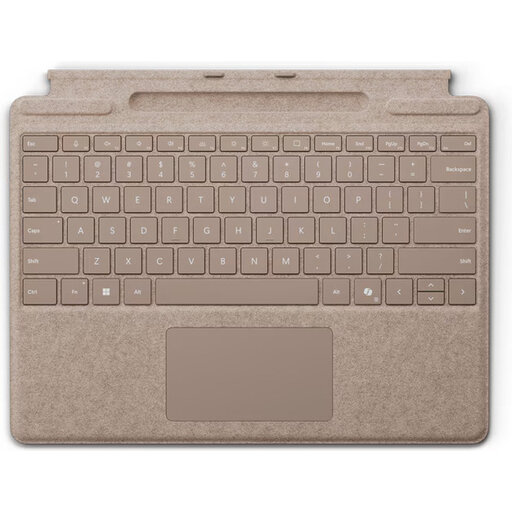
Microsoft Surface Pro Keyboard, QWERTY, Dune
A model-specific option for a compatible Surface Pro, not a general Bluetooth keyboard. The product description lists Surface Pro 8, 9, 10 and 11; check that your tablet is one of these models.
Joybuy
Frequently asked questions
How do you pair a keyboard with an Android tablet?
Put the keyboard into pairing mode, then go to Settings on a supported Android tablet and choose the option to pair a new device. Google Android Help also explains how to choose a layout under Physical keyboard; some steps only apply to Android 14 or later. Then test punctuation in your own inventory app.
What should you bring so you can type while you’re out?
Check how the exact version is powered. Trust says the Nado II has a rechargeable battery, while ProtoArc lists USB-C for the XK01. Charge a rechargeable model before you set off, and only bring a suitable power solution if you’ll need it while you’re out.
What are your rights if a keyboard bought online doesn’t work properly?
When you buy as a consumer from a business, you’re covered by the statutory guarantee: if a product is faulty, the seller must provide a solution. The Government of the Netherlands says there is no general fixed two-year guarantee period in the Netherlands. When you buy from a business at a distance, you generally have a 14-day cooling-off period. There are exceptions, and different rules apply to purchases from private individuals.
What product rules may apply to a Bluetooth keyboard?
The Radio Equipment Directive may apply to Bluetooth devices. Business.gov.nl says that, among other things, manufacturers must apply a CE mark and draw up an EU declaration of conformity for devices that meet the applicable requirements. A product listing alone doesn’t confirm that a particular version meets those requirements.
Do privacy rules apply to the information in your inventory?
That depends on the information and how you use it. The Dutch Data Protection Authority gives names, addresses and identifiable people in photos as examples of personal data; processing this information may bring GDPR obligations into effect. The keyboard doesn’t determine whether the inventory app or the way you use it complies with those rules.


