
Anyone editing on a phone or tablet
You want to make quick edits to your entries between appointments. So, first check the connection, operating system and key layout for your device.


First, choose a keyboard that works with your phone or tablet and its operating system. Then compare its packed size and key layout. A slim standalone keyboard is easy to carry separately, while a foldable model takes up less room in your bag but may have smaller keys. A keyboard case is only a suitable choice if it’s designed for your exact tablet model.
You want to make quick edits to your entries between appointments. So, first check the connection, operating system and key layout for your device.
Compare a slim keyboard with key protection against a foldable model. iClever describes the IC-BK08 as having smaller keys, so a compact folded size doesn’t automatically tell you how the keys will feel to type on.
If you work on a phone, tablet or computer at different times, check how many devices the keyboard supports and which connection methods it actually offers.
First, check that the keyboard works with the device you’ll be editing on. Then consider how much space it takes up on the go and whether its layout suits the way you type.
| What to consider | What should you check? | Who should pay particular attention? |
|---|---|---|
| Connection and compatibility | Check Bluetooth and the stated operating system for the exact version. A USB receiver needs a compatible port. | If you want to edit your reading list on your existing phone or tablet, the keyboard needs to connect to that device. Around 33% of consumers put compatibility first. |
| Space and protection | Compare the packed size with the space in your bag and check whether the keys are protected in transit. A foldable model may have smaller keys. | If you have limited space in your bag, you’ll want a keyboard that’s easy to carry without compromising on usability. Around 25% of consumers prioritise portability above all else. |
| Switching between devices | Check how many devices can be paired and which connections are supported. Three connection channels don’t always mean three Bluetooth connections. | If you switch between your phone, tablet and computer, you’ll want to know whether you can switch between the right devices. Around 25% of consumers prioritise switching between devices. |
| Key layout and typing feel | Check the layout of the version on offer, including the size and position of the keys. Claims about quiet or comfortable typing aren’t comparative measurements. | When editing titles and short notes, you’ll want to find the letters and punctuation you need quickly. Around 17% of consumers choose a keyboard mainly for its layout and typing feel. |
The Trust Lyra uses both Bluetooth and a USB receiver. The receiver will only work if your device has a compatible port.
Check which connection you’ll use with each device, and whether you need Bluetooth or a suitable port.
A case won’t necessarily fit every tablet, and it isn’t always supplied as standard with a tablet. The Consumentenbond points out that not every tablet comes with a keyboard.
Compare the full tablet model with the case’s compatibility information and check what’s included in the box.
iClever describes the IC-BK08’s keys as smaller. Its compact size doesn’t tell you how its layout or typing feel will suit you.
Look at the key layout and decide whether the key size suits the text you want to edit.
Samsung specifies two AAA batteries for the Trio 500, while Trust describes the Lyra as rechargeable. A manufacturer’s warranty is separate from your statutory rights.
For the exact version, check which batteries or charging cable you’ll need and what the seller says about the warranty.
The Keys-To-Go 2 Universal is a slim standalone keyboard with key protection, while the Pebble Keys 2 K380s is a compact model with Easy-Switch.
The Lyra is designed for use with different connection methods, while the Nado II is a separate, compact Bluetooth model.
The IC-BK08 is a foldable option for anyone looking to use as little bag space as possible.
The Smart Keyboard Trio 500 EJ-B3400UBEGEU is a compact Bluetooth keyboard designed for switching between devices.
This selection includes compact and foldable keyboards for use on the go, as well as a model-specific keyboard for the Surface Pro 12 inch.
 Image unavailable
A foldable keyboard for anyone using a phone or tablet on the go and looking to switch between devices.
The product information lists Bluetooth for up to three devices, support for iOS, Android, Windows and HarmonyOS, a rechargeable battery and a magnetic stand. Check the CE marking and product information for the specific device.
 Image unavailable
A tri-fold model for anyone looking to save bag space and use a touchpad.
The product information lists a 63-key layout, a weight of 0,3 kg and support for iOS, Android and Windows. Check the CE marking and product information for the specific device.
 Image unavailable
A foldable Bluetooth keyboard for anyone who wants to work on a phone, tablet or computer.
The product information lists 64 keys, a touchpad and support for iOS, Android and Windows. The stated folded size is 157,5 × 98 × 15,8 mm. Check the CE marking and product information for the specific device.
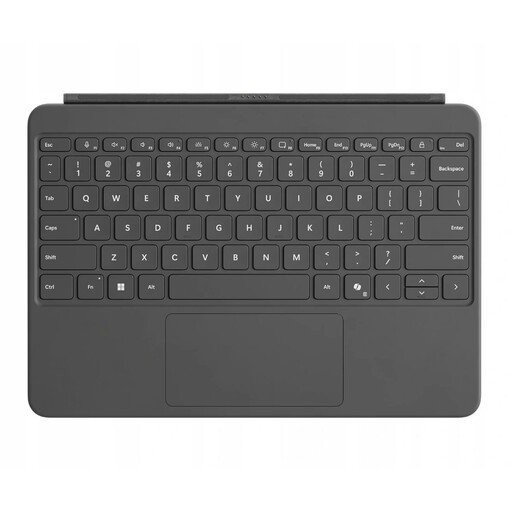 Image unavailable
This model is designed for the Surface Pro 12 inch and isn’t a general-purpose Bluetooth keyboard for other phones or tablets.
The product information lists a magnetic connection, touchpad and backlit QWERTY keys. Check that it matches your exact Surface Pro model and see the product information for details of the CE marking.
 Image unavailable
This compact mechanical model may suit use with multiple devices, but its stated dimensions make it less suitable if you want to take up as little space as possible in your bag.
The product information lists Bluetooth, wired and 2.4G connections, support for up to three devices and an 82-key layout. The stated dimensions are 12,87 × 5,35 × 1,57 inch. Bear in mind that it has a QWERTY US layout and check the CE marking for the specific device.
No. Check the connection and stated operating system for your device and the exact version. Trust says the Lyra has two Bluetooth channels as well as a USB receiver; the receiver isn’t a Bluetooth connection.
Yes. Samsung specifies two AAA batteries for the Trio 500, while Trust describes the Lyra as rechargeable. Check whether the exact model needs batteries or a charging cable.
No. According to the Dutch government, the Netherlands has no fixed statutory guarantee period. You’re entitled to a product that works as it should for as long as you could reasonably expect it to. A manufacturer’s warranty doesn’t replace this statutory right.
For many eligible distance purchases from a business, you have a 14-day cooling-off period. The Dutch government lists exceptions and, for example, distinguishes these purchases from buying from a private individual. Check the terms for the specific purchase.
The Dutch Authority for Digital Infrastructure says retailers may only sell equipment that meets the applicable requirements; CE marking is one of them. Check the marking and product information for the specific device. An FCC reference in a manual doesn’t, by itself, prove EU compliance.