
Anyone who takes short notes
If you review results between appointments and type brief comments, a separate compact keyboard could be a good fit. Logitech and Trust describe models designed for use with multiple devices.


For short notes across different devices, choose a separate compact keyboard. If you enter figures regularly, consider a folding model with a number pad, provided you have enough room to work. A keyboard case is best suited to anyone who always uses the same compatible tablet and wants to carry the keyboard and tablet together. Before buying, check device compatibility, connectivity and keyboard layout.
If you review results between appointments and type brief comments, a separate compact keyboard could be a good fit. Logitech and Trust describe models designed for use with multiple devices.
A number pad can be useful if you regularly enter numerical results as well as notes. ProtoArc lists 105 keys, including a number pad, for the XK01.
A keyboard case can keep your keyboard and tablet together, and may include a stand and touchpad. Logitech and Samsung offer cases for specific tablets, so check compatibility with your exact model.
Choose this if: you switch between a phone, tablet and computer, and mainly type short messages or notes.
Bear in mind: you’ll need to carry a separate item and may also need a stand to prop up your screen.
Choose this if: you enter figures regularly and have enough room where you work.
Bear in mind: ProtoArc lists the unfolded XK01 as 386,39 mm wide; check that it will fit on your work surface.
Choose this if: you always use the same compatible tablet and want to carry the keyboard and tablet as one set-up.
Bear in mind: cases aren’t universal; whether one fits depends on the exact tablet model.
| What to consider | What to check before buying | Who should pay particular attention? |
|---|---|---|
| Taking notes and switching between devices | Check the supported operating system, connection type, number of devices and available keyboard layout. | If I want to type short notes on different devices between appointments, I’ll focus on a suitable connection and easy switching between devices. Around 33% of consumers say this is their top priority. |
| Entering figures | Decide whether you enter figures or mainly review charts; also compare the keyboard’s dimensions when in use. | If I enter numerical results often, a number pad may be worth the extra space it takes up. Around 25% of consumers give numerical input top priority. |
| Using one tablet | Compare the tablet’s full model name and generation with the compatibility information; decide whether you need a touchpad or stand. | If I always work on the same tablet, I’ll want to know whether a case supports it and provides the features I need. This is the main priority for around 25% of consumers. |
| Keeping separate items to a minimum | Consider what you already carry; check the fit of a case and whether you need a separate screen stand for a standalone keyboard. | If I want to keep my kit compact, I’ll compare a case with a separate keyboard and any stand I might need. Around 17% of consumers say keeping separate items to a minimum matters most. |
According to Trust, the Trust Lyra offers Bluetooth and a USB receiver. Check which connection your device can use.
Check the exact model to see whether Bluetooth works directly with your tablet or phone.
The Samsung case reviewed is designed for the Galaxy Tab S9, S9 FE and S10 FE. Logitech also specifies that you need a version made for your particular iPad.
Before buying, compare your tablet’s full model name and generation with the stated compatibility.
A number pad can be useful for regular numerical work, but ProtoArc lists the unfolded XK01 as 386,39 mm wide.
Think about how often you enter figures and measure your available workspace before choosing a model.
If the input language on your device is set incorrectly, characters may appear differently than you expect.
Check the available keyboard layout and set your device’s input language to match.
Logitech offers both separate compact keyboards and keyboard cases for specific tablets.
The compact Lyra is designed for use with multiple devices via Bluetooth or a USB receiver.
The XK01 is a folding model for anyone who wants to carry a number pad.
Samsung offers model-specific keyboard cases for Galaxy Tab tablets.
These products include tablet-specific keyboard cases and standalone keyboards for mobile use. Check that each model suits your device and the way you work.
 No image available
An option if you use the iPad Pro 13-inch (M4) mentioned and want to combine a keyboard and trackpad in one set-up.
Model-specific: the product name refers specifically to the 13-inch iPad Pro with M4.
 No image available
Could be a good fit if you’re looking for a keyboard with both RF and Bluetooth connectivity and would also use the included mouse.
This keyboard and mouse set has a US English QWERTY layout; check that it suits your settings.
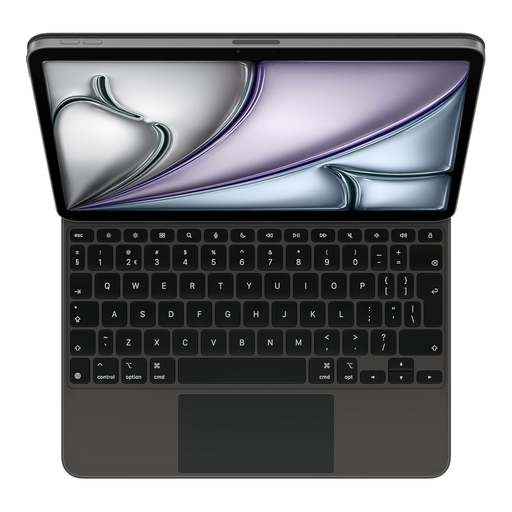 No image available
An option if you use the iPad Air 11-inch (M3) mentioned and want typing and trackpad control in one set-up.
The product information states that the magnets should be kept more than 15 cm away from medical devices.
 No image available
Could be a good fit if you’re looking for a folding keyboard with a touchpad for a tablet, smartphone or computer.
The product name specifies a tri-fold design; check the keyboard layout and compatibility of the version on offer.
 No image available
A possible choice if you enter figures and want to connect to multiple devices; bear in mind its full-size design when using it on the go.
The product name specifies a number pad and US QWERTY layout.
Compare the keyboard’s operating system requirements and connection type with your device. For a keyboard case, also check your tablet’s full model name and generation. Samsung specifies that EF-DX725UBEGWW is for the Galaxy Tab S9, S9 FE and S10 FE.
Check that the input language and keyboard layout in your device settings match the version you’re using. Trust lists an incorrect input language as a possible reason for unexpected letters and symbols.
It depends on the model. According to Logitech, the Combo Touch reviewed connects via the Smart Connector and is powered by a compatible iPad. Don’t assume other cases work in the same way.
For a distance purchase by a consumer, there is usually a 14-day cooling-off period after delivery. The Netherlands’ government also explains your right to a product that works properly and notes that there is no fixed statutory warranty period for all products. If you’re buying on behalf of a business, don’t assume that consumer rights apply.
If results contain information about an identifiable person, they are personal data and the GDPR is relevant, as explained by the Dutch Data Protection Authority. The right approach depends on the data and your organisation’s rules; choosing a keyboard does not, in itself, make the processing secure.