
Field researchers writing longer reports
If you type more than occasional readings, you’ll need to balance a practical keyboard layout and enough room to work against how easy it is to carry.


Choose based on how long you’ll be typing and which device you’ll use to record your observations. First, check the keyboard layout and connection. A foldable model can save space in your bag, while a separate compact keyboard or one with a key cover involves different considerations. A cover doesn’t prove that you can type in the rain.
If you type more than occasional readings, you’ll need to balance a practical keyboard layout and enough room to work against how easy it is to carry.
If you need to keep your kit compact, a foldable model or slim keyboard could be a good choice. Also check that you can type accurately on it.
If you switch between, for example, a phone and a tablet during a field trip, check in advance how pairing and switching work with your devices.
Choose this if: you type longer observations and have room for a non-foldable keyboard.
The trade-off: it takes up its full width in your bag. Also check that its connection mode works with your device.
Choose this if: a small packed size is a priority and you can try out the keyboard layout beforehand.
The trade-off: iClever says the keys on the IC-BK08 are smaller than standard. Check whether they’re comfortable to use for numbers and units.
Choose this if: you want to keep the keys covered while travelling. Logitech describes the Keys-To-Go 2 as having this feature.
The trade-off: a cover for transport doesn’t prove that the keyboard is waterproof when used outdoors.
Choose this if: you want to consider a wired mode as well as a wireless connection. Keychron lists this feature for the B1 Pro.
The trade-off: the cable will work only if the connector and device support match. Also check the version and keyboard layout you’re buying.
| What to consider | What should you check? | Who should pay particular attention? |
|---|---|---|
| Typing accurately | Check the keyboard layout and where the numbers and symbols are. If possible, try typing a sample note. | If I’m entering readings, units and longer observations, I want to type numbers and symbols without mistakes. Around 31% of consumers prioritise typing accurately. |
| Packed size | Compare the dimensions when folded and unfolded, and think about where you’ll place your tablet and keyboard while writing. | If my field bag has limited space, I want to know how much room the keyboard takes up on the way. Around 25% of consumers give packed size top priority. |
| Device connection | Check Bluetooth, any receiver or cable, and compatibility with your device. Test the connection before you set off. | If you record notes on a phone or tablet, you’ll want to make sure the keyboard can connect to that device. Around 19% of consumers prioritise device compatibility. |
| Power | Check how the exact version is powered, and charge it or replace its power source before you set off. | If I’m writing away from a fixed workstation, I want to avoid a flat battery interrupting my work. Around 13% of consumers put power at the top of their list. |
| Protection | Look for an explicit protection claim for the exact model. Otherwise, keep the keyboard and writing device dry. | If you want to protect your keyboard while travelling or from possible moisture, don’t mistake a cover for protection from rain while typing. Around 12% of consumers make protection their top priority when choosing. |
Logitech describes the Keys-To-Go 2 cover as protecting the keys during transport. That doesn’t mean you can type in the rain with it.
Treat protection during transport and weather resistance while in use as separate features.
The models mentioned offer different connection options. A keyboard won’t be useful if its chosen connection mode doesn’t work with your device.
Check the connection mode of the exact version and the ports on your device.
iClever describes the keys on the IC-BK08 as smaller than standard keys. So the packed size alone won’t tell you whether the layout suits the way you enter information.
Try typing a note with numbers, symbols and units beforehand.
The Keys-To-Go 2 is a range of mobile keyboards with a built-in key cover. The Pebble Keys 2 K380s is a compact Bluetooth range with device switching.
The Lyra is a compact keyboard that offers Bluetooth and, with a compatible device, a USB receiver as options.
The IC-BK08 is an example of a foldable keyboard with a touchpad for anyone who needs to save space when packing.
The B1 Pro is a compact model to consider if you want to compare different connection options.
This selection includes foldable keyboards, a compact keyboard set and a keyboard for a specific iPad Air version. Before buying, check that the layout, connection and protection options suit your device and fieldwork. The Netherlands Authority for Digital Infrastructure says that radio equipment placed on the Dutch market must meet the applicable requirements and carry the required CE marking. Check this for the exact version.
 No image available
A foldable Bluetooth keyboard to consider if you’re looking for a model for mobile use.
The product name mentions a rechargeable battery and magnetic stand. Check the keyboard layout and compatibility with your device.
 No image available
A keyboard set to consider if you want to type notes on a mobile device and are also looking for a mouse.
The product name specifies the QWERTY US English layout. Check that it matches the layout you want to use, and keep the set away from moisture.
 No image available
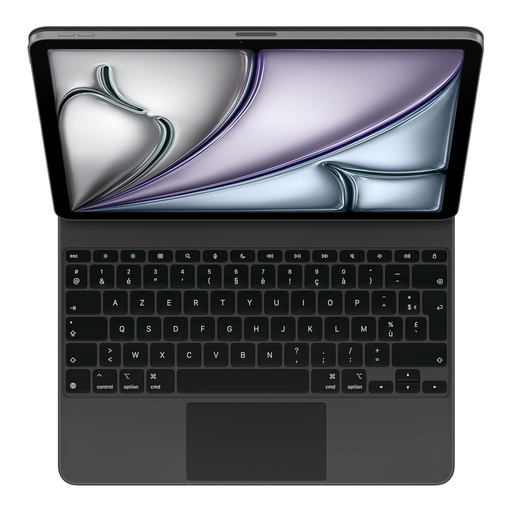
This version is designed for anyone looking for a keyboard for an iPad Air 13-inch (M3).
The product name specifies a French version. Before buying, check that it matches your iPad model and preferred keyboard layout. Keep the keyboard away from moisture.
 No image available
A foldable keyboard with a touchpad to consider if you want to pack light.
The product name mentions Bluetooth and an integrated touchpad. Check the keyboard layout and keep this version away from excessive moisture.
 No image available
A foldable keyboard with a touchpad to consider if you want to combine typing and navigation in one accessory.
Check that the connection and keyboard layout suit your device, and keep this version away from excessive moisture.
Choose Bluetooth if both your device and the exact keyboard version support that connection. Trust also lists a USB receiver for the Lyra. Check whether your device can connect to it, and test the connection before you set off.
Logitech says the cover on the Keys-To-Go 2 is designed to cover the keys during transport. That doesn’t prove the keyboard is suitable for use in the rain.
The Dutch government says that flat batteries shouldn’t go in the bin. Take them to a suitable collection point, such as a shop that sells batteries. An unwanted electric keyboard can also be taken to a collection point for electrical equipment. When you buy a similar new appliance, private consumers can use the take-back scheme described for old-for-new purchases.
For distance purchases from a business, you’ll often have 14 days to change your mind. Check whether an exception applies. According to the Dutch government, the statutory guarantee is your right to a product that works properly; there’s no fixed statutory warranty period. If something is faulty, contact the seller.
The Netherlands Authority for Digital Infrastructure says that radio equipment placed on the Dutch market must meet the applicable European requirements and carry the required CE marking. Check the marking and product documentation for the exact version. A CE marking is a declaration by the manufacturer, not a separate approval by an EU body.