Who is a portable keyboard useful for?

Researcher with short breaks between appointments

You want to quickly note down a name or discovery during a break, and prefer to carry as little as possible. The size of the keyboard in your bag and how quickly you can get started are key considerations.

Frequent typist of source details

You write longer transcriptions or source references and want to assess the keys and layout before opting for an extra-compact model.

Researcher using a tablet or phone

You switch between search results and notes on a mobile device. Compatibility and how you control the pointer may therefore be important.

What should you look for when buying?

Slim, non-folding keyboard

A good fit if: you can carry a keyboard flat in your bag and want to get started quickly on a tablet, phone or laptop.

Bear in mind: the keyboard takes up space along its full length in your bag; Logitech lists a protective cover for the Keys-To-Go 2.

Folding keyboard without a touchpad

A good fit if: saving space in your bag is important, but you want plenty of room to type when the keyboard is unfolded. ProtoArc lists a 105-key layout with a number pad for the XK01.

Bear in mind: check the layout of the version you’re considering and how much room the keyboard takes up when unfolded.

Folding keyboard with a touchpad

A good fit if: you do a lot of navigating while researching and would rather not carry a separate mouse; ProtoArc lists a touchpad and 88 keys for the XK01 TP.

Bear in mind: the XK01 TP doesn’t have the same layout with a number pad as the XK01; also check that the touchpad functions work with your device.

What to consider What should you look for? Who should prioritise this?
Size and setup Compare the dimensions when folded and unfolded with the space in your bag and where you’ll be working. Logitech lists an integrated cover for the Keys-To-Go 2. If I have little space between appointments and want to make a quick note, I prioritise a compact folded size; around 31% of consumers share this priority.
Layout and typing Check the exact version and look at keys such as Enter, Shift, numbers and punctuation. ProtoArc describes the XK01 as having 105 keys and a number pad, and the XK01 TP as having 88 keys and a touchpad. For longer transcriptions, I want familiar keys and enough room for names, dates and source references; around 31% of consumers prioritise these typing needs.
Connection Check the operating system, Bluetooth support and whether you need a USB port. Logitech lists the Pebble Keys 2 K380s as being able to switch between three devices; Rapoo lists Bluetooth and a USB receiver for the E9010M. If I carry several devices, I want to know which connection works with each one; around 23% of consumers prioritise this flexibility.
Navigating without a mouse Check whether the version you’re considering has a touchpad and whether the functions you need work with your operating system. When I switch frequently between search results and notes, I’d rather not carry a separate mouse; around 15% of consumers prioritise control via an integrated touchpad.

Common mistakes when choosing

  • Choosing based on ‘QWERTY’ alone

    That label doesn’t automatically tell you which physical keys and punctuation positions you’ll get. For example, ProtoArc also offers a separately identified UK-layout version of the XK01 TP.

    Check the exact version and look at an image of the keys you often use for names and source references.

  • Treating the XK01 and XK01 TP as the same keyboard

    ProtoArc describes the XK01 as having a number pad, while the XK01 TP has a touchpad and a different key layout. This difference could determine whether a model suits your typing or navigation needs.

    Decide in advance whether number entry or pointer control matters more to you, and check the full model name.

  • Assuming a USB receiver will fit every mobile device

    The USB receiver for the Rapoo E9010M requires a compatible USB port.

    Check the ports on your device, or see whether the Bluetooth connection on the version you’re considering suits the way you’ll use it.

Brands to consider

Logitech

The Pebble Keys 2 K380s and Keys-To-Go 2 are examples of compact keyboards with different features for mobile use.

  • Logitech lists Easy-Switch for the Pebble Keys 2 K380s and an integrated cover for the Keys-To-Go 2.
  • Check the layout of the version you choose; these model specifications don’t tell you how comfortable it will be to type on for your task.

ProtoArc

The XK01 and XK01 TP are folding models with different layouts and controls.

  • According to ProtoArc, the XK01 has 105 keys and a number pad, while the XK01 TP has 88 keys and a touchpad.
  • The models aren’t interchangeable if you specifically want a number pad or touchpad. Also check the key layout of the version on offer.

Rapoo

The E9010M is a compact option for anyone who wants the choice of using Bluetooth or a USB receiver.

  • Rapoo lists 78 keys, two AAA batteries, Bluetooth and a USB receiver for the E9010M.
  • The receiver requires a compatible USB port; these model specifications don’t compare typing comfort with other brands.

Joybuy products

This selection from Joybuy includes folding keyboards for mobile use and keyboard cases with trackpads for specific iPad models.

NAXSIR foldable wireless Bluetooth keyboard with magnetic stand, grey

NAXSIR foldable Bluetooth keyboard with magnetic stand, grey

Worth a look if you’re after a folding keyboard with a stand for your phone or tablet.

The product name lists Bluetooth, a rechargeable design, an aluminium casing and quiet keys.

View at Joybuy

Apple Magic Keyboard for iPad Pro 13-inch (M4)

Apple Magic Keyboard for iPad Pro 13-inch (M4)

Consider this option only if you use the specified iPad Pro 13-inch (M4); the product information doesn’t describe it as a universal keyboard.

Check that this specific combination suits the way you want to type and navigate while out and about.

View at Joybuy
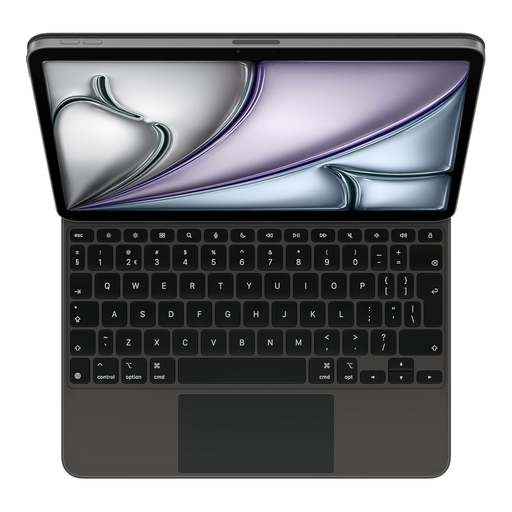
Apple Magic Keyboard for iPad Air 11-inch (M3), Dutch, Black

Apple Magic Keyboard for iPad Air 11-inch (M3), Dutch, Black

This version is designed for the specified iPad Air 11-inch (M3), rather than being a universal keyboard option.

Check that the stated version and the controls you want are compatible with your iPad and research work.

View at Joybuy

Voxis B033 foldable keyboard with touchpad

Voxis B033 foldable Bluetooth keyboard with touchpad

Worth a look if you’re after a folding keyboard with an integrated touchpad and don’t want to carry a separate mouse.

The product name lists a tri-fold design and compatibility with tablets, smartphones and computers; check that it connects to your device.

View at Joybuy

Voxis HL-BOX1 foldable keyboard case with touchpad

Voxis HL-BOX1 foldable keyboard case with touchpad

Consider this option if you’re looking for a folding keyboard case with an integrated touchpad for mobile use.

The product name describes it as a multi-system version; before buying, check that the connection and layout suit your device and typing needs.

View at Joybuy

Frequently asked questions

Will a portable keyboard work with your tablet, phone or laptop?

That depends on the version, operating system and connection. Logitech lists support for Android, ChromeOS, Windows, iPadOS, iOS and macOS for the Keys-To-Go 2; Rapoo lists Bluetooth and a USB receiver for the E9010M. Check the specifications for your device and the exact keyboard version.

How can you set up for a longer typing session while out and about?

Where possible, use an adjustable workstation and vary your posture. Arboportaal recommends this for healthy screen use; a separate keyboard alone won’t make a low table or poorly positioned screen into a properly set-up workstation.

Which batteries does the Rapoo E9010M use, and what happens if it develops a fault?

Rapoo lists two AAA batteries for the E9010M. In the Netherlands, statutory consumer rights apply alongside any manufacturer’s warranty: if a product develops a fault too soon under normal use, the seller must offer an appropriate free solution, according to ACM ConsuWijzer.

Does a wireless keyboard need a CE mark to be sold in the Netherlands?

The Dutch Authority for Digital Infrastructure outlines European requirements and CE marking for radio equipment sold in Europe. Check the marking and product information for the exact version; general model specifications don’t automatically confirm that a specific listing meets all requirements.

Can you return a keyboard bought online if you don’t like the layout?

According to ACM ConsuWijzer, online consumer purchases generally come with a statutory cooling-off period of up to 14 days after delivery, subject to exceptions. Check the seller’s information before buying and inspect the key layout as soon as your keyboard arrives.
