
Researcher with a tablet and laptop
You might search on one device and record your findings on another. Check that the keyboard works with both; Logitech and Trust describe models that let you switch between devices.


Start by checking whether the keyboard works with your tablet, phone or laptop, and whether the layout feels comfortable for entering names, dates and source notes. A compact standalone keyboard is handy if you switch between devices, while a foldable model takes up less room in your bag. A keyboard case only fits the tablet models it’s designed for. Check the exact version and the CE marking; descriptions such as ‘quiet’ come from the manufacturer and are not comparative sound measurements.
You might search on one device and record your findings on another. Check that the keyboard works with both; Logitech and Trust describe models that let you switch between devices.
If you enter lots of names, dates and references, a familiar layout matters. WieWasWie describes searches using multiple criteria, while the CBG provides information about sources for family history research.
You want to take a separate keyboard with you without giving up too much space. Compare compact and foldable versions; iClever describes the IC-BK08 as folding into three sections.
A good fit if: you search on a tablet, for example, and take notes on a laptop; Logitech and Trust list models that switch between devices.
Bear in mind: you’ll need to carry the keyboard separately and check the connection, operating system and layout of the specific version.
A good fit if: saving space in your bag matters more than having a continuous, flat keyboard; the manufacturer describes the iClever IC-BK08 as folding into three sections.
Bear in mind: you’ll need to unfold the keyboard and check the dimensions, connection and layout of the exact version on offer.
A good fit if: you already have a Galaxy Tab S9, S9 FE or S10 FE and want a case with a keyboard and touchpad; Samsung lists these models for the EF-DX725UBEGWW.
Bear in mind: this isn’t a universal keyboard. Check the full tablet model, not just the screen size.
| What to consider | What should you check? | Who is this important for? |
|---|---|---|
| Connection and compatibility | Check the connection type and operating system. For a keyboard case, check the full tablet model. | If I work on more than one device, I want to be sure the keyboard can connect to them. Around 36% of consumers put device compatibility first. |
| Layout and source notes | Check the keyboard layout on offer and where the punctuation keys are; try the keys if possible. | When entering names, dates and references, I want a layout I recognise. Around 29% of consumers prioritise a familiar layout and comfortable typing. |
| Size to carry and table space | Compare the dimensions when folded and unfolded; compare weights only when they have been measured on the same basis. | If my bag has little room, I want a keyboard that I can take with me and that will also fit on the table available. Around 21% of consumers prioritise portability. |
| Typing noise in a café | Treat ‘quiet’ as a manufacturer’s description, and listen to the typing noise yourself if possible. | If I’m sitting close to other customers, I want to be mindful of the noise while typing. Around 14% of consumers put low typing noise first. |
A keyboard case such as the Samsung EF-DX725UBEGWW is designed for specific Galaxy Tab models; it isn’t a universal Bluetooth solution.
Before buying, check the connection type and operating system. For a case, check the full tablet model.
A foldable keyboard also takes up table space when unfolded. The version and layout matter for how you use it, too.
Compare the dimensions both folded and unfolded, and check the details for the version on offer.
Logitech and Trust use this description for their own models, but that doesn’t mean the noise level has been measured under comparable conditions.
Treat the description as something to consider, not proof that one model is quieter than another. Listen for yourself if possible.
Logitech offers compact standalone keyboards, including the Pebble Keys 2 K380s and the separate MX Keys Mini range.
Trust describes the Nado II as a compact Bluetooth keyboard for multiple devices; the Lyra is a separate compact range with a scissor mechanism.
The iClever IC-BK08 is a foldable option if you want to take a standalone keyboard with you.
The EF-DX725UBEGWW is a keyboard case for specific Galaxy Tab models, not a general-purpose standalone travel keyboard.
These product picks focus on portable keyboards for typing in a café, including foldable models and keyboards for specific devices. For each version, check that the connection and layout suit your device and how you plan to use it.
 No image available
The foldable design is an option if you want to take a keyboard with you for use with your phone or tablet.
The product name lists a rechargeable keyboard, a magnetic stand and an aluminium case. Check that the layout and connection suit your device.
 No image available
The tri-fold design is an option if you’re looking for a foldable keyboard to take with you.
The product name lists Bluetooth and a touchpad. Before buying, check that the layout and connection on offer suit your device.
 No image available
The foldable design could suit you if you’re looking for a keyboard to carry alongside your other belongings.
The product name lists a touchpad. Check that the compatibility and layout of the version on offer suit your device.
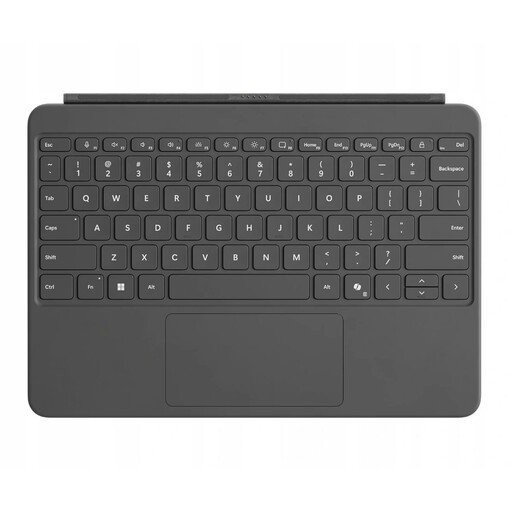 No image available
This version is designed for use with a Surface Pro; check your specific model before choosing.
The product name lists a QWERTY layout and a 12-inch keyboard. Also check that the connection is suitable for your device.
 No image available
The listed Dutch QWERTY layout may suit you if Dutch punctuation and keys are important.
The product name lists USB and Bluetooth. Its larger layout makes this version less suitable if taking up as little space as possible in your bag is a priority; check the product details for the version on offer.
No, a keyboard case may be designed for a specific model. For the EF-DX725UBEGWW, Samsung lists the Galaxy Tab S9, S9 FE and S10 FE; compare your tablet’s full model with the compatibility information for the case you’re considering.
Pair the keyboard with your device in advance and test names, numbers and punctuation using the layout you plan to use. If you have an iClever IC-BK08, check the manual for your exact version; the USB-C manual consulted lists limitations on touchpad support for some devices.
Check whether the version on offer uses batteries or a rechargeable battery, and whether you’ll need a particular charging cable. Logitech specifies two AAA batteries for the Pebble Keys 2 K380s; the USB-C manual consulted for the iClever IC-BK08 describes how to charge it.
According to the Dutch Authority for Digital Infrastructure, products that meet the applicable European requirements may be sold with a CE marking, which must appear on the equipment. This describes the rule, not whether a particular keyboard on offer complies.
No. The Dutch government states that there is no fixed statutory warranty period in the Netherlands and that you are entitled to a product that works as it should. What you can reasonably expect in terms of its lifespan depends on factors including the product; a manufacturer’s or seller’s warranty is separate.