Choose a keyboard with a physical layout and connection that suit the device you write on, and consider whether it’s comfortable to edit longer pieces of text. A slim model with a built-in key cover can be handy in a crowded bag. Compact models can be useful if you switch between devices, while a foldable model may take up less space when packed away but needs a suitable layout and surface when opened. Logitech describes the Keys-To-Go 2 as having a built-in cover and the Pebble Keys 2 K380s as allowing you to switch between three devices. Arboportaal emphasises that a separate keyboard does not replace the rest of your workspace.
Who is a portable keyboard suitable for?
Field researcher writing longer pieces
If you write and revise chapters while travelling, you’ll benefit from a layout that’s practical for navigating and editing as well as typing. Arboportaal recommends paying attention to your entire workstation if you work at a screen for long periods.
Writer with limited luggage space
If you often travel with a full bag, consider a keyboard with a cover or a foldable design. But also check that the keyboard fits on the available surface when opened. Logitech describes the Keys-To-Go 2 as having an integrated cover; according to Targus, the European Targus AKF003NO has a foldable design.
Writer using both a laptop and a tablet
If you switch between devices while consulting sources, first check whether the keyboard works with both devices and how to switch the connection. Logitech, CHERRY and Trust describe models that can switch between multiple devices.
What should you look for?
Start with the key layout and device compatibility. Then weigh the packed size against the space you need to type comfortably, and check how your chosen model is powered.
| What to consider |
What to look for when buying |
Who is this important for? |
| Typing and editing |
Try the physical layout, arrow keys and shortcuts with your writing software. Also compare the keyboard’s size when open with the space on your table. |
If I’m writing long chapters, I want to be able to type and edit comfortably. Around 28% of consumers put typing and editing first. |
| Packed size and protection |
Compare the packed and open sizes, key protection and the surface area needed to use the keyboard. |
If my bag is already full, I want a compact keyboard that’s easy to carry without overlooking the space I’ll need to use it. Around 22% of consumers put packed size first. |
| Compatibility and switching |
Check operating system support, the Bluetooth connection, how many devices you can use and the language layout of the exact model. |
If I switch between my laptop and tablet to research and write, I want to know whether both devices will work with the same keyboard. Around 22% of consumers put device compatibility first. |
| Workspace and posture |
Consider your screen setup and the space available on your table as well as the keyboard. Don’t assume a product claim means the keyboard will solve all your workspace needs. |
If I’m working for a long time in a temporary location, I want to be able to set up my screen and workspace properly too. Around 17% of consumers put workspace and posture first. |
| Power |
Check what power source, cable or batteries your chosen model uses, and whether it suits your trip. |
If I can’t recharge regularly, I want to know in advance what power source I need and what to take with me. Around 11% of consumers put power first. |
What to watch out for when buying
-
Comparing only the packed size
A compact design doesn’t tell you whether the layout is comfortable or whether you’ll have enough space to open the keyboard. The European Targus AKF003NO we looked at has a Nordic layout.
Check images and specifications for the exact layout, and compare the keyboard’s open size with the space where you plan to write.
-
Assuming an iPad keyboard case is a universal keyboard
A keyboard case is designed for specific iPad models. The separate Magic Keyboard (USB-C) - Dutch is a different product.
Before choosing a model, check your exact iPad model or the system requirements for the separate keyboard.
-
Assuming an ergonomic keyboard will solve all your workspace needs
A separate keyboard is just one part of a temporary writing setup. Arboportaal recommends assessing your entire workspace if you work at a screen for long periods.
Also consider your screen position, the space available on your table and how you break up your screen-based work.
-
Confusing an extended warranty with your statutory rights
The Dutch government distinguishes between statutory protection for a product that is fit for purpose and any additional warranty that may be offered.
Check what an extended warranty actually covers before choosing it.
Brands to consider
Logitech
The Keys-To-Go 2 and Pebble Keys 2 K380s suit different needs when it comes to portability and working across multiple devices.
- Logitech lists an integrated cover for the Keys-To-Go 2 and Easy-Switch for three devices on the K380s.
- Check the physical layout of the model you choose. These specifications don’t tell you which keyboard is more comfortable to type on during long sessions.
CHERRY
The KW 7100 MINI BT is a compact Bluetooth option for writing in different locations.
- CHERRY lists three Bluetooth channels, a scissor mechanism and an included carry case.
- Check the physical layout of the model. A manufacturer’s description is not an independent typing test.
Trust
According to Trust, the Nado II is a rechargeable Bluetooth model designed for use with multiple devices.
- Trust says the Nado II can switch between three devices and comes with a charging cable.
- Check the layout of the model you choose. Battery life quoted by the manufacturer isn’t a guaranteed duration of use.
Apple
The separate Magic Keyboard (USB-C) - Dutch and keyboard cases for iPad are different product options.
- Apple lists a Dutch layout and system requirements for supported devices for its separate keyboard.
- Check the system requirements for the separate model or the compatibility of a keyboard case with your exact iPad model.
Targus
The European AKF003NO we looked at is a foldable model for anyone who wants to save space in their bag.
- Targus lists a Bluetooth connection for up to three devices and USB-C charging.
- This model has a Nordic layout. A split design isn’t proof that it will be more comfortable for every writer.
Joybuy product picks
These products are designed for a mobile writing setup with an iPad or Surface Pro. If you’re choosing a keyboard for a specific device, always check that the model is compatible with yours.
 Image unavailable
VoxorAI / Apple Magic Keyboard for iPad, white, for 11-inch iPad Pro (M5/M4)
Designed for writing with a compatible 11-inch iPad Pro model.
Wireless; 78 keys; charging cable included.
View at Joybuy
 Image unavailable
NAXSIR foldable wireless Bluetooth keyboard, rechargeable, grey
A foldable option for anyone who wants to carry a keyboard for mobile use.
According to the product description: scissor-mechanism keys, switching between up to three devices and a storage pouch.
View at Joybuy
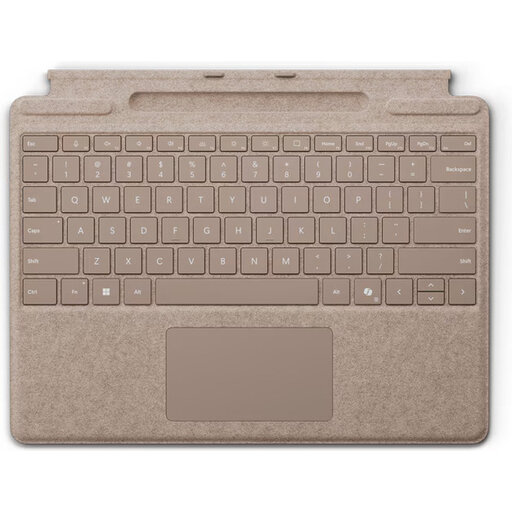 Image unavailable
Microsoft Surface Pro Keyboard, QWERTY, Dune
Designed for use with a Surface Pro; this isn’t a general-purpose separate keyboard.
The product description lists backlit keys, a touchpad, magnetic attachment and a weight of 281 g.
View at Joybuy
 Image unavailable
Apple Magic Keyboard for iPad Pro 13-inch (M4)
Designed for writing and editing with a compatible 13-inch iPad Pro (M4).
The product description lists a trackpad, 14 function keys, a protective case, adjustable viewing angles, backlighting and USB-C pass-through charging.
View at Joybuy
 Image unavailable
Apple Magic Keyboard for iPad Air 11-inch M3, Dutch layout, white
Designed for writing with a compatible iPad Air 11-inch M3.
The product description lists a trackpad, backlighting and a protective case.
View at Joybuy
Frequently asked questions
Can I use one Bluetooth keyboard with my laptop and tablet?
Yes, if the keyboard works with both devices and their operating systems. Logitech says you can switch between three devices with the Pebble Keys 2 K380s. Also check the compatibility and layout of the model you choose.
How can I set up a writing space while doing fieldwork?
Position the separate keyboard so you can also set up your screen appropriately, and take regular breaks from screen work. Arboportaal recommends considering your entire workspace when working for long periods; this isn’t a promise that a particular keyboard will prevent discomfort.
What should I check before setting off so I can charge my keyboard?
Check the power supply and accessories for the exact model. Trust lists a USB-A to USB-C charging cable for the Nado II; Apple lists a USB-C charging cable for the separate Magic Keyboard (USB-C). Take the cable or batteries that suit the model you’ve chosen.
If I buy a keyboard online in the Netherlands, do I have a cooling-off period and a warranty?
Online purchases from a business generally come with a 14-day cooling-off period. You’re also entitled to a product that is fit for purpose; according to the Dutch government, there is no fixed statutory two-year warranty period in the Netherlands. If there’s a fault, contact the seller. Check the terms and conditions of your purchase.
Am I legally required to use a separate keyboard when writing a dissertation?
Not because you’re writing a dissertation as such. For employees who work at a screen for more than two hours a day, Arboportaal describes rules that require a separate screen or keyboard to be available when using a laptop. Whether these employment rules apply to your fieldwork depends on your employment relationship and the work you do.


