
Designer who moves between rooms
Takes an extra screen along for portfolios and notes, with a focus on weight, setup and the connection to their laptop. Lenovo and ASUS describe portable models with different sizes and connection options.


If you regularly move between rooms, a portable monitor may be a better fit, provided its video connection and power supply are compatible with your laptop. If you mainly assess colours and fine details in one place, compare larger monitors by their colour modes, calibration options and adjustability. A stated colour gamut alone doesn’t tell you how colours will look across your complete setup.
Takes an extra screen along for portfolios and notes, with a focus on weight, setup and the connection to their laptop. Lenovo and ASUS describe portable models with different sizes and connection options.
Works mainly in one place and compares colour modes and calibration options for the intended digital or printed result. ASUS and BenQ list features and colour modes for specific models; check which ones suit your output.
Regularly connects a different laptop at the same meeting space and looks for suitable video connections and a practical screen setup. Dell describes the U2725QE as having a Thunderbolt hub.
First decide whether you’ll be carrying the screen around or keeping it in one place. Then compare the colour modes, connections and setup options that suit your work.
| What to consider | What to look for | Who prioritises this |
|---|---|---|
| Portability and setup | Compare the screen size and the weight of the setup you need; check how the screen can be positioned in different places. | If I often move between meeting rooms, I want to carry my screen easily and set it up without any fuss. Around 33% of consumers put portability at the top of their list. |
| Colour assessment | Decide whether you’ll be assessing a digital presentation or printed work, then compare the colour mode and calibration options of the exact model. | If I assess portfolios for colour, I want a mode that suits my output and the ability to check my own setup. Around 27% of consumers put colour assessment at the top of their buying priorities. |
| Laptop connection | Check your laptop’s video output, the monitor port and the right cable; separately check whether the charging power is suitable for your laptop. | If I present in different places or with different laptops, I want to connect video and power in a way that works for me. Around 20% of consumers give laptop connectivity their top priority. |
| Readability and positioning | View your portfolio with the intended system scaling and viewing distance; check for height adjustment or other positioning options. | If I’m discussing text and fine details, I want to set the screen at a comfortable height and distance. Around 20% of consumers put readability and screen positioning first. |
The monitors listed have different capabilities for video over USB-C and power delivery. So the presence of a USB-C port alone doesn’t tell you whether your laptop, monitor and cable will meet your needs together.
Compare the specifications for your laptop port, cable and exact monitor model before making a choice.
Also check whether your setup needs a different cable, an adapter or a separate laptop power supply.
A colour gamut or colour mode isn’t the same as measuring the complete screen setup. The settings and uniformity of an individual screen also matter.
Choose a mode that suits your intended output and check your own setup. Don’t compare colour gamuts as if they alone determine the complete colour reproduction.
The stated weights vary: Lenovo lists the ThinkVision M14d at 600 g net, ASUS lists the PA279CRV at 5.78 kg with stand, and BenQ lists the PD2706U at 8.3 kg net.
First consider how often you’ll actually move the screen. Then weigh up the benefit of more screen space against the effort of carrying and setting it up.
The features below apply to the models listed and aren’t recommendations for every product from the same brand.
ThinkVision M14d: a portable IPS monitor for meetings in different locations.
The ZenScreen OLED MQ16AH is portable, while the ProArt PA279CRV is a fixed 27-inch monitor. They’re designed for different setups.
The PD2706U is a fixed 27-inch 4K monitor with colour modes and a USB-C connection for a laptop.
According to Dell, the UltraSharp U2725QE is a fixed 27-inch 4K monitor with a Thunderbolt hub.
This selection focuses on portable monitors for viewing portfolios when moving between rooms. Check that your laptop’s video output and power supply are compatible, and that the colour reproduction suits your work.
 No image available
A portable screen to take along to meetings in different locations.
FHD IPS, 16:10 and 144 Hz; with 2 USB-C ports and Mini HDMI.
 No image available
A portable option for viewing portfolios in different locations.
2.5K, IPS, 100% sRGB, 10-bit and 16:10; the stated colour specifications don’t replace checking your own screen setup.
 No image available
A portable screen for portfolios and presentations in different locations.
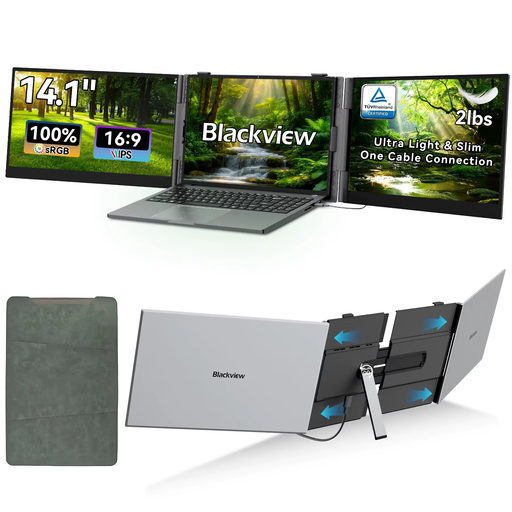
FHD IPS, 1920 × 1080 pixels, 16:9 and 60 Hz. Check the connections and compatibility of your own device.
 No image available
A portable monitor for anyone who wants an extra screen in different locations.
15.6 inches, 1080P, touchscreen and USB-C.
 No image available
A portable monitor for viewing portfolios in different locations.
2560 × 1600 pixels, 16:10 and 144 Hz; with Mini HDMI and Type-C.
No. Check that your laptop port can output video and that the monitor port and cable are suitable. Lenovo lists DisplayPort Alt Mode for the ThinkVision M14d; the available charging power is a separate specification.
For each room, check that the screen can be positioned securely at a practical height, and that your laptop, cable and any power supply are suitable. For employees who work at a screen for more than two hours a day, Arboportaal lists specific workplace requirements; these don’t necessarily apply to every buyer.
No. A stated colour gamut isn’t a measurement of the complete screen setup. Compare the colour mode with your intended digital or printed output, and take the settings and uniformity of your own screen into account.
No. For a consumer purchase, Dutch statutory guarantee rights are separate from any manufacturer’s warranty or extended warranty you buy. According to ACM ConsuWijzer, the seller must resolve issues with a product that breaks too soon under normal use, in line with the applicable terms. So first compare what an additional warranty actually covers.
For an ordinary online consumer purchase, you generally have a statutory cooling-off period of up to 14 days after delivery, with some exceptions. ACM ConsuWijzer explains the Dutch cooling-off period; check which terms apply to your purchase before buying and handle the product with care.