
Vandaag of morgen in huis

Kwaliteit gegarandeerd

Welkomstaanbiedingen ontgrendelen: GRATIS bezorging | Tot 80% korting | Gratis 30 dagen JoyPlus-proefperiode
Download de app
A heatwave in the city, a stuffy train, or an office without air conditioning: a personal, portable fan is no longer a luxury, but a necessity. However, the market is flooded with models that make lofty promises. Many users end up with a noisy device and a battery that dies after just one hour.
As a Joybuy Product Recommendation Officer, I see which products are returned daily and why. Before you make a purchase, it's crucial to look beyond the marketing hype. These are the most common pitfalls and how to avoid them.
Many disappointments can be traced back to three specific problems that often only become apparent after the purchase.
travel fan that breaks after being in your bag twice is a waste of money.To avoid a bad purchase, focus on a few verifiable specifications. These determine whether a fan is worth its price.
A good rechargeable fan offers transparency. Don't just look at the maximum runtime; check the battery capacity (expressed in mAh). A higher capacity generally means a longer, more practical runtime.
Another crucial point is the charging port. A model with a USB-C connection is the modern standard. It charges faster, and you likely already have a cable for your phone or laptop, making it far more convenient than outdated micro-USB ports. A battery-powered fan must be practical above all else.
A quiet fan is essential for use in shared spaces. The noise level is measured in decibels (dB). To give you an idea:
Check the specifications for the minimum noise level. If a manufacturer doesn't list this, it's often not a good sign.
The ideal size depends on your use case. A compact handheld fan or mini fan is perfect for a handbag. If you're looking for something for your workspace, a stable desk fan with a tilting head or a clip-on feature is more practical. Pay attention to the weight and build materials. A slightly heavier model with a sturdy base is often more durable than an ultra-light plastic one.
Not everyone needs the same fan. Below are a few popular choices, matched to specific user profiles.
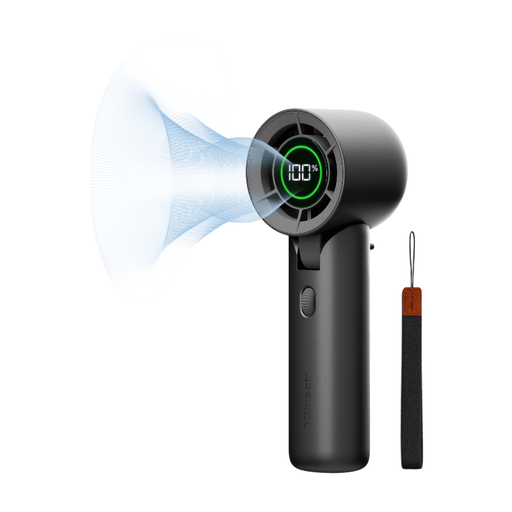
Why This Fits Their Persona: Ideal for the commuter and office professional who values silence, a long runtime, and a sleek design. Fits easily into a laptop bag and is quiet enough for an open-plan office.
Directly addresses the pitfalls with a specified battery life of up to 32 hours and a minimum noise level of just 23 dB. The build quality is geared for daily use.
Variable speed control (0-100) for precise adjustment and a tilting head for hands-free use on a desk. Charges via USB-C.

Why This Fits Their Persona: Perfect for those who need a fan in a fixed yet flexible spot, like a desk, bookshelf, or bed frame. The clip function makes it versatile for small spaces.
This model focuses on one core task: flexible placement. It doesn't make exaggerated claims about battery life but offers a reliable, functional solution for a specific need.
The sturdy clip ensures stable attachment to various surfaces. With 3 speed settings and a built-in rechargeable battery, it's a practical and affordable choice.
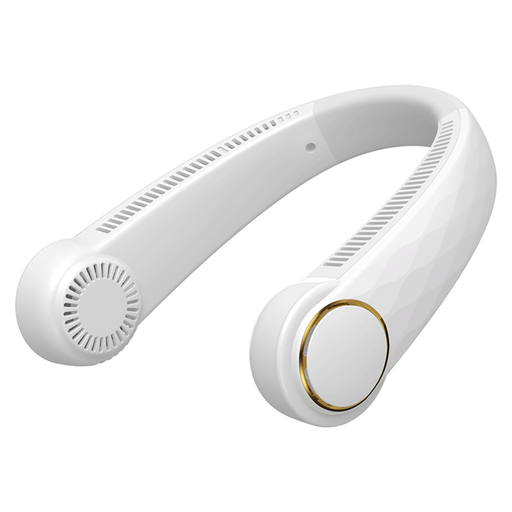
Why This Fits Their Persona: For those who need cooling while walking, commuting on public transport, or at a festival. This fan leaves your hands free and directs airflow straight to your neck and face.
This design bypasses the "flimsy construction" pitfall of traditional handheld fans. It's designed to be worn, making it less vulnerable to drops or bumps in a bag.
Offers 360° adjustable, hands-free cooling. The bladeless design is safer and provides a more even airflow.
We have compiled a complete, up-to-date list of products that meet these selection criteria and comply with current safety regulations.
The actual runtime heavily depends on the chosen speed. The advertised maximum duration is almost always on the lowest setting. For a realistic estimate, it's best to compare the battery capacity (mAh) and assume the fan will last about 4 to 8 hours on a medium setting, depending on the model.
Generally, yes. A higher price tag is often justified by a better motor (e.g., a brushless motor) and a more aerodynamic blade design, resulting in less noise. Always check the specifications for the noise level in dB. A model that stays below 30 dB on its lowest setting is considered very quiet.
Maintenance is simple but important for a long lifespan. Make sure the fan is turned off. Use a soft, dry cloth or a small brush to remove dust from the blades and grille. For stubborn dirt, you can use a slightly damp cloth, but ensure no water gets into the motor or charging port. Never submerge the device in water.
