
Vandaag of morgen in huis

Kwaliteit gegarandeerd

Welkomstaanbiedingen ontgrendelen: GRATIS bezorging | Tot 80% korting | Gratis 30 dagen JoyPlus-proefperiode
Download de app
A portable CarPlay screen for your car can give an older vehicle modern navigation, hands-free calling and music controls. In most cases, there is no need to replace the factory radio. However, portable CarPlay screens vary considerably in connectivity, sound output, camera support and installation.
If you only look at screen size or a low price, you may run into practical problems. So first check compatibility and how the screen receives power and audio.
With wireless Apple CarPlay and wireless Android Auto, the connection is usually established via Bluetooth and Wi-Fi. This does not mean that every device works without a smartphone. Navigation, streaming and voice control often still require a paired phone and mobile data.
Also check whether your phone is supported. For example, a product may offer wireless CarPlay but not Android Auto. This is important when several drivers with different phones use the same car.
A 10- or 11-inch display shows maps more clearly, but it also takes up more space on the dashboard. The mount must not obstruct your view and should remain firmly in place on roads with speed bumps and cobbles.
Pay attention to the dimensions, viewing angle, brightness and mounting base. A universal CarPlay display works in many vehicles, but the available space varies from one dashboard to another.
A screen with a car reversing camera or car dash cam may appear to be plug-and-play, but the rear camera usually needs to be mounted and wired separately. Check in advance how the cable will run to the back of the car and whether the supplied length is sufficient.
A camera view can help you see around the car, but it never replaces mirrors, direct vision or attentive driving. Also check whether a memory card is included and what maximum capacity is supported.
A portable screen often uses a 12V or 24V connection via the cigarette lighter socket. This makes installation straightforward in many cars, vans and motorhomes. Also check for:
Some accessories have specific requirements. According to the product information, the OTTOCAST Cabin Care only works with a vehicle that has original wired CarPlay and a touchscreen. The device is designed for iPhone; Android Auto is not supported.
Do not focus only on the diagonal measurement; resolution also matters. A screen with 1920 × 720 pixels or 1600 × 600 pixels can display maps, menus and camera footage clearly, depending on the viewing distance and brightness.
Different features matter to motorcyclists. A CarPlay screen for a motorbike should be able to withstand splashes and be mounted securely. Check whether it can be operated while wearing gloves and whether Bluetooth pairing with an intercom is available.
For a dash cam, check the following points:
A digital car tyre inflator is a separate, practical accessory. Check its maximum pressure, connection type, cable length and how easy the digital display is to read. A stated value of 150 PSI is a maximum product specification; always use the tyre pressure recommended for your vehicle.
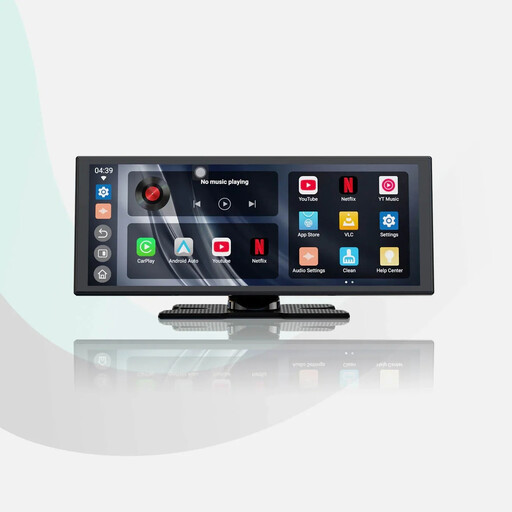
Why it suits this profile: A large screen with wireless Apple CarPlay and wireless Android Auto provides a clear upgrade without replacing the factory radio.
The product information mentions dual-band Wi-Fi and dual Bluetooth for your phone and audio system. However, check your car’s connection in advance.
11.4-inch display with 1920 × 720 pixels; supplied 1080p reversing camera according to the product description.
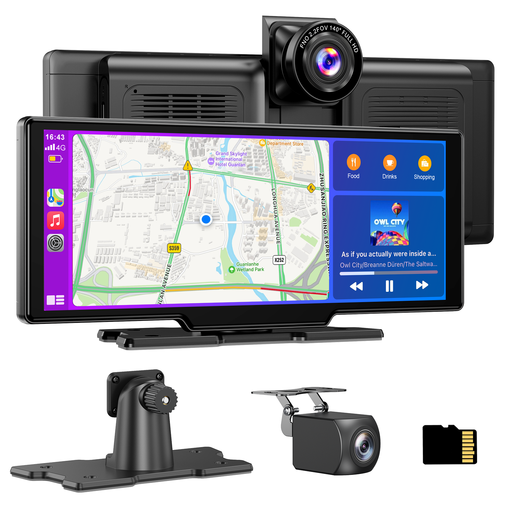
Why it suits this profile: Ideal for drivers who want to combine navigation, smartphone integration and video recording in one dashboard solution.
The set includes a 64GB TF card, loop recording and a rear camera. However, the camera installation and cable routing must be carried out carefully.
10.26-inch screen; front camera up to 4K according to the product information, and 1080p rear camera with IP67 rating.
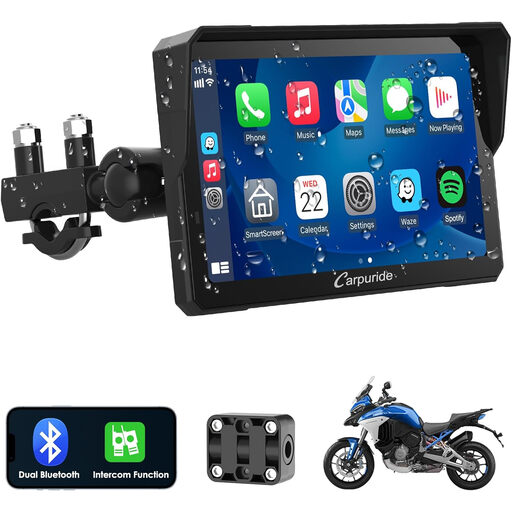
Why it suits this profile: This solution is designed for motorcyclists who want to use navigation and smartphone features on a separate screen.
The product name mentions a waterproof touchscreen, dual Bluetooth and intercom support. Check the mounting and connections for your motorbike.
Support for wireless CarPlay and Android Auto; Bluetooth intercom features according to the product listing.
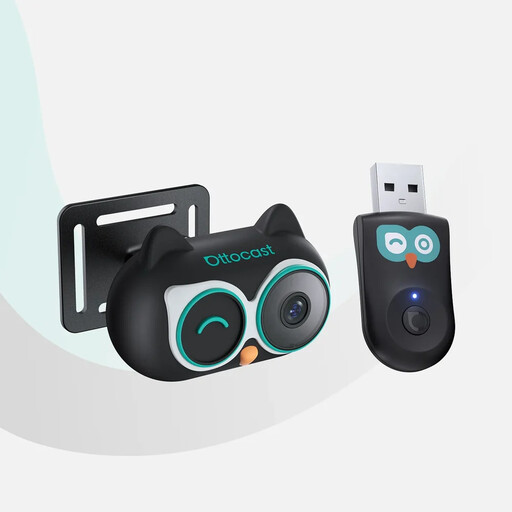
Why it suits this profile: Parents can use a baby car camera through the original car screen, provided the car and phone meet the stated requirements.
The product information lists four display modes, a 3-metre power cable and a camera with a 150° viewing angle. The system is not suitable for Android Auto.
1080p display according to the product description; split-screen, picture-in-picture and a 360° adjustable camera housing.
A screen is only convenient to use when the other connections are right. For an external monitor, media player or other display device, an HDMI cable 1.8 metres can be useful. According to the product specifications, the Neomounts HDMI6MM supports HDMI 1.4, 1080p+ up to 120 Hz, bandwidth of up to 10.2 Gbps and resolutions up to 1440p. However, check that your devices actually use HDMI; CarPlay itself often works via a smartphone connection rather than HDMI.
A digital car tyre inflator can be practical for use on the road. According to the product information, the Carsun 150PSI 12V Portable Inflator has a digital pressure display, LED lighting, a 3-metre cable and support for cars, motorbikes and sports balls. Compare the connection with that of your vehicle and follow the recommended tyre pressure.
We have put together a complete, up-to-date list of products that fully meet these strict selection criteria and the applicable European safety regulations.
Not literally in every situation. The vehicle will usually need a suitable 12V or 24V connection. For audio, Bluetooth, AUX, an FM transmitter or a built-in speaker is required. Also check that your iPhone or Android phone is supported by the model you choose.
Many models can be connected via the cigarette lighter socket and attached using a dashboard mount. A reversing camera or dash cam usually requires additional cable routing and installation at the rear of the car. Position the screen so that it does not obstruct your view or access to important vehicle controls.
CarPlay itself uses your phone’s connection, but navigation, music streaming and video services may use mobile data. Usage depends on the apps and settings you use. Download maps or music in advance if you want to limit data usage while travelling.
