
Vandaag of morgen in huis

Kwaliteit gegarandeerd

Welkomstaanbiedingen ontgrendelen: GRATIS bezorging | Tot 80% korting | Gratis 30 dagen JoyPlus-proefperiode
Download de app
Are you driving a car that's mechanically sound, but its dashboard feels outdated? You're not alone. Many drivers want modern features like Waze navigation, hands-free calling, and music streaming, without the expense of a new car or a complex installation. A portable CarPlay screen seems like the perfect solution, but the market is filled with pitfalls.
Before you make a purchase, it's crucial to know what to look for. Many screens look good at first glance but lead to frustration in practice. We'll discuss the three most common mistakes drivers make, so you can make an informed decision.
To avoid the problems mentioned above, it helps to understand a few technical specifications. These determine the user experience and reliability of a universal CarPlay system.
The promise of wireless CarPlay or Android Auto is convenience: get in your car and be instantly connected. A stable connection is critical for this.
The whole point of a portable screen is simplicity. A true plug-and-play CarPlay solution requires no technical expertise.
A CarPlay with dash cam combines navigation convenience with safety. It records your journeys, which can be invaluable in case of an incident.
Based on these criteria, we have selected a number of products that suit different user profiles.
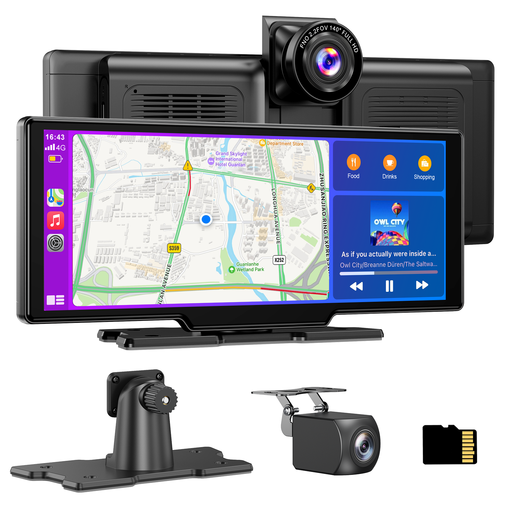
Why This Fits Their Persona: This user wants a complete upgrade: a large screen, seamless smartphone integration, and a reliable dash cam. This all-in-one system modernises the entire driving experience.
The package is complete with a 4K front camera, a 1080p rear camera, and a 64GB TF card, eliminating hidden costs. The dual-band Wi-Fi ensures a stable wireless connection.
Combines a large 10.26-inch HD screen (1600x600) with wireless CarPlay/Android Auto and a full-featured 4K dash cam system.
Why This Fits Their Persona: This user can't or won't make permanent modifications to the car. The solution must be easy to install and remove without leaving any traces.
This is a true plug-and-play system. Power comes from the 12V socket, and the mount is placed on the dashboard. No complex wiring or permanent installation is needed.
Installation takes minutes, and the system is just as easy to remove. Its universal fit (12V-24V) makes it suitable for almost any car, van, or truck.
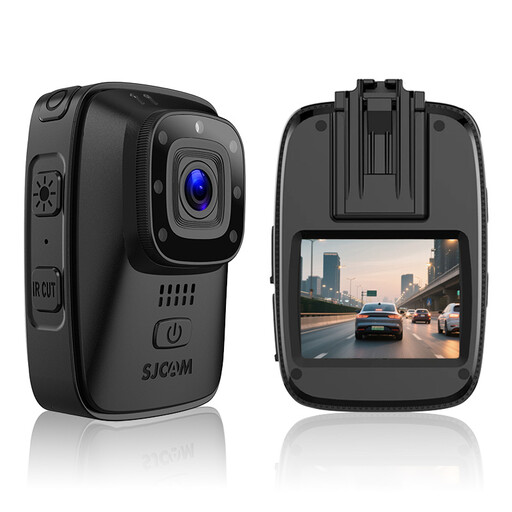
Why This Fits Their Persona: For this driver, recording the journey is the highest priority. A reliable dash cam is essential for safety and for potential insurance matters.
This is a specialised camera from a reputable camera brand (SJCAM), not an infotainment system with a mediocre camera. It focuses on image quality and reliability, and comes with a 64GB card.
Features a dedicated "Car Mode" with loop recording, infrared night vision, and a rugged, IP65 waterproof housing. The focus is entirely on reliable recording under all conditions.
We have compiled a complete, up-to-date list of products that fully meet these strict selection criteria and local regulations.
There are typically four ways to connect the audio. The simplest is via the built-in speaker, but the quality is often mediocre. For better sound, you can use the FM transmitter to send the signal to an empty frequency on your car radio. The options with the highest audio quality are a direct connection via an AUX cable (if your car and the screen have an AUX port) or pairing the screen to your car stereo via Bluetooth.
Yes, in principle. These systems are designed to function independently of the car's make or model. The only requirement is a working 12V or 24V cigarette lighter for power. This makes them suitable for virtually all passenger cars, vans, and trucks.
Absolutely. Integrated models, like the recommended ESSGOO screen, are designed to perform both functions simultaneously. While you're navigating with Google Maps or listening to Spotify via CarPlay, the dash cam continues to record the road in the background. The processing power is tuned for this dual task.
