
Vandaag of morgen in huis

Kwaliteit gegarandeerd

Welkomstaanbiedingen ontgrendelen: GRATIS bezorging | Tot 80% korting | Gratis 30 dagen JoyPlus-proefperiode
Download de app
A portable CarPlay screen with dash cam can add modern features to an older car, SUV, van or motorhome without replacing the original car system. You get wireless Apple CarPlay, Android Auto, navigation, music and hands-free controls. Models with cameras also record footage from the front and rear.
However, not every universal CarPlay screen is equally suitable for your car. Marketing often focuses on a large screen or high camera resolution, but installation, audio connections and storage are just as important.
A claim such as 4K car dash cam usually refers to the front camera’s resolution. It tells you nothing about low-light performance, image processing or the quality of the reversing camera. So, check:
A dash cam is a recording aid, not a guarantee that footage will be usable in every situation.
Wireless Apple CarPlay and wireless Android Auto typically use Bluetooth and Wi-Fi to connect to your smartphone. The screen itself will usually still need power from a 12V or 24V socket. A reversing camera also needs a cable running to the front.
When choosing a plug-and-play CarPlay system, check how you’ll connect the audio. Many models use a built-in speaker, Bluetooth, an FM transmitter or an AUX cable. The options available will depend on your car’s original audio system.
A universal CarPlay screen may be technically suitable for many vehicles, but mounting options vary from one dashboard to another. A suction cup can be handy in a motorhome or van, while a fixed dashboard mount may look neater in a car.
Position the screen so it doesn’t obstruct your view. Only operate the device when the car is stationary, and route cables neatly so they don’t get in the way of the controls or pedals.
A 10.26-inch car screen gives you plenty of room for maps, music controls and camera footage. A resolution such as 1600 × 600 pixels can display maps clearly, but readability also depends on brightness, viewing angle and positioning.
Check the dimensions of the mount and the available space on your dashboard. A larger screen isn’t necessarily more practical if it sits too close to the steering wheel or too low in your line of sight.
Check at least the following:
ESSGOO 10.26-inch models are listed as supporting iOS and Android versions that may vary by product. So, check the current product page before ordering.
A front camera and a reversing camera can be useful for parking manoeuvres and recording road incidents. Check how footage is stored. A supplied 64GB TF card means you can get started straight away, while other versions may require you to buy a memory card separately.
Let passengers know if you’re recording continuously, and use footage responsibly. Rules on filming in public places and sharing number plates or images of people may apply. If in doubt, check the latest guidance from the Dutch Data Protection Authority.
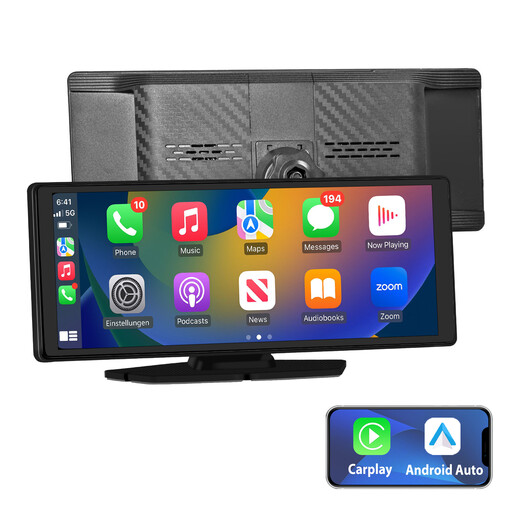
Why it suits this type of driver: This screen combines wireless CarPlay, Android Auto, GPS navigation and several audio options in a relatively straightforward plug-and-play setup.
The specifications list Bluetooth, AUX, FM and built-in audio, so you can check in advance which connection will work with your car.
10.26-inch IPS touchscreen, wireless CarPlay and Android Auto, plus support for online GPS navigation.
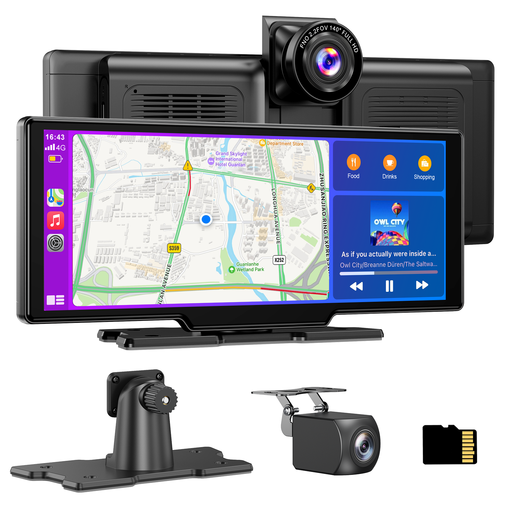
Why it suits this type of driver: With a large display, front camera, rear camera and included storage, this model is a good choice for drivers who want plenty of features in one device.
The product information lists the resolution of each camera separately, loop recording, a 64GB TF card and the option to lock important footage.
4K front camera, 1080P waterproof rear camera, 140° viewing angle and audio via Bluetooth, FM, AUX or the built-in speaker.
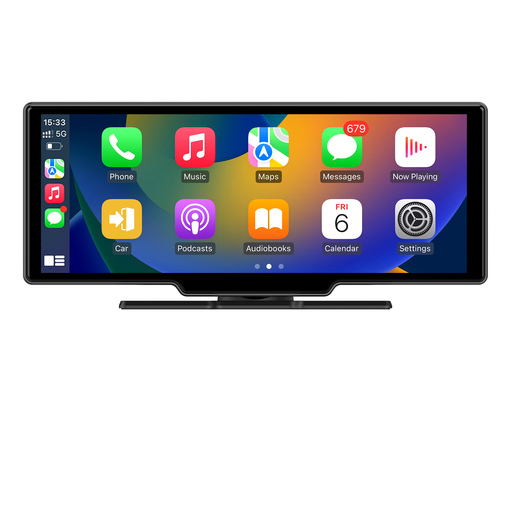
Why it suits this type of driver: This model is designed for users who want GPS, a front camera and a rear camera as well as wireless CarPlay and Android Auto.
The set specifies which camera is used at the front and rear. Check in advance that you have room to fit the extra GPS module and camera cable.
4K front camera, 1080p rear camera, GPS module, touchscreen and audio via Bluetooth, AUX or FM.
We’ve put together a complete, up-to-date list of products that meet these strict selection criteria and comply with current European safety regulations.
Not in every situation. Most of the models mentioned are designed for vehicles with a 12V or 24V socket and a compatible smartphone. Also check the audio connection, mounting position and compatible iOS or Android version.
CarPlay uses your smartphone for map apps, music and online features. You’ll generally need an active mobile data connection for live traffic updates and online GPS navigation. The exact functionality depends on your phone and the app you use.
Its lifespan depends on how often you record, the temperature, the card quality and how frequently footage is overwritten. Check regularly that the card is recording properly, and transfer important files in good time. A supplied 64GB card is handy for getting started, but you should still check it periodically.
