What should you look for?
Dynamic USB microphone
A good fit if: you speak close to the microphone and want to record directly to a computer.
Bear in mind: USB won’t prevent reverberation; positioning and distance still matter.
Dynamic XLR microphone or USB/XLR model
A good fit if: you already have a suitable interface or mixer, or want the option of using either USB or XLR.
Bear in mind: an XLR-only model also requires an XLR cable and suitable recording equipment.
Cardioid USB condenser microphone
A good fit if: you can make the recording space quiet and acoustically controlled, or also want to record vocals or instruments.
Bear in mind: background noise and reflections may still be audible.
Wireless microphone
A good fit if: a presenter needs to move around during the intro and the receiver connects to your recording device.
Bear in mind: check which frequencies are permitted at your recording location in the Netherlands.
First, decide what matters most to you: clear speech, a simple computer connection, several separate voices or freedom to move around. Then make a test recording in the space you plan to use.
| What to consider |
What to check |
Who should prioritise this? |
| Clear speech in a reverberant hall |
Can you position the microphone close to the speaker’s mouth and point it towards them? Make a test recording in the space you plan to use. |
If I’m recording in a reverberant or noisy hall, I want my voice to remain clear. Around 36% of consumers say clear speech despite room noise is their top priority. |
| Recording on a computer |
Check the connection and cable compatibility, the required standard, and whether you can monitor the sound during a test recording. |
As a solo creator, I want to record one voice on my laptop without unnecessary extra equipment. Around 29% of consumers say simple computer recording is their top priority. |
| Recording several voices separately |
Count the speakers and check the number of separate inputs or tracks. Test each voice from the position where the speaker will be. |
If several presenters are speaking, I want to be able to position their voices well and record them separately if needed. Around 21% of consumers say separate voices are their top priority. |
| Freedom to move around |
Decide whether a speaker really needs to move around, then check the connection to the recorder or computer and which frequencies are permitted. |
If the presenter is moving around the hall, I don’t want to be limited by the position of a fixed cable. Around 14% of consumers say freedom to move is their top priority. |
Microphones for different setups
This selection of Joybuy products includes USB microphones for a fixed recording position and wireless microphone systems for mobile or multi-person setups. For wireless equipment, check which frequencies are permitted at your recording location in the Netherlands.
 No image available
USB condenser microphone with cardioid pickup pattern
Could suit a single voice in a quiet, fixed recording space; a condenser microphone is no substitute for controlling the room’s acoustics.
USB connection, cardioid pickup pattern and headphone socket for monitoring, according to the product description.
The description lists a boom arm as included.
View at Joybuy
 No image available
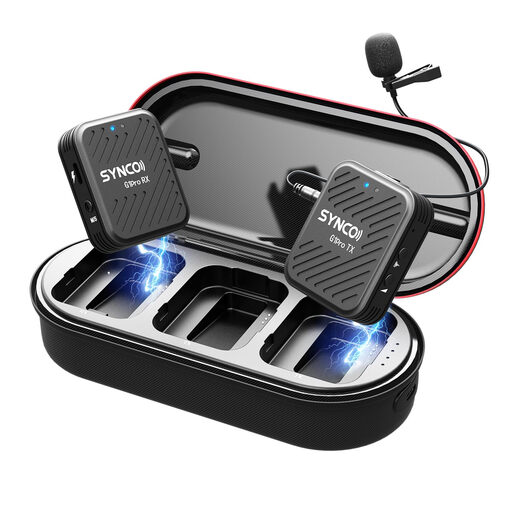
SYNCO G1(A1) Pro 2TX+1RX
A wireless lavalier setup for a presenter on the move or a two-person recording; its omnidirectional pickup pattern is less focused on a single voice.
2TX+1RX, 2,4 GHz and monitoring via a headphone socket on the receiver, according to the product description.
Before use, check which frequencies are permitted at your recording location.
View at Joybuy
 No image available
DJI Mic 3 (1 TX + 1 RX)
A wireless system for a speaker who needs freedom to move around. The product name lists one transmitter and one receiver.
The product description mentions connections to computers and cameras. Before use, check which frequencies are permitted at your recording location.
View at Joybuy
 No image available
Razer Seiren V3 Mini White
Could suit a fixed desktop setup for one voice; its pickup pattern won’t make a reverberant room quiet.
USB connection and supercardioid pickup pattern, according to the product description. The description lists compatibility with PC and Mac, and a tap-to-mute function.
View at Joybuy
 No image available
Moman M1CXT USB-C 2TX+1RX
A wireless lavalier setup for two people; its omnidirectional pickup pattern is less focused on one speaker than a pattern that is less sensitive in certain directions.
The product name lists USB-C and 2TX+1RX. The product description mentions monitoring via the receiver.
Before use, check which frequencies are permitted at your recording location in the Netherlands.
View at Joybuy
Frequently asked questions
Will a more expensive microphone automatically reduce reverberation?
No. A microphone can’t completely separate reflected sound from direct speech. Shure recommends paying attention to positioning and distance, so make a test recording at the location. The distance of around 5–10 cm recommended by RØDE applies specifically to the PodMic USB; it isn’t a set distance for every model.
Can I record to a computer straight away with an XLR microphone?
Not with the XLR-only RØDE PodMic on its own: according to RØDE, you’ll also need an XLR cable and audio interface to record to a computer. Check the connections on your own recorder or mixer and make a test recording.
What can I do if the microphone I bought online doesn’t work properly?
In the Netherlands, the retailer is your point of contact if a product is faulty, according to the Dutch government. For online purchases from a business, you’ll also have a 14-day cooling-off period in many cases; check the relevant terms and exceptions. The cooling-off period and a remedy for a faulty product are two different things.
Can I use any wireless microphone in the Netherlands without a licence?
No, it depends on the frequency used. The Dutch Authority for Digital Infrastructure lists frequency bands where wireless microphones can be used without a licence, as well as bands that require one. Check the frequency of the exact system and which frequencies are available at your recording location; this radio-frequency requirement doesn’t apply to a wired microphone.
What should I consider if visitors may be identifiable in the recording?
If your organisation processes personal data that can identify people, you need a lawful basis under the GDPR, according to the Dutch Data Protection Authority. Consent is one possible lawful basis, but which basis is appropriate depends on the recording and its publication. Check this before publishing, and don’t inadvertently point a microphone at conversations in the background.


