Start by choosing a controller that works with your console or PC and the platform game you play. Then consider which D-pad, buttons and grip feel most comfortable. Wireless play gives you more freedom to move, but you’ll need to keep an eye on the battery. A wired controller means you don’t have to worry about its battery, but the cable may restrict your setup. Manufacturer specifications can’t tell you which controller will feel most comfortable in your hands.
Who is this guide for?
Switch player who enjoys long sessions
If you play platform games on a Switch or Switch 2, first check that the controller is for the right console version, then consider its grip and D-pad. Nintendo says the original Switch Pro Controller can be paired wirelessly with Switch 2, while the Switch 2 Pro Controller is for Switch 2 only.
PC or Xbox platform game player
If you want to play on a Windows PC or Xbox, check that your game is supported and consider the D-pad, connection and power supply. Microsoft lists features of the Xbox Wireless Controller including a hybrid D-pad and textured grip.
PS5 player who also plays on PC
If you want to use the same controller for PS5 and a PC game, check which DualSense features are available for each game and connection method. PlayStation says haptic feedback on PC requires game support and a USB connection.
What should you look for when buying?
Original Nintendo Switch
Best for: Switch players looking for a separate D-pad, motion controls and the features listed.
Keep in mind: Nintendo estimates battery life at around 40 hours, depending on use; comfort is a personal choice.
Nintendo Switch 2
Best for: Switch 2 players who need the C Button, customisable GL/GR buttons or a headset socket.
Keep in mind: Nintendo says this Pro Controller is for Switch 2 only; the battery isn’t user-removable.
PS5 or supported PC game
Best for: Players who want the PlayStation button layout on PS5 or in a compatible PC game.
Keep in mind: PlayStation says features vary by game and device; haptic feedback on PC requires USB.
Xbox or supported Windows PC
Best for: Players who want a hybrid D-pad and textured grip on Xbox or in a supported PC game.
Keep in mind: Check the power supply for the exact version; don’t assume it has a built-in battery.
Alternatives for Switch
Best for: Players who prefer a different D-pad or specifically want a wired controller with the Switch in its dock.
Keep in mind: The 8BitDo Ultimate 2C Bluetooth requires specific firmware for Switch 2; the PowerA wired controller mentioned works only when the Switch is in its dock.
First check your console, game and desired features. Then consider the controls and grip, and choose a power supply that suits your setup.
| What to consider |
What to look for |
Who is this important to? |
| Compatibility |
Check the exact console version, game support and any firmware requirements. |
If I want to make sure the controller and its features work with my console and game, I’ll check they’re compatible before buying. Around 29% of consumers prioritise compatibility. |
| Grip and comfort |
Where possible, try the grip, button reach and your usual playing position. |
For a long session, I want to hold the controller and reach the buttons comfortably, without the shape putting my hands under strain. Around 22% of consumers make hand comfort their top priority. |
| Directional controls |
Test diagonals and quick transitions between the D-pad, stick and jump buttons. |
If my platform game involves a lot of directional changes, I want to know whether the D-pad and buttons suit the way I play. Around 21% of consumers prioritise directional controls. |
| Power supply |
Check the stated play time, charging method and whether a cable will suit your setup. |
If I want to play for a long time, I want to know whether a flat battery could interrupt my session or a cable could restrict where I play. Around 14% of consumers prioritise uninterrupted play and power supply. |
| Running costs and support |
Check the power supply included, any accessories and the service terms for that version. |
If I’m also considering batteries, accessories and support further down the line, I’ll compare the terms for the exact model. Around 14% of consumers put these running costs and support first. |
Things to watch out for when buying
-
Don’t assume different Nintendo Pro Controllers are interchangeable
Nintendo says the Switch 2 Pro Controller is for Switch 2 only; the original Switch Pro Controller has a different set of features.
Before buying, check the full model name and the console you play on.
-
Don’t mistake a Bluetooth connection for full game support
PlayStation says DualSense features vary by device, game and connection method. On PC, haptic feedback requires USB and game support.
Check separately that your game supports the controller and that the features you want work with your chosen connection.
-
Check your playing setup before buying a wired Switch controller
PowerA says the Enhanced Wired Controller mentioned can only be used when the Switch is in its dock.
Choose a controller and cable length to suit where and how you actually play.
-
Don’t treat a manufacturer’s warranty as your full statutory protection
The Dutch government says there is no fixed statutory warranty period in the Netherlands and that you’re entitled to a product that works as it should. A manufacturer’s warranty is extra protection.
Compare any additional warranty terms with your rights, and keep your proof of purchase.
Relevant brands
Nintendo
Nintendo makes separate Pro Controllers for the original Switch and Switch 2; check which features are available for your console.
- For the original Switch Pro Controller, Nintendo lists a separate D-pad, motion controls, HD Rumble and estimated battery life of around 40 hours.
- Nintendo says the Switch 2 Pro Controller is for Switch 2 only; stated battery life depends on use.
Sony PlayStation
DualSense is designed for PS5 and also works with supported games on other devices.
- PlayStation lists haptic feedback and adaptive triggers among the controller’s features.
- Availability depends on the game and device; haptic feedback on PC requires USB and game support.
Xbox
The Xbox Wireless Controller is designed for Xbox and supported PC games; Shock Blue is a version in this product generation.
- Microsoft describes a hybrid D-pad, textured grip and connectivity with devices including Xbox and Windows PCs.
- Check the power supply for the exact version; don’t assume it comes with a standard built-in battery.
8BitDo
The Ultimate 2C Bluetooth is a Switch version; the Ultimate 2C Wireless is a separate model for Windows and Android.
- For the Bluetooth version, 8BitDo lists Switch compatibility, an enhanced D-pad and up to 15 hours of play time.
- 8BitDo specifies a firmware requirement for use with Switch 2. Don’t confuse this version with the Ultimate 2C Wireless.
PowerA
The Enhanced Wired Controller mentioned is designed for wired play with a Switch in its dock.
- PowerA says it doesn’t need batteries and comes with a 3-metre cable.
- This version works only when the Switch is in its dock and doesn’t support features including motion controls or HD Rumble.
Controllers at Joybuy
This selection includes controllers for Switch and Switch 2, Xbox and supported Windows PCs, with both wired and wireless options. Check the compatibility, connection and power supply for each model.
 No image available
Xbox Wireless Controller for Xbox Series/PC – Ice Breaker Special Edition
An option for Xbox or Windows PC platform games if you’re looking for a hybrid D-pad and textured grips.
Product information lists two AA batteries included and up to 40 hours of battery life.
View at Joybuy
 No image available
Hori Horipad Turbo for Switch and Switch 2 – Pokémon Eevee Cottage Core Edition
A wired option for Switch or Switch 2 if you want a USB connection and programmable rear buttons.
The controller is powered via USB; the cable isn’t included. According to the product description, it doesn’t support motion controls, HD Rumble or NFC.
View at Joybuy
 No image available
Nintendo Switch Pro Controller – Black
A wireless option for Switch players who want a separate D-pad.
Nintendo estimates battery life at around 40 hours, depending on use. Product information lists motion controls, HD Rumble and amiibo functionality.
View at Joybuy
 No image available
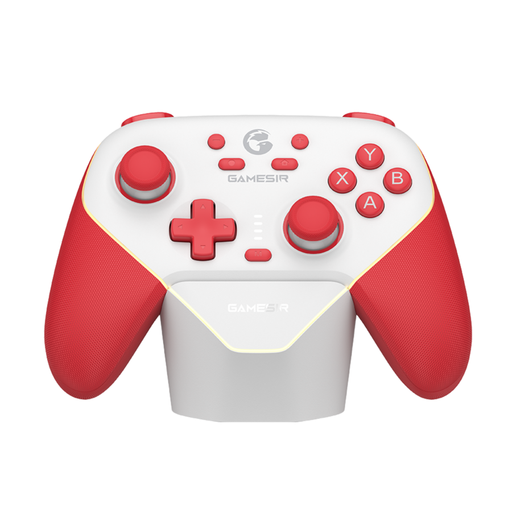
GameSir Super Nova Switch Controller – Red & White
A Switch option if you want to choose between different connection methods.
Product information lists Bluetooth, wired use and a wireless dongle, with up to 25 hours of battery life.
View at Joybuy
 No image available
Nintendo Switch 2 Official Pro Controller – Black
An option for Switch 2 if you’re looking for the features of the Pro Controller designed for that system.
Nintendo estimates battery life at around 40 hours, depending on use. The battery isn’t user-removable; replacement through Nintendo may incur a charge.
View at Joybuy
Frequently asked questions
Can you use a Switch 2 Pro Controller with an original Switch?
No. Nintendo says the Switch 2 Pro Controller is for Switch 2 only. Nintendo says the original Switch Pro Controller can be paired wirelessly with Switch 2.
How do you connect the 8BitDo Ultimate 2C Bluetooth to a Switch with a cable?
On the Switch, turn on the ‘Pro Controller Wired Communication’ option, then connect the controller using a USB cable, as instructed by 8BitDo.
Do all DualSense features work over Bluetooth on a PC?
No. PlayStation says the features available depend on the game and device. Haptic feedback on PC requires both a USB connection and game support.
What warranty applies to a purchase in the Netherlands?
The Dutch government says you’re entitled to a product that works as it should, but there is no fixed statutory warranty period in the Netherlands. A manufacturer’s or seller’s warranty is additional protection. If a product is faulty, contact the seller.
Do you have a cooling-off period for an online purchase in the Netherlands?
The Dutch government says that for distance purchases, a 14-day cooling-off period applies in many cases. Check whether the rules apply to your purchase and whether any exceptions apply.


