
Switch players who want to share controllers
You want to play together without immediately needing two full-size controllers. Check whether your game supports one Joy-Con held horizontally per player.


Start with your system, your game’s local multiplayer mode and the number of controllers you need for your players. In supported Switch games, a pair of Joy-Con controllers can be shared between two players. Full-size controllers give each player their own controls, while a wired controller is only practical if you can keep its cable safely out of the way.
You want to play together without immediately needing two full-size controllers. Check whether your game supports one Joy-Con held horizontally per player.
You want to play from the sofa without a cable crossing a walkway, so check whether the controller connects wirelessly to your system.
You’re looking for an extra controller that works with your PC and the local multiplayer mode of the game you want to play.
First, check that your game supports the controller and confirm how many players can use the controllers you have. Then make sure the cable route, connection and charging method suit your seating area.
| What to consider | What should you check? | Who is this important for? |
|---|---|---|
| Compatibility | Check the system, game and supported controller configuration. | If I want to be sure my game works with the controller and player count, compatibility comes first. Around 30% of consumers say this is their main concern when buying. |
| Walkways and cables | Check the distance between the system and sofa, and whether a cable can be kept out of the way. | If I play in a small room, I want to keep the walkway clear and avoid a cable between the sofa and system. Around 30% of consumers prioritise clear walkways. |
| Controllers per player | Check whether the game supports separate Joy-Con halves, and count the controllers you already have. | If I want to play together with as few extra controllers as possible, I check whether the game allows one Joy-Con per player. Around 20% of consumers prioritise sharing the controllers they already have. |
| Charging and extras | Check how the controller charges, what type of batteries it uses and which accessories you already have. | If I don’t want to be caught short of extra charging accessories or batteries, I check how the controller is powered in advance. Around 20% of consumers prioritise charging and additional accessories. |
Joy-Con 2 does not work with the original Nintendo Switch, so choosing the wrong model means it won’t suit your system.
Check the full product name and your console’s name before choosing a set.
The PowerA Enhanced Wired Controller reviewed here has a 3 m cable and is designed for use with a docked Switch. In a small room, the cable could cross a walkway.
Check where the dock, sofa and walkway are. Choose this option only if you can route the cable safely.
The Ultimate 2C Wireless and Ultimate 2C Bluetooth have different stated platform support.
Compare the full model name with the platform list for your system; don’t rely on ‘Ultimate 2C’ alone.
A Switch 2 comes with two Joy-Con 2 controllers. Original Joy-Con controllers cannot be attached to a Switch 2 for charging.
First check how the game handles players and how you can charge the controllers you already have.
Joy-Con and Joy-Con 2 are worth considering for supported Switch games that let you use each controller half separately.
The Xbox Wireless Controller is a full-size controller for Xbox consoles and supported Windows PCs.
DualSense is a full-size wireless controller for PS5 and compatible PC games.
The Ultimate 2C range has several versions, so the full model name matters when choosing for your platform.
The Enhanced Wired Controller for Nintendo Switch reviewed here is a wired option for use with a docked Switch or Switch 2.
The products below include shareable Joy-Con sets for Switch systems and full-size controllers for various listed devices. For each controller and game, check that the local multiplayer setup you want is supported.
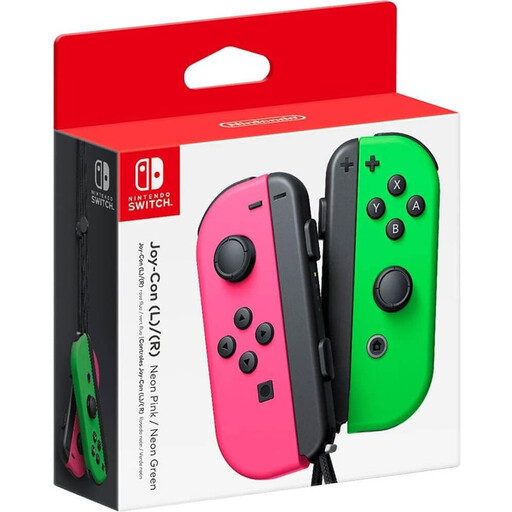 No image available
A pair that can be used as two separate player controllers in compatible Switch games; check the game’s controller options.
The Joy-Con halves are used separately. Nintendo describes this setup for supported games.
 No image available
For Switch 2 players who want to share a pair between two players in supported games; check the game’s player setup.
Joy-Con 2 does not work with the original Nintendo Switch.
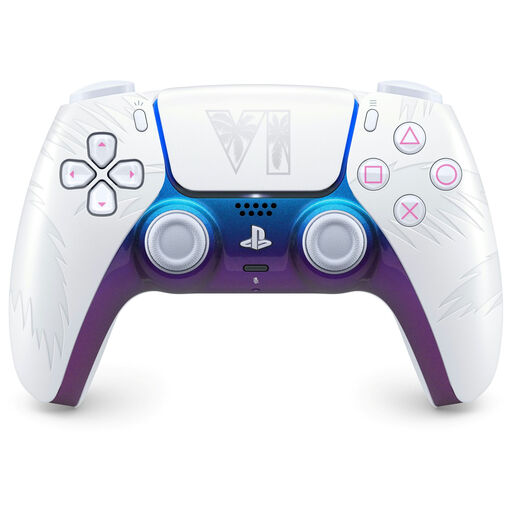 No image available
A full-size controller for one player; you’ll need two controllers for two players. Check that your game and device are supported.
The product name lists PS5, PC, Mac and mobile devices. On PC, advanced features depend on game support.
 No image available
A full-size controller for one player; you’ll need a second controller for another player. Check that your game supports it.
The product name lists PC, Switch, iOS and Android. The bundle listing applies to this version.
 No image available
A full-size controller for one player on Nintendo Switch; you’ll need two controllers for two players.
Check that the game supports this controller, and count any controllers already included with your system or setup.
Yes, if the specific game supports one Joy-Con held horizontally per player. Nintendo describes this setup for Super Mario Bros. Wonder; check the controller options separately for other games.
No. Nintendo states that Joy-Con 2 only works with Switch 2. Original Joy-Con controllers can connect wirelessly to Switch 2, but cannot be attached to that console.
Nintendo recommends using an original Switch or a compatible Joy-Con charging accessory. Original Joy-Con controllers cannot be attached to Switch 2 for charging.
For a standard online purchase from a business, the ACM generally gives you 14 days from delivery to change your mind. You’re also covered by the statutory guarantee if, under normal use, the product doesn’t do what you could reasonably expect; there isn’t one fixed statutory two-year guarantee period for all controllers.
The Dutch Authority for Digital Infrastructure describes the CE marking and requirements for radio equipment sold in Europe. When your controller arrives, check the marking and follow the instructions; a product listing alone doesn’t prove that an individual item meets the requirements.