What should you look for?
Start by checking compatibility with your console or PC and the game you want to play. Then compare the directional controls, controller lighting and cable or charging requirements with your gaming setup.
| What to consider |
What to look for |
Who is this important for? |
| System and game |
Check the exact console or operating system, connection type and support in the game. |
If I mainly want to avoid buying a controller that doesn’t work with my system or game, I check that combination before looking at other features. Around 33% of consumers put system and game compatibility first. |
| D-pad and buttons |
Compare the shape of the D-pad, the ABXY layout and any mappable buttons; if possible, try them with your own game. |
When changing direction quickly, I want to know whether the button layout suits the way I play. Around 27% of consumers give directional controls and button layout top priority. |
| Lighting in the dark |
Find out where the lights are and whether you can adjust their brightness or switch them off completely. |
If I want to see my controller more clearly in the dark without unnecessary light in my field of view, I look at the position and adjustability of the lighting zones. Around 20% of consumers put adjustable controller lighting first. |
| Cable and power |
Check the required connection, cable length and routing, wireless connection options and charging method. |
My seating distance and preference for wired or wireless play determine which connection is practical. Around 20% of consumers base their choice mainly on the cable, connection or power supply. |
Joybuy product picks
This selection includes controllers whose product names indicate compatibility with Nintendo Switch systems, plus a Lightning controller for iPhone and iPad. Check that the exact model is compatible with your device and game.
 No image available
Turtle Beach Afterglow Wave Wireless Controller, RGB, Transparent
A good fit if you’re looking for a wireless controller for Nintendo Switch systems with RGB lighting.
The product name lists Bluetooth, TMR sticks, 40-hour battery life, four RGB modes and two programmable buttons. Systems listed: Switch 2, Switch, Switch Lite and Switch OLED.
View at Joybuy
 No image available
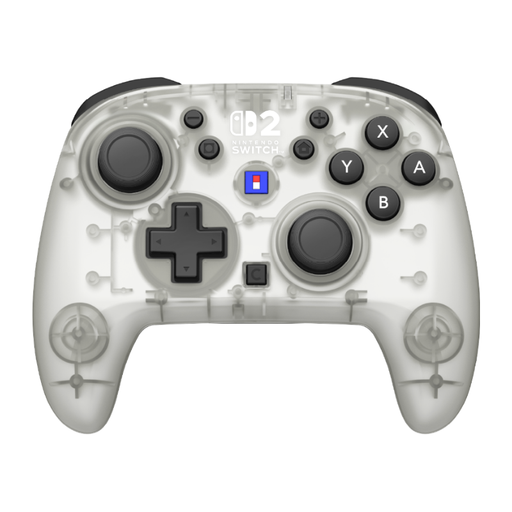
Hori Horipad Turbo Frost Wireless Controller, White & Transparent
A wireless controller for anyone looking for a model for Nintendo Switch or Switch 2.
The product name lists a C button, an assignable function and 10-hour battery life. The colour is white and transparent.
View at Joybuy
 No image available
Turtle Beach Rematch Super Mario Jump Wireless Controller
This model is for anyone looking for a wireless controller for Switch 2 or Switch OLED.
The product name lists a TMR joystick, C button, two programmable buttons and 40-hour battery life. This is the Super Mario Jump Edition.
View at Joybuy
 No image available
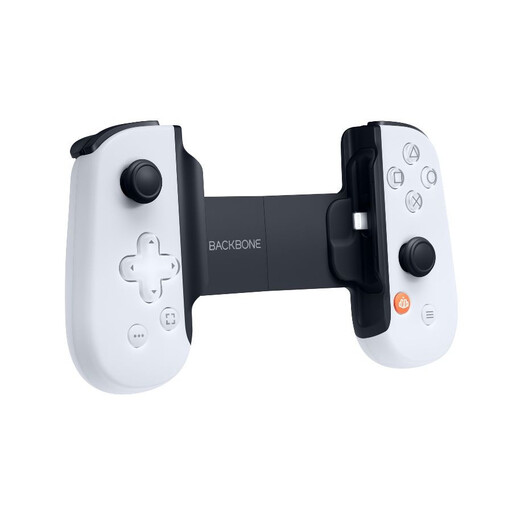
Backbone ONE Gen 2 Controller, PlayStation Edition, iPhone/iPad, Lightning
An option if you’re looking for a Lightning controller for iPhone or iPad and want to play on the go. Check that your chosen game or service works on your device.
The product name lists a Lightning connector and the PlayStation Edition.
View at Joybuy
 No image available
KONIX JoyPad Controller Pair, Blue and Red
This controller pair is an option if you’re looking for a model for Nintendo Switch, Switch OLED or Switch 2.
The product name lists compatibility with Nintendo Switch 2 and Switch OLED.
View at Joybuy
Frequently asked questions
Does the original Switch Pro Controller also work with Switch 2?
Yes. According to Nintendo, you can pair the original Switch Pro Controller wirelessly with Switch 2. Nintendo also says it can be charged via a USB cable connected to the Switch 2 dock; also check that your chosen game supports the controls.
Can I switch off the PowerA Spectra Infinity lighting?
Yes. According to PowerA’s manual, pressing the LED Program Button once switches the Spectra LEDs off completely. Press it again to switch them back on.
How can I test whether my Switch controller buttons are responding?
Nintendo describes a button test under System Settings, Controllers and Sensors, Test Input Devices and Test Controller Buttons. The test doesn’t cover every button, including HOME and SYNC.
Who should I contact about a faulty controller bought in the Netherlands?
According to the Dutch government, you should contact the retailer about your statutory guarantee. The Netherlands has no fixed statutory guarantee period; what you can expect from a product depends on factors including the product, its price and the information provided. A manufacturer’s guarantee provides additional cover.
Can I return a controller bought online?
For distance purchases from a business, the Dutch government says you’re entitled to a 14-day cooling-off period in many cases. Check the terms for your purchase; according to the same government information, these distance-selling rules don’t apply to purchases from a private individual.


