
Meeting leader in a noisy room
You want to explain action points clearly while there’s noise around you. Assess the microphone separately from the noise cancellation that helps you hear, and test how clearly you can be heard at your workstation.


If you’re the only person speaking, choose a personal headset with a microphone that’s easy to control. A wireless model is a better fit if you change position or move around during the meeting; a wired one may be more convenient if a reliable connection matters more than freedom of movement. If colleagues beside you also need to be heard, consider room audio as a separate solution: Microsoft treats microphones and speakers for meeting rooms as separate components.
You want to explain action points clearly while there’s noise around you. Assess the microphone separately from the noise cancellation that helps you hear, and test how clearly you can be heard at your workstation.
You switch between sitting, standing and moving around your desk during the meeting. Check the wireless connection, controls and distance from your computer; Arboportaal advises alternating between sitting and standing.
You wear your headset for extended periods and want to reduce pressure on your ears and head. Compare the fit and, for wireless models, the talk time listed for the settings on the version you’re considering.
A good fit if: you’re the main speaker and get up or move away from your computer while planning.
Bear in mind: charging, the wireless connection, and the receiver or connection type of the version you choose.
A good fit if: you mostly stay at your computer and don’t want to rely on a headset battery.
Bear in mind: the cable may get in your way when you adjust your desk height or move around your workspace.
A good fit if: colleagues beside you join in from the desk and remote participants need to hear everyone.
Bear in mind: a microphone positioned near one person’s mouth won’t automatically pick up other voices; the microphones and speakers need to suit the room.
| Factor to consider | What should you check? | Who is it important for? |
|---|---|---|
| How clearly you can be heard | Check the microphone boom and mute controls on the exact version. Test the microphone before an important meeting. | If you’re explaining action points while there’s noise around you, you’ll want remote participants to hear you clearly. Around 36% of consumers prioritise clear speech. |
| Freedom of movement | For wireless models, check the receiver, connection type and the conditions under which the stated range and talk time apply. | A cable can get in the way when you stand during a meeting or adjust your desk height. Around 29% of consumers prioritise freedom of movement. |
| Comfort | Consider the fit, ear cushions and headband; a low weight alone doesn’t guarantee comfort. | For long meetings, you’ll want a headset that remains comfortable to wear; fit varies from person to person. Around 21% of consumers put comfort first when choosing. |
| Connection and controls | Compare USB-A or USB-C, any receiver and the platform-specific version. Also select the right microphone in your meeting app. | If you want to connect and mute without any fuss before a meeting starts, the exact connection type matters. Around 14% of consumers give connection reliability top priority. |
ANC reduces the noise you hear; it doesn’t prove that remote participants will hear your voice without background noise. In a 2024 test, PCMag praised the Jabra Evolve2 65 Flex microphone but was less impressed by its ANC.
Assess the microphone and your listening experience separately, and test how clearly you can be heard in your own meeting environment.
Receivers, included accessories and platform features can vary between versions. The model name alone therefore isn’t enough to confirm the connection type or what’s in the box.
Before buying, check the full model number, receiver, USB connection and included accessories.
A wired headset means you don’t need to charge a headset battery, but the cable can restrict your movement when you adjust the desk.
Check where the cable runs while you’re sitting and standing. Choose a wireless model if the cable really does get in your way.
The Evolve2 65 Flex is a range of wireless business headsets for anyone looking for a foldable microphone boom and portability.
The Voyager Focus 2 is a wireless business stereo headset you can compare for its microphone features and adjustable ANC.
The Zone Vibe Wireless range includes receiver, UC and Teams versions.
The Ayda USB-ENC is a wired PC headset for anyone who values a USB connection and easy-to-use mute controls.
The WH-1000XM6 is a pair of wireless headphones with integrated call microphones, for anyone looking for ANC headphones as well as a meeting headset.
These product picks focus on wireless headphones or headsets with a microphone for personal use; check that the connection and controls on each version are right for your meeting.
 No image available
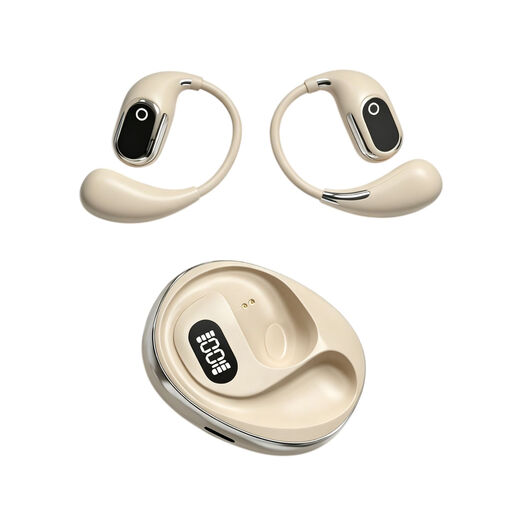
A wireless option if you want to join meetings without a cable; the stated playback time isn’t the same as talk time.
Bluetooth; four beamforming microphones; up to 60 hours of playback according to the product information.
 No image available
An on-ear model with a built-in microphone; check that the controls and connection work with your meeting app and computer.
Built-in condenser microphone; charging case with Type-C connection.
 No image available
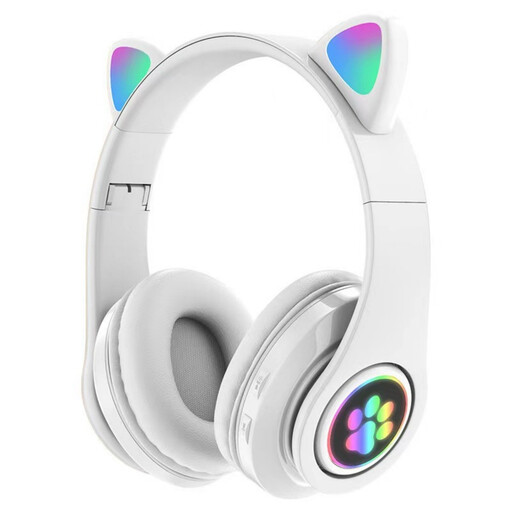
The product name indicates that it’s for children; check that the version and controls are suitable for professional meetings.
Bluetooth; microphone; three modes; foldable design.
 No image available
Wireless headphones with built-in microphones; before use, check that your meeting app selects the right microphone.
Bluetooth; active noise cancellation; multipoint pairing; up to 24 hours of battery life according to the product information.
 No image available
A wireless headset to consider if you want to move around during meetings; check the connection and settings for your computer.
Bluetooth; beamforming microphone array; connects to two devices according to the product information.
Don’t assume it will. If several people in the same room need to speak, consider a microphone and speaker setup designed for that room. Microsoft describes microphones and speakers as separate components of a hybrid meeting room.
In Teams, select the speaker and microphone you want to use, then make a test call. Also check the mute setting on the headset itself.
No. Arboportaal advises alternating between sitting and standing. It doesn’t require you to use a particular headset model.
For a consumer purchase made at a distance, you’ll generally have a cooling-off period of up to 14 days after delivery; ACM ConsuWijzer lists exceptions, including certain unsealed hygiene products. Your statutory guarantee is separate from the manufacturer’s warranty: a product must perform as you could reasonably expect with normal use. For a business purchase, check the applicable terms separately.
Don’t assume you automatically have the right to process personal data. The Dutch Data Protection Authority says an organisation must identify an applicable GDPR legal basis before processing; which basis applies depends on the purpose and circumstances. Using a headset doesn’t change that assessment.