
New online seller with an existing camera
You want to show a watercolour study clearly and first check whether your current camera and a stable setup are up to the job.


Start by taking a test shot with your current camera or smartphone. If it captures the whole artwork straight, in focus and in a format you can use for your online shop, a new camera body may not be the first thing you need. A mirrorless camera could be worthwhile if you want more choice of lenses or greater flexibility for close-up shots. However, your results also depend on the lens, lighting and a stable setup.
You want to show a watercolour study clearly and first check whether your current camera and a stable setup are up to the job.
You want to avoid changing light or misleading colour reproduction obscuring subtle watercolour tones and the look of the paper.
You want to show brushstrokes or paper texture as well as the whole painting, so you’re looking for a camera that can focus at the distance you need.
Start by taking test shots in conditions you can repeat. This will help you work out whether your main issue is colour reproduction, the overall image, fine details or your existing setup.
| What to consider | What to look for when buying | Who is this more important for? |
|---|---|---|
| Colour reproduction | Take a test shot in repeatable lighting and compare it with the watercolour. Check the available settings, including white balance. | If I need my sales photo to reflect subtle shades accurately, I compare it with the original. Around 33% of consumers say colour reproduction is their main consideration. |
| Sharp image of the whole painting | Check that the entire sheet fits in the frame from the distance available and stays in focus. A tripod or other steady support can help. | If I want to show the whole artwork in one shot, I look for straight framing and a sharp image. Around 25% of consumers give the overall image the highest priority. |
| Paper and brushstroke details | Test the supplied lens’s focus at the working distance you use. Also check how much detail remains when you crop the image. | Sharpness at close range matters for individual shots of brushstrokes or paper texture. Around 25% of consumers prioritise close-up details. |
| Complete setup | Compare the exact contents of the set with what you already own. Check whether a lens is included and what other accessories you’ll need. | If I only want to buy something new when a test shot reveals a shortcoming, I look at the whole setup, not just the camera body. Around 17% of consumers prioritise the total purchase cost. |
A stated sensor resolution doesn’t prove that a camera will reproduce watercolour colours accurately. Lighting and your chosen settings also affect the test shot.
First, compare images taken in a repeatable setup with the original artwork.
Buying a new camera body when the visible problem is actually the lighting or setup could mean spending money on equipment without improving the result you want.
A camera body and a lens kit are different purchases. Your framing and focusing options also depend on the lens you actually get.
Check the exact contents of the set, the lens mount and how you can frame the artwork from your working distance.
If the lens is missing or unsuitable, you may still need to buy a lens or a stable support for your setup.
Image file requirements can vary between sales platforms. The rules for one platform don’t automatically apply to another online shop.
Before exporting and uploading your images, check the current requirements of the online shop where you sell.
The Canon EOS R50 is an APS-C mirrorless camera for anyone who wants to choose their own lens.
The Sony ZV-E10 II is an APS-C camera with interchangeable E-mount lenses.
The Nikon Z50II is a mirrorless camera to consider if you’d like to assess a tilting screen for your setup as well as a full-picture shot.
These cameras are options to compare for an online shop setup featuring a watercolour. Consider what’s included, the level of detail you want and how you plan to frame the artwork.
 No image available
The included mini tripod could come in handy for a fixed shooting setup. Take a test shot to see whether the camera frames the artwork clearly and in focus.
The product name lists 64 MP and a rotating lens. These stated features don’t guarantee accurate colour reproduction.
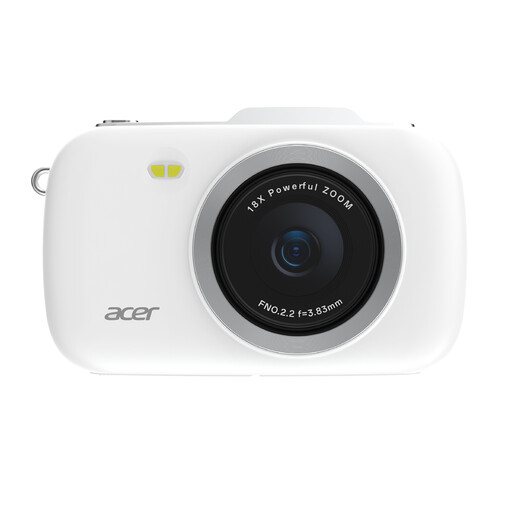 No image available
If you’re considering a compact camera, take a test shot to check whether you can capture the whole artwork and the details you want from your available working distance.
The product name lists 80 MP and 18X zoom. Judge the image against your needs: these figures don’t prove a particular level of image quality for watercolours.
 No image available
The listed zoom lens offers a choice of focal lengths to help you assess your framing. Take a test shot at the working distance you use for your watercolour.
The product name lists a 16–50mm lens. Check the exact contents of the set before comparing the camera with your existing equipment.
 No image available
The included lens could help you assess different framing options. Take a test shot to check whether the whole sheet and the details you want fit in the frame from your working distance.
The product name lists a 16–50mm f/3.5-5.6 OSS II lens. Check exactly which items are included in the offer.
 No image available
A compact camera could be an option if you want to use a single device. Test whether the screen, framing and focus suit your shooting setup.
The product information lists 20 MP, RAW photo format and 2.7× optical zoom. Use your own test shot to assess the crop and colour reproduction you want.
No. First, take a test shot with your existing camera or smartphone, a stable support and suitable lighting. Then check whether the full image and any close-up crops are good enough for your online shop.
Where possible, take your photos in repeatable lighting conditions and make a note of how you set everything up. Always compare the colour reproduction with the original artwork.
Check the current image requirements of the online shop where you sell. A format recommended for one platform isn’t automatically required by another online shop.
For consumer sales, the Netherlands Authority for Consumers and Markets says the seller is responsible for the legal guarantee. The Government of the Netherlands explains that a 14-day cancellation period applies in many cases to qualifying online consumer purchases. Don’t assume the same rights apply to a business purchase or a purchase from a private individual.
If you created an original work yourself, copyright arises automatically, according to Business.gov.nl. If the work or photo belongs to someone else, you’ll need to check the rights to use it separately. Owning a camera doesn’t give you those rights.