Which approach is right for you?

Tile seller creating a consistent set of photos

If you photograph tiles in changing window light, consistent colours and a similar representation of the finish are important. Adobe describes white balance as a way to adjust colour reproduction in different lighting conditions.

Maker capturing tile and glaze details

For close-ups, you’ll want to show the texture or shine without a reflection obscuring the relevant surface. Nikon explains that a polarising filter can reduce unwanted reflections, but may also change the image.

Occasional tile photographer

If you mainly need an overall shot, first test whether your existing smartphone captures enough detail and reproduces colours well enough. Adobe lists a smartphone as a possible option for product photography on a limited budget.

What should you consider when choosing?

Start with your smartphone

Choose this if: you need a few overall shots and your phone captures enough detail and reproduces colours suitably in the window light you plan to use.

Trade-off: you don’t need a new camera, but you’ll need to judge whether the images meet your requirements.

Mirrorless camera with a suitable lens

Choose this if: you want to adjust colour afterwards, crop images frequently or take separate overall and detail shots.

Trade-off: RAW gives you scope for post-processing and an interchangeable lens lets you choose your framing, but the camera body isn’t the complete setup.

Polarising filter as an add-on

Consider this if: a reflection obscures the tile surface or a detail, and your chosen lens can take a suitable filter.

Trade-off: a filter can reduce reflections, but may also affect the visible shine and colour saturation.

Buying concern What to look for Who is this more important for?
Consistent colour in window light Check RAW support and white balance; photograph a neutral reference in the same light as the tile. If I compare tiles in changing window light, I don’t want the lighting conditions to alter the colour impression each time. Around 33% of consumers put colour consistency first.
Reflections and visible shine Take test shots from the intended angle and check whether a suitable polarising filter will fit the lens. When a reflection obscures details, I want to reduce it without misrepresenting the tile’s shine. Around 27% of consumers put reflection control first.
Overall view and finish details Work out the tile dimensions and working distance, then assess which lens will give you the framing you want. If I need to show both the whole tile and a crop of the finish, I consider the framing of both images. Around 20% of consumers put detail and framing first.
Do you need new equipment? Test your current smartphone first; if you’re considering a camera, compare the body with the lens and other accessories you’ll need. For a few simple photos, I want to know whether my existing phone will do the job before buying new equipment. Around 20% of consumers prioritise keeping additional purchases to a minimum.

Common buying mistakes

  • Comparing megapixels alone

    A higher resolution can give you more scope to crop an image, but it doesn’t automatically determine how accurately the tile’s colour or shine will be reproduced. Exposure, white balance and framing all need attention.

    First decide whether you mainly want to show a whole tile, compare colours or capture a detail of the finish. Then compare complete camera-and-lens combinations.

  • Trying to filter out every window reflection

    A polarising filter can reduce reflections, but it can also change the visible shine and colour saturation. This could give a misleading impression if the glossy finish itself is important.

    Compare test shots with and without a suitable filter before deciding how to present the tile.

  • Confusing the manufacturer’s warranty with your statutory rights

    According to the Dutch government, a manufacturer’s warranty is in addition to your statutory rights. If a product is faulty, the retailer is your point of contact; in the Netherlands, there is no fixed statutory period for the legal guarantee.

    Keep your purchase information and check what extra cover a warranty actually provides.

Camera brands to consider

Canon

The EOS R50 and EOS R5 are RF mirrorless cameras worth comparing if you’re looking for an interchangeable-lens system.

  • Canon Europe specifies 24.2 effective megapixels for the EOS R50 and around 45 megapixels for the EOS R5.
  • A higher resolution alone says nothing about how tile colours will be reproduced or which lens is supplied with a camera body.

Sony

The ILCE-6400 is an APS-C model worth looking at if you want to compare a camera with an E-mount and RAW shooting.

  • Sony Netherlands specifies around 24.2 effective megapixels, RAW and an E-mount for the ILCE-6400.
  • Check whether you’re looking at a body-only option or a kit, and which lens is included; these specifications are not a tile photography test.

Fujifilm

The X-S20 is an X-mount model worth comparing if you want RAW files and manual exposure control.

  • Fujifilm specifies 26.1 million effective pixels, RAW and manual exposure for the X-S20.
  • When buying, check the exact body or kit version and the lens; these specifications don’t confirm a specific Dutch bundle.

Nikon

The Z50II is a model worth considering if you have other uses in mind for your camera as well as photographing tiles.

  • Nikon Netherlands describes adjustable Picture Controls and a product review mode for this model.
  • A colour preset doesn’t prove that a tile’s colour will be reproduced exactly. Use a neutral approach when comparing colours.

Cameras at Joybuy

This selection includes digital cameras and Sony cameras with a 16–50mm zoom lens. First check whether your current equipment is up to the task, then assess the options shown against the framing you need for overall and detailed shots.

KOMERY G7 5K digital camera, white

KOMERY G7 5K digital camera, 80MP, 18X zoom, white

It could be an option for overall shots if you first assess the results in your window light.

The product title lists 80MP and 18X zoom; check what these figures mean and test the colour and detail in your own photos.

View at Joybuy
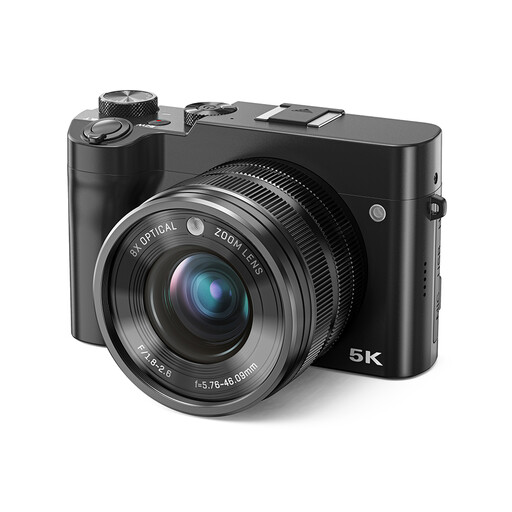
Songdian 5K digital camera with dual lens, black

Songdian 5K digital camera, 64MP, 8X optical zoom, dual lens, black

The listed zoom lens may be useful for overall or detailed shots if you want to adjust the angle of view.

The product title lists 64MP and 8X optical zoom; check the product information and assess test shots for tile colour and finish.

View at Joybuy
Songdian 5K digital camera, black

Songdian 5K digital camera, 56MP, 10X optical zoom, black

The listed zoom may be useful if you want to frame both an overall view and a cropped detail when photographing tiles.

The product title lists 56MP and 10X optical zoom; check these product claims and test whether the images show the tile’s colour and texture as intended.

View at Joybuy
Sony ZV-E10 with 16–50mm zoom lens, black

Sony ZV-E10 + 16–50mm Zoom, black

This kit could suit you if you want to use one lens to choose the angle of view for an overall tile shot or a detail.

The product title lists a 16–50mm zoom lens; check what’s included in the kit and take test shots in the light you’ll use to photograph the tiles.

View at Joybuy
Sony Alpha A6100 with 16–50mm f/3.5–5.6 OSS II lens

Sony Alpha A6100 + 16–50mm f/3.5–5.6 OSS II

This kit is worth considering if you want to adjust the framing with a zoom lens for overall and detailed shots.

The product title lists a 16–50mm f/3.5–5.6 OSS II lens; check the exact kit contents and test the colour reproduction in your window light.

View at Joybuy

Frequently asked questions

Should I buy a mirrorless camera straight away?

No, first test your existing smartphone with the tile, shooting angle and lighting you plan to use. Adobe lists a smartphone as an option for product photography; judge for yourself whether the results have enough detail and reproduce colours suitably.

How can I keep pale tiles looking more neutral in window light?

Use a neutral reference in the same light and set the white balance accordingly. Adobe explains that RAW images give you scope to adjust white balance later; also make sure other artificial light doesn’t change the colour impression.

Does a polarising filter always help with glossy glaze?

No, not if you want to show the shine. Nikon explains that a polarising filter can reduce unwanted reflections and affect the visible colour saturation. Compare test shots before using one to present the finish.

What warranty applies when buying a camera in the Netherlands?

When you buy as a consumer, you’re entitled to expect a product that works properly, and the retailer is your point of contact if it develops a fault. According to the Dutch government, there is no fixed statutory warranty period in the Netherlands; a manufacturer’s warranty is in addition to your statutory rights.

Can I return a camera bought online?

For distance purchases from a business, you generally have 14 days to change your mind, according to the Dutch government. Check whether this applies to your transaction; according to the Dutch government, an online purchase from a private seller is not classed as a distance purchase in this sense.
