For overview shots, a standard zoom lens may be enough. For engravings and signs of wear, choose based on the magnification and working distance of the exact lens. A dark background also calls for adjustable lighting and a stable set-up. Focus bracketing or focus stacking can help if a single close-up doesn’t provide enough depth of field. Check what’s included with the camera: the specifications of a separate macro lens don’t automatically apply to a standard kit lens.
Who is this camera guide for?
Key detail photographer
You want to capture engravings, teeth or signs of wear in close-up. Compare the magnification and the clearance in front of the exact lens, not just the camera body. Canon and Nikon publish these lens specifications for their respective models.
Photographer of products against dark backgrounds
You want to show the shape and texture of the metal on complete keys against a dark background. A stable set-up and control over the lighting are important considerations; Canon recommends using a tripod to keep your composition consistent.
Photographer with a simple set-up
You want to photograph a key quickly without changing lenses, but also need to check that the close-up mode leaves room for your lighting and the composition you want. The OM SYSTEM TG-7 manual describes shooting from 1 cm away in Microscope mode.
What should you look for when choosing?
Start with the framing you want: a shot of the whole key calls for something different from a full-frame engraving. Then compare the working distance, the space available for lighting and the lens that actually comes with the kit.
| What to consider |
What should you check? |
Who is more likely to prioritise this? |
| Magnification and working distance |
Compare the maximum magnification of the exact lens and the clear space in front of it. Canon specifies a maximum magnification of 0.26× at 45 mm with manual focus for the RF-S 18-45mm; Nikon specifies 1:1 for the separate Z MC 50mm f/2.8. |
I want engravings and signs of wear to fill the frame, so I look at both magnification and the space in front of the lens. Around 29% of consumers prioritise close-up magnification when buying. |
| Lighting and background |
Check whether you can adjust the light and position it near the key at your chosen working distance. Take test shots with the background you plan to use; Canon recommends a tripod to keep your composition consistent. |
If I want the metal key to stand out clearly against a dark background, I need to be able to assess the lighting separately. Around 29% of consumers prioritise control over the lighting. |
| Keeping the whole key in focus |
Check whether the exact camera model supports focus bracketing or focus stacking, and whether the technique works with your lens. Nikon describes focus stacking using shots taken at different focus points. |
With a key that has a raised design, I want several parts to appear sharp, so I look at the focus options available. Around 24% of consumers prioritise depth of field when buying. |
| Complete kit and lens choice |
Check which lens is included with the kit and whether it suits your close-ups. The Canon EOS R50 kit includes the RF-S 18-45mm; the separate RF 35mm Macro is a different lens. |
I want to know in advance whether I can get started with the included lens or need to choose another one. Around 18% of consumers prioritise the convenience of a complete kit. |
Common buying mistakes
-
Assuming a separate macro lens’s magnification applies to a kit lens
The Canon EOS R50 kit includes the RF-S 18-45mm. The magnification specification for Canon’s separate RF 35mm Macro does not apply to that kit lens.
Compare the full kit contents with the specifications of the exact lens you’ll receive.
-
Looking only at the focusing distance
Focusing distance and working distance are not the same. Sony lists a minimum focusing distance of 9.5 cm and a minimum working distance of 2.4 cm for the E 30mm F3.5 Macro.
Check how much space there is in front of the lens and whether you can still position lighting near the key.
-
Assuming a dark background solves the lighting problem
A dark background won’t automatically give you controlled lighting on the metal key. Canon and Adobe treat lighting and the background as separate considerations for product photography.
Take test shots with the key, background and lighting you plan to use.
Camera brands to consider
Canon
A mirrorless camera system with a standard zoom lens for overview shots, giving you the option to choose a different RF lens later.
- Canon specifies a maximum magnification of 0.26× at 45 mm with manual focus for the RF-S 18-45mm.
- The kit zoom is not the same lens as the separate RF 35mm Macro; check which lens comes with your chosen kit.
Nikon
A Z system that lets you choose a compatible macro lens separately.
- Nikon specifies 1:1 magnification for the Z MC 50mm f/2.8, with around 5 cm of clearance from the front of the lens at the closest focusing distance.
- These lens specifications don’t mean the lens is included with a Z50II kit; check the contents of the kit you choose.
OM SYSTEM
The TG-7 is a compact camera with a fixed lens and a close-up mode for anyone who doesn’t want to change lenses.
- The OM SYSTEM manual describes shooting from 1 cm away and focus bracketing in Microscope mode.
- When shooting from very close range, there may be little room to position lighting around a reflective key.
Sony
APS-C cameras with an E-mount, for which you can choose a compatible macro lens separately.
- Sony specifies 1:1 magnification for the E 30mm F3.5 Macro.
- Sony lists a minimum working distance of 2.4 cm in front of the lens; allow for the space you’ll need for lighting.
Cameras at Joybuy
Explore these Joybuy cameras for photography and video. For each version, check whether the included lens—or the lens you still need to buy—is suitable for the close-ups you want of key engravings.
 Image unavailable
DJI Osmo Pocket 4 Standard Combo
The product name describes this model as a pocket gimbal camera for photography and video. Check whether it suits the still images of keys you want to take.
The product name lists a 1″ CMOS sensor, 2× zoom, 3-axis stabilisation, 107 GB of built-in storage and a 2-inch rotating screen.
View on Joybuy
 Image unavailable
Sony ZV-E10 with 16–50mm zoom lens, black
According to the product name, this kit includes a zoom lens. Check the close-up capabilities of the exact lens before choosing it for engravings.
The product name lists a 16–50mm zoom lens.
View on Joybuy
 Image unavailable
Sony ZV-E10, body only
This version is for you if you want to choose a suitable lens yourself. The product name says ‘Body Only’, so no lens is included.
View on Joybuy
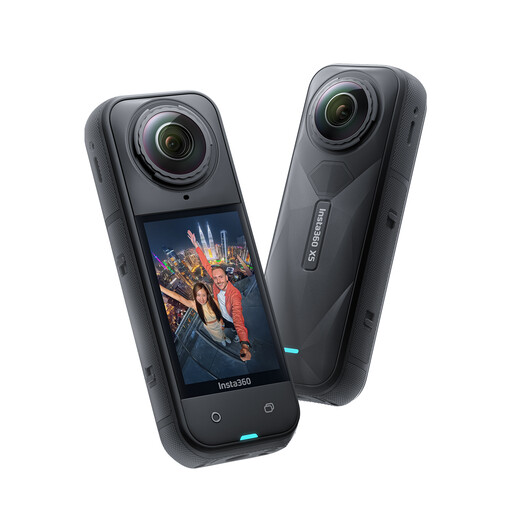 Image unavailable
Insta360 X5
The product name describes this model as a 360° action camera. Check whether its shooting format suits the standard product photos you want to take of keys.
The product name lists a waterproof design, 8K 360° video and a replaceable lens.
View on Joybuy
 Image unavailable
Sony Alpha A6100 with 16–50mm f/3.5–5.6 OSS II
This kit is sold with a zoom lens; check whether the exact lens is suitable for the distance and magnification you want for key details.
The product name lists a 16–50mm f/3.5–5.6 OSS II lens.
View on Joybuy
Frequently asked questions
Do you need a true 1:1 macro lens to photograph the whole key?
Not necessarily: first decide how large you want the key to appear in the frame. For small engravings, the magnification of the exact lens matters more. Canon lists a maximum magnification of 0.26× at 45 mm with manual focus for the RF-S 18-45mm kit lens reviewed here, while Nikon specifies 1:1 for the separate Z MC 50mm f/2.8.
How do you photograph old keys against a dark background?
Start with a stable set-up and a consistent composition, then use test shots to assess the lighting on both the key and the background. Canon recommends a tripod to keep your composition consistent; Adobe’s product photography guide recommends controlled lighting and a clean background as starting points.
What can you do if the whole key isn’t in focus?
You could take several shots at different focus points, if your camera and workflow support it. Nikon describes combining these shots as focus stacking; the OM SYSTEM TG-7 manual lists focus bracketing in Microscope mode. Check the features of the exact model.


