
Creator with colour-sensitive covers
You want the paper to look white and cover colours to remain true to life, so you pay attention to even lighting and adjustable white balance, as recommended by Nikon Netherlands.


Don’t rush out to buy a new camera: Canon Netherlands explains how a tripod can keep your framing and background consistent, while Nikon Netherlands recommends consistent lighting and a preset white balance for similar colours. Use your current camera if it can capture the entire notebook in sharp focus. If you take lots of full-page shots, consider a mirrorless camera with a suitable standard zoom, or compare cameras with a close-focusing setting for small details. Always check the exact lens and working distance.
You want the paper to look white and cover colours to remain true to life, so you pay attention to even lighting and adjustable white balance, as recommended by Nikon Netherlands.
You regularly photograph entire notebooks on the same white background and want to keep the framing consistent. Canon Netherlands explains how a tripod can help keep the framing and background consistent between shots.
You want to show details such as the binding or paper texture on their own, so you check the close-focusing capability of the exact camera-and-lens combination. OM SYSTEM and OM Digital Solutions list close-up photography as a feature of the TG-7.
Choose this if: your current camera can capture the entire notebook in sharp focus and you can set the colour accurately under consistent lighting.
Trade-off: a better setup won’t automatically overcome limited close-focusing capability or a lack of the shooting controls you want.
Choose this if: you often take full-page shots with varying framing and want the option to choose a different lens later.
Trade-off: the standard zoom supplied in the kit won’t necessarily capture every small detail so that it fills the frame.
Choose this if: you mainly want to photograph small details and would rather not change lenses. The OM SYSTEM TG-7 is one option to compare.
Trade-off: a manufacturer’s claim that a camera can focus from 1 cm doesn’t prove that you’ll be able to frame an entire notebook well in the space you have available.
| Consideration | What should you check? | Which consumers is this relevant to? |
|---|---|---|
| True-to-life colours | Adjustable white balance and even lighting throughout the series. | I want the paper to look white and the cover colour to remain true to life, so I pay attention to lighting and white balance. Around 31% of consumers prioritise colour reproduction. |
| Consistent full-page shots | Whether the entire notebook fits in the frame from the available distance and the camera can be kept steady. | If I photograph lots of notebooks from above, I want to keep the framing and background consistent. Around 31% of consumers prioritise consistent full-page shots. |
| Binding and paper details | The close-focusing capability of the exact camera-and-lens combination and the space in front of the subject. | For a photo of the binding or paper texture, I want to capture the detail clearly, so I check the close-focusing capability of the exact combination. Around 23% of consumers prioritise details like these. |
| Investment and what’s included | Which lens is included and whether your current camera will do the job with a stable setup. | I want to know what comes with the camera and whether my current one is suitable before buying a new one. Around 15% of consumers prioritise what’s included and the total investment. |
A tripod can help keep the background and framing consistent, while the lighting you use can also affect white balance.
First, test your current camera with a stable setup and consistent lighting.
Mirrorless camera kits may include a standard zoom, while a compact camera may have different close-focusing capabilities. The exact combination determines which option is right for your detailed shots.
For the smallest detail you want to photograph, check the focusing capabilities of the specific camera and lens.
If the supplied lens isn’t suitable for your detailed shots, you may need a different lens or camera solution.
The statutory cooling-off period for consumers doesn’t automatically apply to business purchases. Ondernemersplein and ACM ConsuWijzer explain that the circumstances of the purchase may be relevant.
Before ordering, check whether you’re buying as a private individual or for business, and which terms apply to that specific purchase.
The EOS R50 with RF-S 18-45mm kit lens is a mirrorless camera kit worth comparing for full-page shots and varying framing.
The Z50II with NIKKOR Z DX 16-50mm VR is a standard zoom kit worth comparing for full-page shots.
The α6400 is an E-mount mirrorless camera worth comparing if lens choice and RAW shooting matter to you.
The Tough TG-7 is a compact alternative worth comparing for close-ups without changing lenses.
The following Joybuy products are described as digital cameras for photography. Compare the listed features with your setup and check whether the focusing distance is suitable for both full-page shots and small details.
 Image unavailable
The title lists 12× optical zoom, 4K video, Wi-Fi and 64 MP. Also check whether the camera can focus closely enough to capture your details.
 Image unavailable
The title lists a 1-inch CMOS sensor, 4K/120fps video, 3-axis stabilisation and an included microphone. Check whether the camera setup is suitable for still overhead shots.
 Image unavailable
The title lists a 1-inch CMOS sensor, 4K/120fps video, 3-axis stabilisation and a 2-inch rotating touchscreen. Assess separately whether the camera is suitable for your fixed product photography setup.
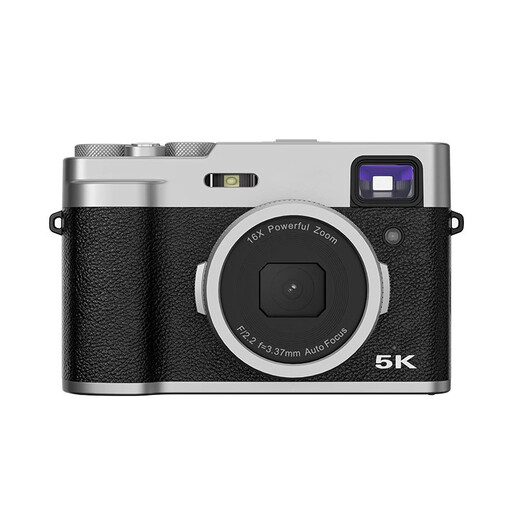 Image unavailable
The title lists autofocus, a 2.8-inch LCD screen and an optical viewfinder. Check whether the camera can frame the entire notebook from the distance you have available.
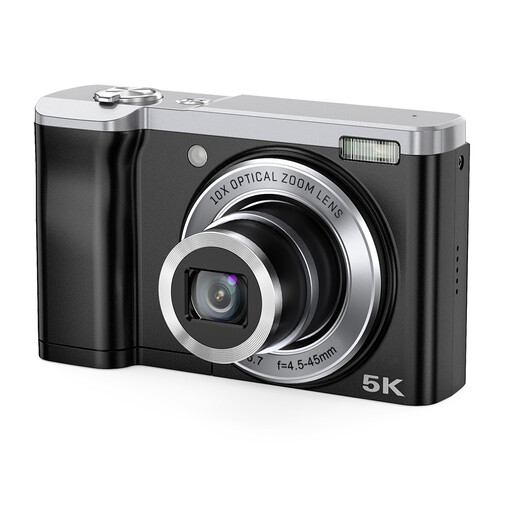 Image unavailable
The title lists 10× optical zoom and front and rear cameras. Check the close-focusing capability before choosing it for small book details.
Keep the lighting as consistent as possible and set the white balance to suit it. If you’re photographing an unusually bright white scene, also check the exposure compensation and take a test shot before photographing a whole series.
A stable mount can help keep the framing and background consistent between shots, as Canon Netherlands explains. Also check whether the lens can capture the entire notebook from the height available.
For an online purchase made by a consumer in the Netherlands, a statutory 14-day cooling-off period after delivery generally applies. ACM ConsuWijzer also explains your right to receive a product that meets what you could reasonably expect. The consumer cooling-off period doesn’t automatically apply to a business purchase, although a business buyer may still be entitled to consumer protection in certain circumstances.
Not without permission: according to the Dutch government, you may only use other people’s copyright-protected photos with the creator’s permission. Take your own product photos or arrange the necessary permission in advance.