
Occasional scarf seller
You want to take a clear overall photo and detailed close-ups without buying a camera you don’t need. First, see what your current phone can capture in daylight.


You don’t need a separate camera to get started. Use your smartphone if it can clearly capture the whole scarf, the knitting and any flaws in daylight. A compact camera could suit you if you want a dedicated device without changing lenses; consider a system camera if you take photos more often and want to choose the lens and focus settings yourself. Check colour and close-ups using your own scarf, and bear in mind the extra cost and any file-transfer steps.
You want to take a clear overall photo and detailed close-ups without buying a camera you don’t need. First, see what your current phone can capture in daylight.
You photograph scarves regularly and want consistent framing, visible stitches and a reliable process. A fixed set-up and greater control over the camera could work well for you.
You want the yarn colour and condition in the photo to match the scarf. Compare shots taken in even daylight, and pay attention to white balance and filters.
Choose this option: if you sell scarves occasionally and your phone can take a sharp overall photo and clear detail shots.
Bear in mind: colour and stitches can look different depending on the phone, lighting and scarf, so check the results for yourself.
Choose this option: if you want a dedicated device without having to change lenses.
Bear in mind: use sample photos to check in advance whether the fixed lens shows the knitting details clearly enough from your preferred distance.
Choose this option: if you take photos regularly and want to choose the focus, composition and lens yourself.
Bear in mind: the supplied lens affects how large a stitch appears in the frame; buying a different lens may mean an extra expense.
| What to consider | What to look for when buying | Who is this important to? |
|---|---|---|
| Colour and condition | Compare the photo with the scarf in the same daylight; check whether you can adjust the white balance and avoid filters. | I want the colour and any signs of wear to match the scarf itself. Around 31% of consumers say colour and condition are their main concern. |
| Stitches and small details | Take test shots of the knitting, a label and any damage; with a system camera, check the magnification of the supplied lens. | If I want to show stitches or small flaws clearly, I need to know whether my chosen set-up will capture those details sharply. Around 25% of consumers prioritise knitting detail. |
| A repeatable process | Try the full process, from setting up and taking photos to transferring them to your phone; a tripod can help you keep the framing consistent. | When photographing several scarves in a row, I want to take and upload my photos quickly and consistently. Around 25% of consumers also prioritise this process. |
| Your complete photo set-up | Check which lens is included and whether you need another accessory for your planned framing; try your current phone first. | I don’t want to buy a camera or lens that I don’t need for my photos. Around 19% of consumers make avoiding unnecessary spending their top priority. |
A good listing photo needs to show the whole scarf, its true colour and the details clearly. A separate camera doesn’t guarantee this.
Before buying anything, take a photo with your current phone in daylight and check the overall view, colour and knitting.
A separate camera could be an unnecessary expense and take extra time to transfer photos.
With a system camera, the lens actually supplied affects how large a stitch appears in the frame. According to Canon, the Canon RF-S 18-45mm lens has a maximum magnification of 0.16× at 45 mm with autofocus and 0.26× with manual focus; these figures don’t apply to every lens.
Check the full body and lens description, then take a test shot of the detail you want to capture with that combination.
If the supplied lens can’t capture the close-up you want, you may need to buy a suitable lens separately.
An edited colour or wear that hasn’t been shown could give an inaccurate impression of the scarf.
Take photos in daylight without filters, compare the image with the actual scarf and photograph any visible wear or damage separately.
The EOS R50 with an RF-S 18-45mm kit lens is worth looking into if you want an interchangeable lens and manual focus.
The Z50II with a NIKKOR Z DX 16-50mm kit lens is a system camera option to compare if you want to use a consistent photo set-up.
The ZV-1 II is a compact camera with a fixed lens for anyone who wants to transfer photos to a phone without changing lenses.
This selection includes compact cameras and system cameras with a specified lens for photographing scarves. Check with your own scarf whether your chosen model captures the colour and details you want.
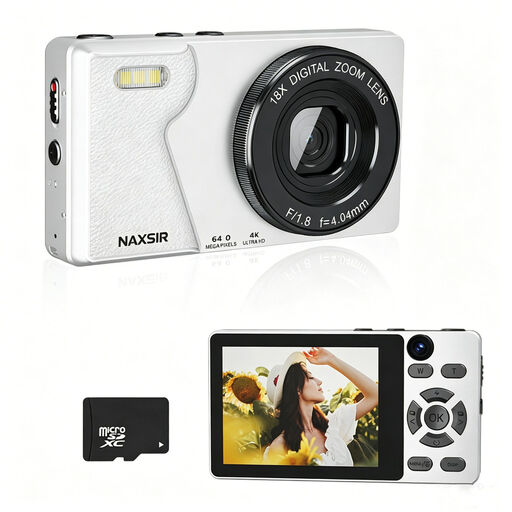 Image unavailable
Could suit you if you’re looking for a dedicated device with autofocus; check with your scarf whether the stitches you want to show appear sharp and large enough in the frame.
The product title specifies 4K Ultra HD, 64 MP photo resolution and 18× digital zoom. The product description mentions autofocus and an included 32 GB memory card.
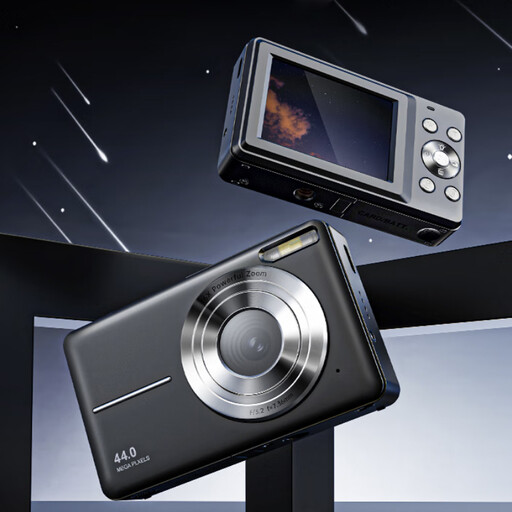 Image unavailable
Could suit you if you’re looking for a pocket camera with autofocus; take a test shot to check that the knitting and any flaws are clearly visible.
The product information specifies 44 MP photo resolution, autofocus and 16× digital zoom. A removable memory card is needed to save photos.
 Image unavailable
Could suit you if you want a system camera with a zoom lens; check whether the supplied combination lets you take the close-ups you want.
The product information specifies a 24.2 MP APS-C sensor, autofocus and an E PZ 16-50mm lens. Wi-Fi is listed for file transfer. According to the product information, an SD memory card and adapter/charger are not included.
 Image unavailable
Could suit you if you want a system camera with a specified zoom lens; use test shots to see whether the lens gives you the framing you want.
The product information specifies a 24.2 MP APS-C sensor, autofocus and a 16-50mm lens. Wi-Fi and Bluetooth are listed for sharing and camera control.
 Image unavailable
Could suit you if you’re looking for a dedicated compact camera; check whether this model clearly captures the knitting details you want to show.
The product information specifies a 20 MP photo resolution, 2.7× optical zoom and a tilting screen.
Start with a photo showing the whole scarf, then add shots of the knitting, any label and visible flaws. Take photos in daylight and don’t use filters if you want the colour to look as true to life as possible.
Lay or hang the scarf against a plain background, then check the lighting and framing. If you’re photographing several items in a row, a tripod can help you keep the framing consistent; check that the relevant stitches are in focus in every shot.
Check which lens is included with the version you’re considering, then use it to take an overall photo and a close-up. The Nikon Z50II kit described by Nikon includes a 16-50mm lens; with the Canon RF-S 18-45mm lens, maximum magnification depends in part on the focus setting. You only need a different lens if the one supplied can’t achieve the framing you want.
In the Netherlands, online purchases from a business often come with a 14-day cooling-off period; the Dutch Government lists some exceptions and distinguishes these from online purchases from private sellers. If there’s a fault, contact the seller. The Dutch Government states that there is no fixed statutory guarantee period that applies to all products.