What should you look for when choosing?
Existing smartphone or compact camera
Best for: occasionally photographing a complete invitation in a fixed setup with plenty of light.
Bear in mind: a compact camera has a fixed lens, so check that it can focus at the required distance for small details.
Mirrorless camera with a standard or kit lens
Best for: regularly photographing complete cards and different compositions, with control over settings such as exposure or white balance.
Bear in mind: a camera body without a lens isn’t a complete kit, and a kit lens isn’t automatically suitable for frame-filling close-ups.
Mirrorless camera with a close-up or macro lens
Best for: regularly capturing small typography, paper texture or finishing up close.
Bear in mind: check whether the lens is included in the set. Being able to focus up close doesn’t automatically mean the whole card will be sharp from edge to edge.
First check whether lighting and a steady camera position will give you the shot you want. Then decide which camera feature or lens, if any, you still need.
| Consideration |
What should you check? |
Who is this important for? |
| Legible text and exposure |
Check the exposure of both the card and the dark background in a test shot, and see whether you can adjust the exposure. |
With a dark background, I want the text and light-coloured paper to remain legible. Around 33% of consumers prioritise readability and controlled exposure. |
| Colour and reflections |
Compare the photo with the invitation under the same lighting and check whether you can adjust the white balance. Move the light source if there’s distracting glare. |
If I want to show the colour and finish of the printed design, I look out for colour casts and reflections. Around 27% of consumers prioritise these points. |
| Small print details |
Compare the minimum focusing distance and maximum magnification of the exact lens, and check the lens mount too. |
Lens choice matters if you want to show small lettering or paper texture up close. Around 20% of consumers prioritise close-ups of print details. |
| Simplicity and a complete kit |
First test your existing camera in a fixed setup. If you’re buying a mirrorless camera, check which lens is actually included. |
If I only photograph a complete card occasionally, I want to know whether my current camera will do the job and what’s included in the kit. Around 20% of consumers prioritise simplicity and a complete setup. |
Joybuy products
This product selection features DJI Osmo Action and Pocket cameras, including bundles with Ulanzi LED lighting. The bundle names and listed features describe the products; they don’t provide a specific guarantee that they’re suitable for photographing printed invitations.
 No image available
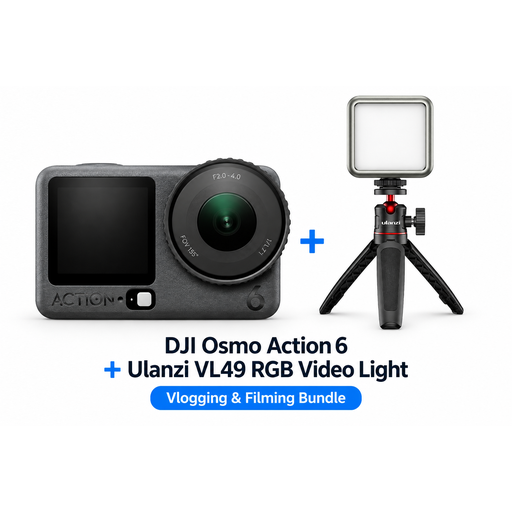
DJI Osmo Action 6 Standard Combo + Ulanzi VL49 RGB LED light
The bundle includes a Ulanzi VL49 RGB LED light for additional lighting when taking product photos.
Joybuy
 No image available
DJI Osmo Pocket 4 Standard Combo + Ulanzi VL81 LED light
This bundle includes a Ulanzi VL81 LED light with an adjustable colour temperature range of 3200 K to 5500 K.
Joybuy
 No image available
DJI Osmo Pocket 3 Creator Combo + Ulanzi VL49 RGB LED light
The product name lists a Ulanzi VL49 RGB LED light as part of this bundle for additional lighting.
Joybuy
No image available
DJI Osmo Pocket 3 + Ulanzi VL49 RGB LED light
This version includes a Ulanzi VL49 RGB LED light for additional lighting when taking product photos.
Joybuy
 No image available
DJI Osmo Pocket 4 Standard Combo
The product title lists a 1″ CMOS sensor, 4K/240fps video and 107 GB of built-in storage.
Joybuy
Frequently asked questions
Do you need a camera that performs well in low light for a dark background?
No, not necessarily: a dark background doesn’t mean you have to photograph the invitation in low light. First, light the card properly and check the result. Canon Netherlands explains that a scene with lots of dark tones can affect automatic exposure.
How can you keep a series of invitations framed consistently?
Set up the camera securely and keep its position the same for each shot. Canon Netherlands describes a tripod as a useful way to create product photos with a consistent composition.
When do you need a macro lens?
You don’t automatically need a macro lens to photograph a complete card. If you regularly want to capture small lettering or paper texture so it fills the frame, compare the minimum focusing distance and magnification of the specific lens. These features depend on the lens.
What should you check when buying a camera online in the Netherlands?
Check which lens is included with the version you’ve chosen and whether the kit is complete for your needs. According to the Dutch Government, online purchases from a business are generally covered by a 14-day cooling-off period in many cases. The Netherlands has no fixed statutory warranty period; if a product is faulty, you can contact the seller.
Can you post an invitation showing names or addresses publicly online?
That depends on the personal information shown, as well as the purpose and reach of the post. The Dutch Data Protection Authority explains that organisations need a legal basis to process personal data. Under limited conditions, an exception applies to purely personal or household use. For a public example photo, it’s better to use a card without other people’s personal information, or first check which legal basis applies.


