Who is this for?

Patch maker taking lots of product photos

You want to photograph patches consistently, with similar framing, backgrounds and thread colours. Canon Europe explains how a tripod can help keep framing and backgrounds consistent. Controlling the light also matters for colour reproduction.

Maker showcasing stitching details

You want to show stitches or small sections enlarged. So pay attention to the focusing distance, magnification and depth of field of the setup. Canon Netherlands discusses the limited depth of field in macro photography; Nikon Netherlands specifies 1:1 magnification for the NIKKOR Z MC 50mm f/2.8.

Maker who wants to keep things simple

You want to take close-ups without changing lenses, and are comparing a built-in close-up mode with a mirrorless camera and a separate macro lens. The OM SYSTEM manual describes close-up shooting and focus stacking on the TG-7.

What should you look for when choosing?

Compact camera with close-up mode

Best for: anyone who wants to photograph patches and stitching details without separate lenses. According to the OM SYSTEM manual, the TG-7 can photograph subjects from as close as 1 cm and use focus stacking.

Bear in mind: check that the short working distance leaves enough room for lighting and a useful composition.

Mirrorless camera with a macro lens

Best for: anyone who wants to choose a suitable lens. Canon supports RF lenses on the EOS R50; Nikon specifies 1:1 magnification for the NIKKOR Z MC 50mm f/2.8.

Bear in mind: the macro lens is a separate choice, so check whether it’s actually included in the offer.

Try your current camera first

Best for: anyone who already has a camera that can capture their smallest patches in focus. Start with a stable setup, a consistent background and controlled white balance.

Bear in mind: this won’t solve the problem if your current lens has too long a minimum focusing distance or doesn’t offer enough magnification.

What to consider What should you check? Who is this important for?
Capturing small stitches in focus Check the minimum focusing distance and magnification of the exact lens or close-up mode. Canon Netherlands points out that depth of field is usually limited in macro photography. If I want stitches to fill the frame, I need to know whether the lens can focus at my working distance. Around 33% of consumers say capturing small details is their main concern when buying.
Consistent presentation Check whether you can position the camera securely and frame the whole patch from the distance you need. Canon Europe explains how a tripod can help keep framing and backgrounds consistent. If I’m photographing a collection, I want to keep the framing and background consistent between shots. Around 25% of consumers prioritise a repeatable presentation.
Reproducing thread colours Take test shots in the lighting you plan to use and check the white balance. Canon Europe explains how white balance and changing lighting conditions affect colour reproduction. If I want to capture recognisable thread colours, I need to minimise differences caused by changing light from a window. Around 25% of consumers prioritise colour reproduction.
Simple equipment Check the exact lens name and what’s in the box. The OM SYSTEM manual describes a built-in close-up option on the TG-7; the Canon EOS R50 kit mentioned includes different lenses from the RF 35mm F1.8 MACRO IS STM. If I’d rather not change lenses, I need to know whether the camera can meet my close-up needs without a separate macro lens. Around 17% of consumers prioritise ease of use and purchase.

Common buying mistakes

  • Assuming the camera body determines close-up capability

    Minimum focusing distance and magnification depend on the lens you use or the camera’s built-in mode. A macro lens mentioned in a listing isn’t automatically included with the camera.

    Before you buy, check the lens name, compatibility, magnification and exact box contents.

  • Assuming closer always means sharper

    If you get closer than the lens’s minimum focusing distance, the camera won’t be able to focus on the patch.

    Take a test shot at the distance your table, window and patch setup allow.

  • Buying a camera to fix inconsistent colour or framing

    Changing light affects colour reproduction, while a consistent setup can help keep framing and backgrounds the same.

    If your current camera can already focus close enough, first try positioning it securely and using consistent lighting.

Camera brands to consider

OM SYSTEM

The Tough TG-7 offers a compact option for anyone who wants to take close-ups without choosing a separate lens.

  • The manual describes close-up photography from as near as 1 cm and a feature that combines images taken at different focus points.
  • These features don’t guarantee better colour or detail when photographing patches in window light. Check that the working distance suits your setup.

Canon

The EOS R50 supports RF lenses. One option available for this mirrorless camera is the RF 35mm F1.8 MACRO IS STM, sold separately.

  • Canon Netherlands specifies RF lens support for the EOS R50 and describes the RF 35mm F1.8 MACRO IS STM as a macro lens.
  • The EOS R50 kit mentioned doesn’t include the RF 35mm macro lens. Consider the camera body and the lens you actually choose together.

Nikon

The Z50II with Z mount can be paired with a separately chosen macro lens, such as the NIKKOR Z MC 50mm f/2.8.

  • Nikon Netherlands specifies 1:1 macro magnification for the NIKKOR Z MC 50mm f/2.8.
  • The Z50II isn’t a 1:1 macro camera on its own; the relevant lens needs to be part of your setup.

Cameras at Joybuy

Joybuy camera options relevant to this topic. Check whether each model’s focusing distance is suitable for your patches.

Songdian 4K 44MP pocket camera, 16X zoom, pink

Songdian 4K 44MP pocket camera, 16X zoom – pink

Check that the camera can focus at the distance you need to photograph your smallest stitches.

The product name lists 4K, 44MP and 16X digital zoom. These specifications alone don’t tell you whether the camera can focus suitably for patch close-ups.

View at Joybuy
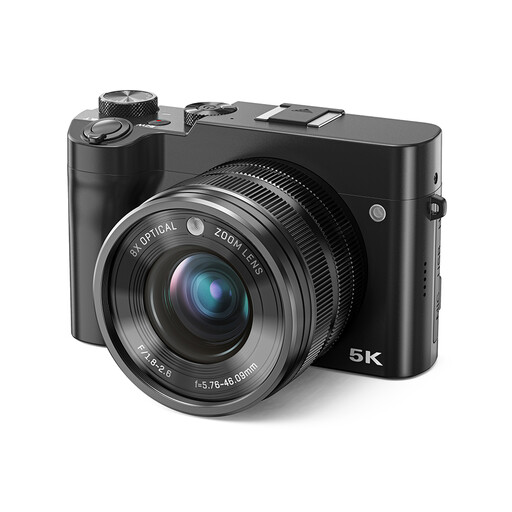
Songdian 5K 64MP digital camera, 8X optical zoom, dual lens, black

Songdian 5K 64MP digital camera, 8X optical zoom, dual lens – black

Check that the camera can focus at the distance you need to photograph your smallest stitches.

The product name lists 5K, 64MP, 8X optical zoom and a dual lens. These specifications don’t tell you whether the close-up distance suits your setup.

View at Joybuy
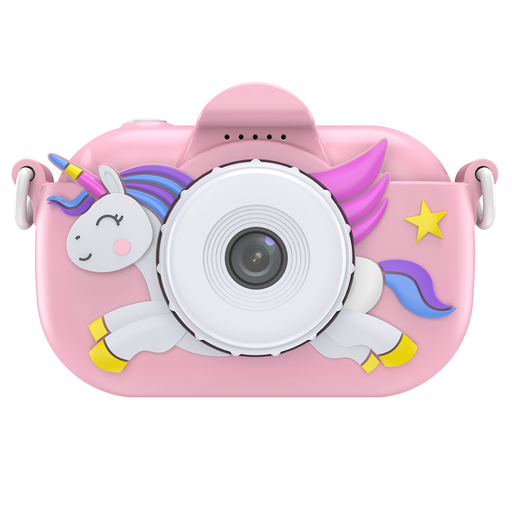
Songdian children’s camera with cartoon soft cover, pink

Songdian children’s camera with cartoon soft cover – pink

Check that the camera can focus at the distance you need to photograph your smallest stitches.

The product name identifies this model as a children’s camera with a cartoon soft cover. Check that its controls and focusing capabilities suit the way you plan to use it.

View at Joybuy

Frequently asked questions

Why is only part of my embroidered patch in focus?

Close-ups usually have a limited depth of field. Check your focus and compare test shots taken with different aperture settings. If one shot isn’t enough, a feature that combines multiple focus points may help. The OM SYSTEM manual describes this feature for the TG-7.

How can I stop window light changing the thread colours?

Photograph the patch in lighting that’s as consistent as possible, and check the white balance. Take a test shot of the thread you want to capture, as lighting conditions can affect both colour reproduction and shadows.

Does a Canon EOS R50 kit come with the RF 35mm macro lens as standard?

No. The EOS R50 kit described by Canon Netherlands lists an RF-S 18-45mm lens and an RF 75-300mm lens, not the RF 35mm F1.8 MACRO IS STM. Always check which lenses are actually included with each offer.

Do I have a cooling-off period when buying a camera online?

According to the official EU consumer information, you can generally withdraw from a distance contract within 14 days without giving a reason. Before buying, check the applicable terms and any exceptions for the specific order.

What can I do if a camera bought in the Netherlands doesn’t work properly?

According to the Dutch government, you’re entitled to a product that works properly when you buy it, and the seller must provide a solution if there’s a problem. A manufacturer’s guarantee is in addition to your statutory rights, not a replacement for them.
