
Compact holiday album maker
Wants to print individual photos for an album without leaving an A4 printer on the desk. Canon Nederland specifies 100 × 148 mm paper for the SELPHY CP1500.


Start by choosing your print size: a compact photo printer for postcard-sized prints is different from a pocket printer for small stickers or instant photos. If you also want to print A4 photos or documents, compare an inkjet model and consider how much room you’ll need for the printer and paper feed.
Wants to print individual photos for an album without leaving an A4 printer on the desk. Canon Nederland specifies 100 × 148 mm paper for the SELPHY CP1500.
Wants a printer that’s easy to put away and can make small photos or stickers from a phone. Canon lists 5 × 7.6 cm sticky-backed prints for the Zoemini 2.
Wants to print holiday photos and everyday documents with one device, and has room for a larger printer. Epson describes the EcoTank ET-8500 as a printer with scanning and copying functions.
Choose this option: if you mainly want to print individual photos around postcard size.
Bear in mind: the space needed for the paper cassette and paper path while printing.
Choose this option: if a small size and easy storage matter more than a larger album photo.
Bear in mind: the smaller print size and compatibility with your phone and app.
Choose this option: if you want to print, scan or copy A4 documents as well as photos.
Bear in mind: the space required and how infrequent printing can affect inkjet maintenance.
Choose this option: if you specifically want to share photos printed on instax film.
Bear in mind: the compatible film type and how its size differs from album photo paper sizes.
| What to consider | What to look for | Who should pay more attention? |
|---|---|---|
| Photo size and workspace | Compare your preferred paper size with the space needed for feeding and output during printing. | If I want to make album photos, the size needs to be right and the printer needs to fit on my desk. Around 40% of consumers prioritise size and workspace. |
| Storage and phone operation | Check phone and app compatibility, connectivity, and the size of the correct paper or film. | If I want to put the printer away after use and mainly make small prints from my phone, I look at how it works and the print size. Around 20% of consumers prioritise storage and mobile printing. |
| Consumables and usage | Check which paper, film or ink is compatible with the model and match it to the number of prints you expect to make. | If I don’t print often, I want to know which consumables my chosen model needs and whether they suit the way I’ll use it. Around 20% of consumers focus mainly on consumables and printing frequency. |
| A4 and extra features | Check support for A4 and documents, any scanning or copying functions, and the space needed for paper trays. | If I want one device for documents and larger photos too, I check whether I need A4 and the extra features. Around 20% of consumers prioritise A4 and document use. |
A paper cassette or paper path can take up extra room while printing. The stated printer dimensions don’t necessarily show how much space the full setup needs.
Measure the space available and check how the printer sits with paper loaded.
A 5 × 7.6 cm Canon Zoemini 2 print is much smaller than the 100 × 148 mm postcard size Canon specifies for the SELPHY CP1500.
First decide what size you want your photos to be, then compare it with the supported paper size.
Consumables vary between printers. If you use an inkjet printer infrequently, ink may be needed for cleaning cycles; the Consumentenbond highlights this as a general consideration for inkjet printers.
Compare the compatible paper, ink or film with how often you expect to print, and bear the specific size in mind.
Polaroid distinguishes between a standalone Hi·Print printer without a cartridge and a starter set.
Check what’s included in the version you choose and which type of cartridge it takes.
Canon offers compact models for different print sizes, from small phone prints to postcard-sized photos.
The EcoTank ET-8500 is aimed at people looking for A4 printing and all-in-one home use as well as photo printing.
The instax mini Link 3 is an option if you’re specifically looking for small prints on instax film.
The Hi·Print 4x6 is designed for postcard-sized prints from your phone.
The Joybuy products shown range from portable mini and sticker printers to an A4 inkjet printer. Check that each model’s print size and features suit the photos you want to print.
 No image available
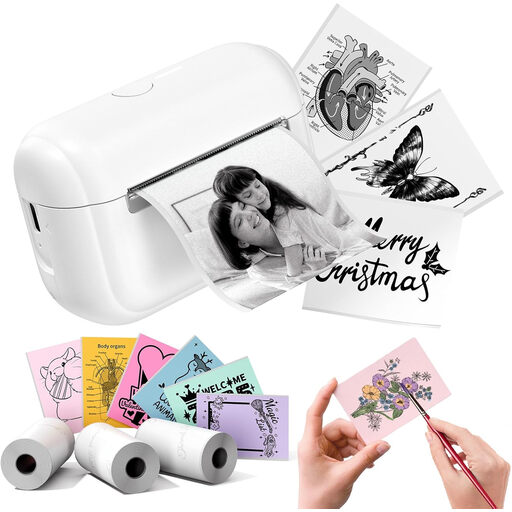
The product title describes a portable printer for photos; the description mentions Bluetooth operation via a smartphone app.
The title lists 10 rolls of thermal paper.
 No image available
The product title mentions printing study notes and stickers.
 No image available
The product title lists travel and home use as possible applications.
 No image available
The product title describes a sticker printer for creative projects.
The title lists 3 label refills.
 No image available
An option if you want to print documents as well as 10 × 15 cm photos, and scan and copy too.
Supports colour printing and paper sizes up to A4; stated print resolution: 4800 × 600 DPI.
The stated dimensions are 42,60 × 30,60 × 14,50 cm. Check that the printer will fit in the space available.
Yes. Check how much space is needed when the paper cassette and paper path are in use. Canon lists dimensions for the SELPHY CP1500, but those measurements alone don’t show whether every tight space will work while printing.
Yes. According to Canon, a compatible iOS or Android device can print over Wi-Fi using the SELPHY Photo Layout app. The printer has a mains adapter; the optional battery isn’t included.
If used infrequently, an inkjet print head can dry out or use ink for cleaning. The Consumentenbond describes this as something to bear in mind with inkjet printers; don’t assume that the stated photo yield will reflect your own usage.
Report a fault to the retailer. According to the Rijksoverheid, the Dutch legal guarantee doesn’t have a fixed term: what matters is what you can reasonably expect from the product. A manufacturer’s warranty doesn’t replace this right.
Milieu Centraal explains that you can hand in an old or broken appliance free of charge at a shop when buying a similar new one. There are also collection points for small appliances; check the conditions at your chosen drop-off point.