
Album photo printer
You want to print individual graduation photos from your phone and don’t need enlargements. Focus on the print size and a compatible paper-and-ink set; Canon and Polaroid describe models for postcard-size prints.


Start by deciding on your preferred print size and how often you expect to print photos. A compact printer may be enough for individual album photos, while framed enlargements call for a printer that supports A4 or A3+. If you print sets of photos regularly, an ink-tank printer is worth comparing, but remember to factor in suitable photo paper and the possibility of extra ink use when the printer is used infrequently. These recommendations are based on uses and specifications, not an independent quality ranking.
You want to print individual graduation photos from your phone and don’t need enlargements. Focus on the print size and a compatible paper-and-ink set; Canon and Polaroid describe models for postcard-size prints.
You want to print larger graduation photos, so first decide whether A4 is big enough or whether you need A3+. Then check the paper support and make sure you have space for the printer and paper feed. Epson lists support for photos up to A3+ for the ET-8550.
You expect to print sets of photos repeatedly and want to look beyond the printer’s price alone: suitable photo paper, ink and possible cleaning-related ink use all count. The Consumers’ Association notes that infrequent use of inkjet printers can lead to extra ink being used for cleaning.
Start by choosing your photo size, then check the features that suit how often you want to print and which device you’ll be printing from.
| What to consider | What should you check? | Who is this important for? |
|---|---|---|
| Individual album photos | Check the supported paper size, how it connects to your phone and which paper-and-ink set or cartridge is compatible with the printer. | If I mainly want individual photos for an album or a gift, a suitable small format and easy printing from my phone matter most. Around 31% of consumers prioritise this. |
| Framed enlargements | Compare your preferred photo size with A4 or A3+ support, and check which paper feeds are supported. Also make sure the crop and source file are suitable for enlarging. | For a portrait on the wall, I want to know in advance whether A4 is big enough or whether I need A3+. Around 31% of consumers put their preferred enlargement size first. |
| Regular photo prints | Compare refill bottles with cartridges, and factor in suitable photo paper and how often you expect to print. According to the Consumers’ Association, an inkjet printer may use extra ink for cleaning if it is used infrequently. | If I print sets of photos more often, I want to take the ongoing cost of ink and paper into account rather than looking only at the printer. Around 23% of consumers prioritise these costs when printing regularly. |
| Photos and other tasks | Check whether the model can also print documents or scan originals, which paper sizes are suitable and whether the connection works with your devices. | If I also want to print documents or scan photos in my hobby room, I look for features that go beyond printing individual photos. Around 15% of consumers prioritise this combination of tasks. |
The compact models in this comparison are designed for postcard prints, while other models support A4 or A3+, depending on the version. A small print size may not suit the portrait you want to frame.
Measure the frame or decide on your preferred print size in advance, then check the supported paper size for the exact model.
For a larger print, you may still need a different printer or an external print service.
Manufacturer estimates for the number of photos are no guarantee of the yield you’ll get. Paper, ink and possible cleaning-related ink use can also add to the cost. The Consumers’ Association highlights extra ink for cleaning as a consideration when inkjet printers are used infrequently.
For the number of prints you expect to make, compare the printer, compatible refills and the photo paper you want to use.
Also remember to choose and replenish paper and ink that are suitable for your preferred size.
Polaroid distinguishes between the standalone Hi·Print 4x6 printer, which comes without a cartridge, and a starter set that includes a cartridge and paper.
Check the exact version and what’s included in the box, not just the model name.
If you choose a version without a cartridge, you’ll need to buy a compatible cartridge or paper-and-ink set separately.
These brands offer different types of photo printers. The features listed apply to the models described and do not, on their own, indicate availability.
The models discussed range from compact SELPHY prints to A4 photo printing with refillable ink tanks.
The models mentioned include an A4 cartridge printer, A4 ink-tank models and an A3+ photo printer.
The Hi·Print 4x6 is designed for postcard-size prints from a smartphone, not A4 enlargements.
This selection includes two inkjet printers for photo and document tasks, and a Polaroid Go camera. The camera is for taking photos; it isn’t a printer for existing graduation photos stored on a phone or computer.
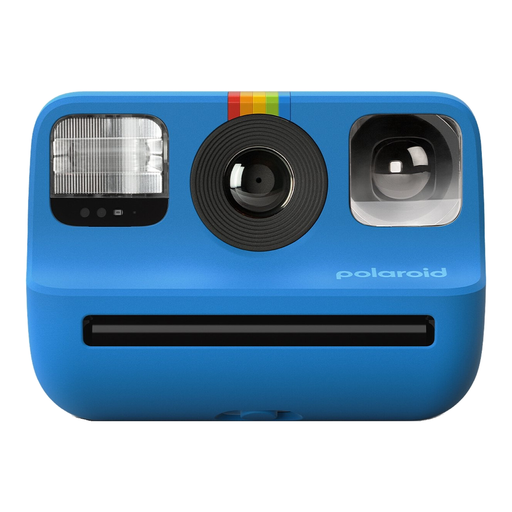 No image available
This model is a camera for taking photos; don’t choose it if you want to print existing graduation photos from a phone or computer.
 No image available
An ink-tank model to consider if you want to print colour photos and other documents regularly.
The product information lists A4 and photo sizes such as 4×6 and 8×10. The model has an ink-tank system and supports scanning, copying and duplex printing.
 No image available
An inkjet printer to consider if you want to print documents as well as photos, or scan originals.
The product information lists support for 10×15 and A4, along with printing, scanning and copying functions.
First, choose your preferred paper size and check the crop in the print settings. For an enlargement, it’s best to use the original photo file. Canon highlights cropping, paper and colour settings as things to check, and warns that shared photos may have been resized or compressed. This manufacturer advice does not guarantee a particular print quality.
With inkjet printers, dried ink can clog the print head, and cleaning it can use ink. Take your expected frequency of use into account when choosing a printer, and follow the maintenance instructions for your chosen model.
Check which cartridges, ink bottles or paper-and-ink sets are compatible with the model, and include the cost of paper for your preferred size. When you buy as a consumer in the Netherlands, you’re entitled to a product that meets reasonable expectations. If there’s a problem, contact the seller about your statutory rights, even if the manufacturer offers its own warranty.
Yes. According to the Dutch government, the old-for-new scheme applies to individuals buying a similar electrical appliance, including online purchases. The seller cannot charge you to take it back. If collection at delivery isn’t possible, the Dutch government outlines alternatives through the online seller.