Who is this choice relevant to?

Laptop user with few power sockets

You want to organise or edit photos at a fixed workstation, ideally with just one cable between your laptop and monitor. Check that your laptop can output video and receive power through that USB-C port. BenQ Netherlands recommends checking what your laptop port supports.

Photo print maker

You assess photos for physical display and want to know whether the colours on screen will match your print workflow. Adobe highlights the combined role of calibration, ambient light, paper and colour management.

Photo selector without a spare power socket

You have a mobile workstation and want an extra screen that can be powered by a compatible laptop. ASUS describes the ZenScreen MB16ACV as a screen that combines power and video over USB-C; final colour assessment is a separate requirement.

What should you look for?

Fixed USB-C monitor with laptop charging

Choose this if: you have a spare power socket for the monitor and your laptop can output video and receive enough power over USB-C.

Bear in mind: the monitor still needs mains power. A USB-C port alone doesn’t guarantee that video and charging will both work.

Fixed monitor for colour-critical work

Choose this if: you assess photos for printing or other colour-critical output and have a power socket available for the screen.

Bear in mind: a suitable colour gamut or calibration doesn’t replace colour management or careful consideration of lighting and paper.

Laptop-powered portable screen

Choose this if: you don’t have a spare socket for a monitor and mainly want to select or organise photos, or check a layout.

Bear in mind: the laptop supplies the power, and a portable screen may offer less workspace than a fixed monitor.

Keep your current screen

Choose this if: your existing monitor meets your needs for photo and layout work, and it’s mainly the position of the plugs that’s causing difficulty.

Bear in mind: an extension lead doesn’t give you extra electrical capacity; plan your connections safely.

What to consider What should you check? Who is this important for?
Connecting and charging your laptop Check for video over USB-C, Power Delivery, your laptop’s charging requirements and the cable. BenQ Netherlands recommends checking the features of your laptop port. If I want to use as few mains plugs as possible for my laptop and monitor, I check that both devices work together. Around 36% of consumers prioritise easy connections.
Colour for printing Check which colour gamut suits your print workflow and whether your calibration and software support it. Adobe also highlights ambient light and paper. If I’m assessing photos for a physical gallery, I want the screen, colour management and printing process to work together. Around 29% of consumers prioritise print colour.
Working without a monitor power socket Check whether your laptop supports both video and power through the port you plan to use, and whether the screen size is sufficient for your layout. ASUS describes this combination for the ZenScreen MB16ACV. If I don’t have a spare power socket for a separate screen, I look for a portable option that works with my laptop. Around 21% of consumers have this priority.
Screen space and working comfort Check the screen’s dimensions, resolution and adjustability, as well as the stand. Also check the energy label for the exact model. If I spend long periods arranging photos at a fixed workstation, I want enough screen space and an adjustable setup. Around 14% of consumers prioritise this.

Common buying mistakes

  • Assuming USB-C guarantees laptop charging

    USB-C ports don’t all support the same video and charging features. A port that carries video may not also charge your laptop.

    Check what the ports on both your laptop and monitor support, and compare the stated Power Delivery output with your laptop’s charging requirements.

    If the monitor can’t supply enough power to your laptop, you may still need your laptop charger, leaving another socket in use.

  • Assuming a wide colour gamut guarantees accurate prints

    A stated colour gamut doesn’t automatically mean a print will match what you see on screen. Calibration, profiles, ambient light and paper all play a part too.

    Decide how you’ll print your photos and assess the whole colour workflow, not just the monitor’s colour gamut.

  • Assuming a portable USB-C screen is equivalent to a large photography monitor

    The ASUS ZenScreen MB16ACV has a 15.6-inch Full HD screen. ASUS doesn’t list the same colour features for this model as it does for the photography monitors mentioned here.

    Consider a screen like this for selecting or organising photos on the move if its size and display are up to the task. Assess colour-critical work separately.

  • Connecting extension leads to each other

    Brandweer Nederland recommends using approved, undamaged extension leads and advises against connecting them to one another.

    Plan a safe power setup first, then decide whether a fixed monitor or a laptop-powered screen is right for your workspace.

Brands to compare

ASUS

The ProArt PA279CRV is an option for a fixed 27-inch 4K photo workstation; the ZenScreen MB16ACV is a portable second screen.

  • ASUS lists up to 96 W USB-C Power Delivery and 99% Adobe RGB for the PA279CRV.
  • The MB16ACV is 15.6-inch Full HD. These models serve different purposes, so don’t assume the portable screen has the same colour features.

BenQ

The Creative Pro SW272U is a fixed 4K monitor for anyone looking for colour features and laptop charging over USB-C.

  • BenQ lists 90 W USB-C, 99% Adobe RGB and a 16-bit 3D LUT for this model.
  • BenQ’s claims about print accuracy aren’t an independent measurement or a guarantee that prints will match without suitable colour management.

EIZO

The ColorEdge CS2740 is designed for a fixed, colour-critical photo and print workflow.

  • EIZO lists hardware calibration and more than 99% Adobe RGB for the CS2740.
  • USB-C power for a laptop is limited to 60 W; compare this with your laptop’s charging requirements.

Dell

The UltraSharp U2723QE is an example of a fixed 27-inch 4K monitor with a USB-C hub.

  • Dell lists up to 90 W USB-C power and 100% sRGB for this model.
  • The Dutch product page says this exact model is temporarily unavailable; check current availability.

Philips

The 27E1N1900AE/00 is a 27-inch 4K USB-C monitor for a fixed workstation used for photos and office tasks.

  • Philips confirms that this model has an IPS panel, 4K resolution and USB-C.
  • Before choosing this exact model for your laptop or colour workflow, check its Power Delivery output and calibration options.

Portable monitors at Joybuy

These Joybuy products are portable monitors for laptop use. Check for each model whether your laptop supports video and power over USB-C.

TECLAST V16H portable 16-inch monitor

TECLAST V16H 16-inch portable monitor

Suitable for working on the move with a laptop when you want an extra screen; check that your laptop supports video and power over USB-C.

The product information lists a 16-inch IPS screen with FHD resolution and a 16:10 aspect ratio.

USB-C is listed for power, video and data.

View at Joybuy
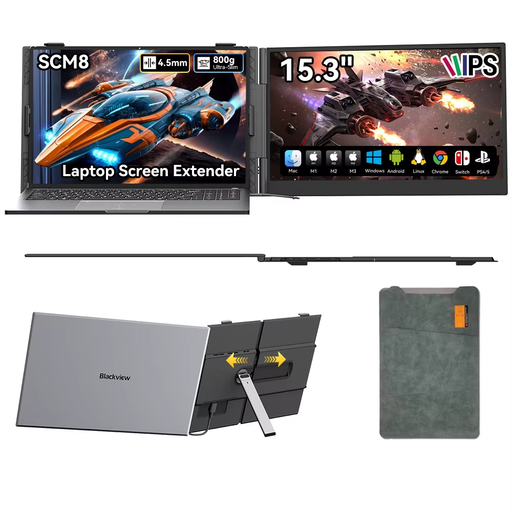
Blackview SCM8 portable 15.3-inch monitor

Blackview SCM8 15.3-inch portable monitor

A portable second screen to use with a laptop; check that your devices are compatible with USB-C.

The product information lists an adjustable stand and video and power over a single USB-C cable.

View at Joybuy

Blackview portable 23.8-inch HDR monitor

Blackview 23.8-inch portable HDR monitor

Could suit laptop use if you want a larger portable screen; check that the connections are compatible with your laptop.

The product information lists 1920 × 1200 pixels, 100% sRGB and two USB-C ports.

View at Joybuy

UPERFECT 15.6-inch portable touchscreen monitor

UPERFECT 15.6-inch portable touchscreen monitor

A portable option for laptop use; check that your laptop can output video through the USB-C port you plan to use.

The product name lists 15.6 inches and 1080p. The product information mentions touchscreen controls and USB-C for video and power.

View at Joybuy

UPERFECT 15.6-inch portable IPS monitor

UPERFECT 15.6-inch portable IPS monitor

Worth considering if you’re looking for a portable extra screen to use with a laptop; check your laptop’s connection.

The product information lists 1080p, an IPS screen and USB-C for video and power.

View at Joybuy

Frequently asked questions

Does using a single USB-C cable mean I don’t need a power socket for the monitor?

No. With a fixed monitor, the USB-C cable connects it to your laptop, but the monitor still needs its own power supply. A laptop-powered portable screen gets its power from a compatible laptop.

How can I make the colours on screen and in my photo prints as consistent as possible?

Calibrate and profile the screen for your workflow, and consider your workspace lighting, paper and colour management when printing. A stated wide colour gamut alone doesn’t guarantee a match with the print.

How can I compare the energy use of monitors?

Compare the energy labels for the exact models. The European Commission lists monitor energy consumption in kWh per 1,000 hours. You’ll also need to know how long you use the monitor and your electricity tariff to calculate the cost for your situation.

Do I still have rights in the Netherlands after two years if my monitor breaks down too soon?

Possibly. According to ACM ConsuWijzer, the statutory guarantee doesn’t have a fixed two-year term. What you could reasonably expect from the product and whether it was used normally are also relevant. Contact the seller if you think the product may be faulty.

What rules apply to monitors sold in the Netherlands?

The European Commission states that computer monitors are covered by EU energy-labelling and ecodesign rules. These rules apply, among other things, to products placed on the market; buyers don’t need to apply for an energy label for the monitor themselves.
