Choose a keyboard layout that works with the shortcuts in your photo-editing software and leaves enough room for using your mouse. Adjustable key backlighting can help if the keys are hard to read in changing daylight. However, backlighting won’t prevent glare on your screen: Arboportaal advises positioning your viewing direction parallel to the window and using a blind or other sunshade if needed. Also check the exact keyboard layout, connection and compatibility with your computer.
Who is this advice for?
Photo editor who uses lots of keyboard shortcuts
You sort, review and organise lots of images, and want a keyboard layout that works well with your photo-editing software. Adobe explains keyboard shortcuts and gallery work in Lightroom Classic; this information is relevant if you use the programme.
Creative working beside a bright window
In changing daylight, it helps to treat hard-to-read keys and screen glare as two separate issues. Arboportaal offers advice on positioning your screen in relation to a window, while Logitech describes ambient lighting that adapts to its surroundings for the MX Keys S.
Creative with limited desk space
You want to leave room for your mouse or find a layout that suits longer working sessions. Compare the keyboard’s size and layout; Arboportaal also recommends taking breaks and varying your activities when working at a screen.
What should you look for in a keyboard for photo editing?
Adobe explains keyboard shortcuts and how to create web galleries in Lightroom Classic. Arboportaal’s workplace advice distinguishes between key readability and light falling on the screen.
| Consideration |
What to look for when buying |
Who is this important for? |
| Shortcuts and photo-editing workflow |
Check the shortcuts for your photo-editing software and make sure the layout keeps the keys within easy reach. |
If I select and organise lots of images, I want a layout that suits my workflow; around 33% of consumers prioritise their photo-editing workflow. |
| Keys that are easy to read in daylight |
Check whether the key backlighting is adjustable; assess screen glare separately. |
When the light from my window changes, I want to be able to read the key legends clearly, without mistaking backlighting for a solution to screen glare; around 27% of consumers prioritise keys that are easy to read in daylight. |
| Room for using a mouse |
Compare the keyboard’s width and layout with the space available on your desk. |
If I often move photos around with my mouse, I want enough room to work beside the keyboard; around 20% of consumers choose mainly on the basis of space and desk layout. |
| Layout and compatibility |
Check the regional keyboard layout, connection and any system requirements. |
I want a layout and connection that work with my computer, and to be able to use features supported by my device; around 20% of consumers prioritise compatibility. |
Common buying mistakes
-
Assuming key backlighting will solve screen glare
A bright window can cause glare on your screen, even if the keys are backlit.
Assess key readability and screen glare separately. If you experience glare, Arboportaal advises positioning your viewing direction parallel to the window and using a blind or other sunshade if needed.
-
Choosing a regional or Mac-specific version based only on the product family name
The Dutch Apple version with Touch ID has specific system requirements and its own keyboard layout.
Before ordering, check the full version name, keyboard layout and system requirements on the product page.
-
Choosing a full-size keyboard without checking how much room you’ll have for your mouse
A number pad adds keys for entering figures, but a more compact model leaves more room beside the keyboard.
Measure the available space and consider whether you’ll actually use the number pad.
Brands worth comparing
Logitech
The MX Keys S is a useful comparison model for adjustable key backlighting and programmable actions.
- Logitech describes backlighting that responds to proximity and ambient conditions, as well as Smart Actions through Logi Options+.
- These are features Logitech lists for the MX Keys S; they don’t prove that it saves time when editing photos or prevent screen glare. Check the regional version.
CHERRY
The STREAM KEYBOARD WIRELESS is an example of a full-size wireless layout with a 2.4 GHz receiver.
- CHERRY lists SX scissor technology, a low-profile design and a receiver connection.
- A full-size keyboard takes up space; check that your computer has a suitable port for the receiver. The description of quiet keystrokes comes from CHERRY.
Apple
The Dutch Magic Keyboard with Touch ID and no number pad is worth considering if you’re looking for a compact keyboard for a compatible Mac.
- Apple lists the Dutch version and its compact layout without a number pad.
- Using Touch ID on this model requires a Mac with Apple Silicon and macOS 15.1 or later. Check that your computer meets these requirements.
Keyboard options on Joybuy
This selection focuses mainly on compact keyboards that can leave room for using your mouse. The models vary in features such as backlighting, keyboard layout and connection.
 No image available
AJAZZ AK820 MAX 75% Wireless Mechanical Keyboard
The 75% layout is worth comparing if you want to leave room for moving your mouse.
Tri-mode connection, RGB lighting and macro memory. US QWERTY layout; check that it suits the way you type.
View on Joybuy
 No image available
Razer Huntsman Mini RZ03-03390200-R3M1
The compact 60% layout could suit you if you need to leave room on your desk for using your mouse.
Individually backlit keys, macro recording and a detachable USB-C cable. The product description lists a US International/QWERTY layout.
View on Joybuy
 No image available
Apple Magic Keyboard with Touch ID for Mac models with Apple Silicon - Dutch
The compact layout without a number pad could suit you if you want to leave space beside the keyboard.
Dutch version. Using Touch ID on this model requires a Mac with Apple Silicon and macOS 15.1 or later.
View on Joybuy
 No image available
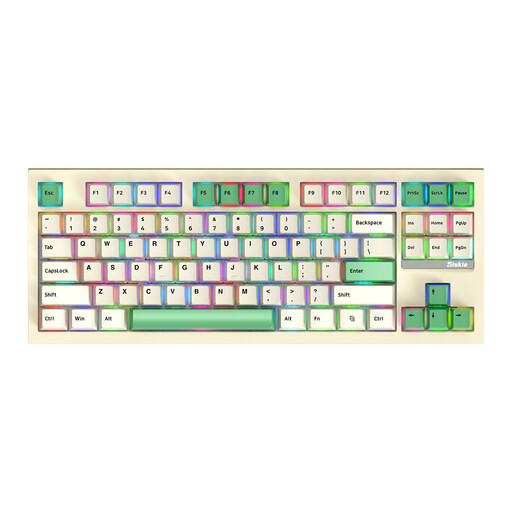
Siukie PL87W 87-Key 3MODE RGB Mechanical Keyboard
The 87-key layout is worth comparing if you’re looking for a more compact keyboard.
RGB lighting and connection via 2.4 GHz, Bluetooth or USB-C. The product name states that the switches are interchangeable.
View on Joybuy
 No image available
MageGee TS91 60% Wired Gaming Keyboard
The compact 60% layout could suit you if you want room to use your mouse beside the keyboard.
Wired connection, RGB lighting with adjustable brightness and a US QWERTY layout.
View on Joybuy
Frequently asked questions
Will a backlit keyboard stop glare on my screen when I’m near a window?
No. Key backlighting lights up the keys; it won’t prevent glare on your screen. Arboportaal advises positioning your viewing direction parallel to the window and using a blind or other sunshade if needed.
Do you need a number pad to create a web photo gallery?
Adobe’s instructions for creating web galleries in Lightroom Classic don’t list a number pad as a requirement. Choose one based on your other input tasks, and check the relevant keyboard shortcuts for any other software you use.
Is a compact keyboard suitable for photo editing that involves lots of mouse use?
A more compact keyboard can leave you with more room beside it, but it may not have all the keys found on a full-size layout. Compare the dimensions with your desk and decide whether you need a number pad, for example.
Will Touch ID on the Magic Keyboard mentioned here work with any Mac?
No. Using Touch ID on this Apple version requires a Mac with Apple Silicon and macOS 15.1 or later. Check the requirements for the exact version and your Mac.
What can you do if a keyboard you bought online doesn’t suit you or breaks?
For eligible online consumer purchases, you generally have a statutory cooling-off period of up to 14 days after delivery, with some exceptions. ACM ConsuWijzer explains how this period works. In the Netherlands, there is no fixed general period for statutory guarantees when a product is faulty: ACM ConsuWijzer notes that expectations around the product’s lifespan and normal use are taken into account.


