
Student with limited safe charging space
You want a dedicated charging spot without an overloaded or daisy-chained extension lead. The Netherlands Fire Service advises students to charge devices during the day, when they are awake and at home.


If you usually charge just one compatible phone, a suitable USB-C charger may be all you need. If you want to charge several devices at once, the number of ports and how the power is shared are important. A wireless station is especially convenient if your phone and any accessories support its charging technology, but also check which adapter and cables are included with the version you choose.
You want a dedicated charging spot without an overloaded or daisy-chained extension lead. The Netherlands Fire Service advises students to charge devices during the day, when they are awake and at home.
You want to charge your phone at the same time as, for example, a tablet or laptop. Check that the port types are suitable and that there is enough power when using them simultaneously.
You want to charge your phone, and perhaps a compatible watch or earbuds, wirelessly in one place. Charging technology and compatibility can vary between devices and charging spots.
Choose this option if: you mainly charge one phone and the device, charging technology and cable are compatible.
Trade-off: you won’t have extra charging spots for other devices. Samsung lists PD 3.0 PPS up to 25 W for the adapter mentioned, but your phone must support this charging technology.
Choose this option if: you regularly charge your phone alongside other devices at the same charging spot.
Trade-off: the available power may change when you use more ports. Anker lists 67 W for one device and 64,5 W total for three connected devices with model A2669.
Choose this option if: you’d rather place your compatible devices in a dedicated spot than connect a charging cable to your phone each time.
Trade-off: check compatibility for each charging spot and what’s included in the bundle. Samsung sells a Duo version without a mains adapter, while Belkin lists an adapter with the 3-in-1 version mentioned.
| What to consider | What should you check? | Who should consider this? |
|---|---|---|
| A safe place to charge | Choose a spot without daisy-chained extension leads or an overloaded multi-socket adaptor. For a mains-powered charger or adapter, check that it carries the applicable CE marking; the Netherlands Food and Consumer Product Safety Authority explains the rules and when they apply. | I want a dedicated charging spot without overloading the power outlets in my room, and I charge my devices when I’m awake and at home. Around 33% of consumers put safety first. |
| Charging several devices at once | Make a note of which devices you’ll connect at the same time, then check the port types and power distribution for the exact model. | If I need to charge my phone and other devices at the same time, I want to know whether the available connections suit that combination. Around 27% of consumers prioritise charging devices simultaneously. |
| Wireless charging | Check whether your phone supports Qi or Qi2, and check which accessories are compatible with each charging spot. | I want to place my compatible phone on the charger and perhaps charge accessories too, without assuming that every charging spot supports the same device. Around 20% of consumers prioritise the convenience of wireless charging. |
| Version and what’s included | Compare the full model code and box contents with the cables and adapter you already have. | If I only need the features I’ll actually use, I also want to know whether the necessary cable or adapter is included. Around 20% of consumers prioritise a straightforward, complete purchase. |
The available power may change when you connect more devices. Your phone must also support the charging technology being used.
Compare the power distribution for the exact model and your combination of devices, and check your phone’s charging support.
Compatibility at the phone charging spot doesn’t automatically mean the watch spot or other charging spots are compatible.
Check support for each device and each charging spot, not just the stated Qi2 technology.
The Samsung Wireless Charger Duo is available in versions with different box contents.
Compare the full model code and what’s included before you choose.
If you choose the version without a mains adapter, you may need to source a suitable one yourself.
Extra ports don’t make an overloaded multi-socket adaptor or daisy-chained extension leads safe.
The Netherlands Fire Service advises against connecting extension leads to one another and recommends charging devices during the day, when you’re awake and at home.
Samsung offers both a wired USB-C adapter for a compatible phone and wireless Duo versions with two charging spots.
The Anker Prime 67W GaN Wall Charger A2669 is a wired multi-port option if you need to connect several devices.
The Nexode 65W with three ports mentioned here, version 10335, is a wired option for charging multiple devices at once.
The BoostCharge 3-in-1 Qi2 version WIZ024vfBK is designed for a phone and accessories that are compatible with the individual charging spots.
This selection includes wired multi-port options for a shared charging spot and wireless charging stations for compatible phone accessories. For each model, check the connections, what’s included and the conditions for safe use.
 Image unavailable
May suit a dedicated spot where you want to use several connections; check the applicable CE marking and avoid overloading it.
The product name specifies a 1.5 m cord and a maximum of 2500 W.
 Image unavailable
Worth considering if you’re looking for a charging station with built-in USB-C cables; check that the connections and charging technology suit your devices.
The product name specifies 320 W and two retractable USB-C cables.
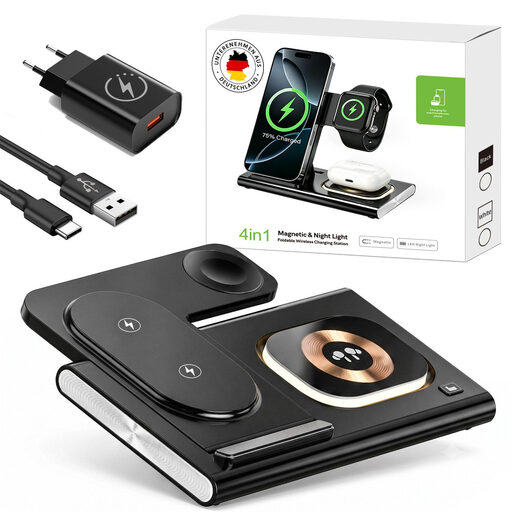 Image unavailable
May suit anyone who wants to charge a phone and accessories wirelessly in one place; check compatibility for each device and individual charging spot.
The product name specifies inductive charging, 25 W, Qi 2.0 and MagSafe.
 Image unavailable
A wired option if you want to connect your phone and a second device at the same time; check the power distribution for your combination.
The product name specifies two USB-C ports, 65 W and an included 1.5 m USB-C cable.
 Image unavailable
May suit you if you need both USB-C and USB-A connections; check the power distribution for the devices you want to charge at the same time.
The product name specifies 65 W, two USB-C ports and one USB-A port. The product description limits use to indoors and warns against exposure to moisture and water.
The marking is required for electrical products covered by the applicable CE rules. For a mains-powered charger or adapter, check whether it falls within the scope of the rules and carries the CE marking; the Netherlands Food and Consumer Product Safety Authority explains the relevant requirements. A marking is not proof that a specific item has been independently tested.
No. The European guidance covers specified categories of devices that can be charged via a cable. It doesn’t make an existing phone USB-C compatible retrospectively, nor does it guarantee that every wireless charging station will work with every phone. Check the port or wireless charging support of your own device.
Choose a spot where you won’t need to connect extension leads to one another or overload a multi-socket adaptor. The Netherlands Fire Service advises students to charge devices during the day, when they’re awake and at home.
For distance purchases from a business, you’ll often have a 14-day cooling-off period, according to the Dutch Government; exceptions may apply. If there’s a problem with a product, contact the seller about your statutory guarantee. Check the terms that apply to your specific purchase.