
Vandaag of morgen in huis

Kwaliteit gegarandeerd

Welkomstaanbiedingen ontgrendelen: GRATIS bezorging | Tot 80% korting | Gratis 30 dagen JoyPlus-proefperiode
Download de app
Choosing a new pen or marker set may seem straightforward. Yet many people buy a product that is not suitable for their paper, how they use it or their device. When it comes to pens for writing, drawing and colouring, there are three main pitfalls to watch out for:
You should also check properties such as “erasable”, “water-repellent” or “quick-drying” in the product description. According to a brand’s own information, a particular feature may apply under certain conditions, but that is not a guarantee for every type of paper or every user.
For notes, diaries and journaling pens, a fine nib and consistent ink flow are important. A 0.5 mm nib gives you greater control when writing small letters and colour-coding. Gel ink usually flows smoothly, but it can bleed through thin paper. So check whether the ink is suitable for your paper and allow it enough time to dry.
A retractable mechanism prevents loose caps from ending up in your bag. That is practical for students, office work and everyday use. For left-handed users, quick-drying ink can help reduce smudging, although the result also depends on writing speed and the type of paper.
Fibre-tip pens and colouring pens are suitable for illustrations, schoolwork and colouring sheets. Pay attention to these specifications:
Brush pens have a flexible nib that allows you to create thin and thicker lines by adjusting the pressure and angle. This is useful for hand lettering, sketching and short texts. According to the product information from Faber-Castell, the ink in the Brush Pen set mentioned is washable and based on food colourings. However, use the pens on light-coloured paper, as stated in the product description.
With a stylus pen, compatibility, pressure sensitivity, tilt recognition and palm rejection are more important than its shape or colour alone.
Check the following before buying:
According to the product information, the Apple Pencil USB-C is intended for selected iPad models and features tilt recognition, magnetic attachment and a USB-C connection. According to Samsung, the Samsung S Pen EJ-PX510 is suitable for the Galaxy Tab S9 FE and Tab S9 FE+. The Microsoft Surface Slim Pen 2 is intended for compatible Surface devices. A Wacom stylus, such as the Wacom Pro Pen 3, is paired with specific Wacom devices. So always check the current compatibility list before placing your order.
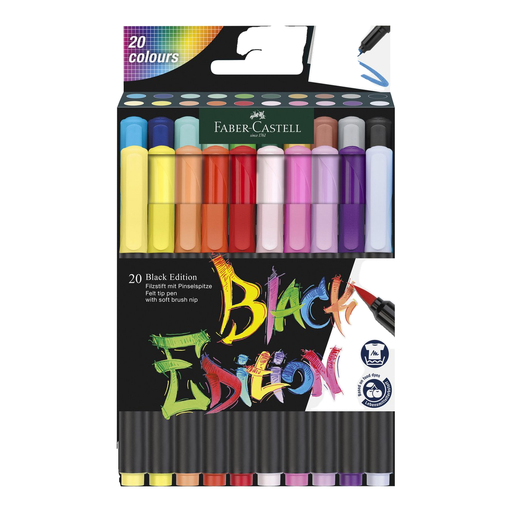
Why it suits this profile: This set offers 20 colours for small drawings, lettering and simple brush lettering, without having to invest in a large case straight away.
The number of colours remains manageable, and the product information clearly states that the pens are suitable for light-coloured paper.
20 colours, a brush nib for thin and thicker lines, washable ink according to the product description, and an EN 71 listing.
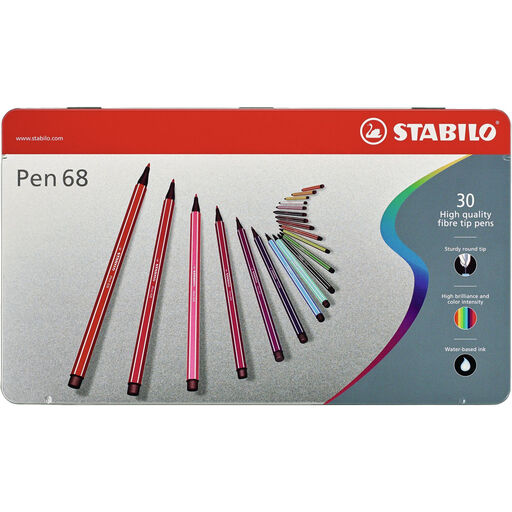
Why it suits this profile: The medium fibre tip of approximately 1 mm is suitable for writing, sketching and colouring, while the set combines a range of shades.
The nib width and water-based formula are specified in the product information, making it easier to assess how the pens will perform on paper.
30 colours, a pressure-resistant tip and, according to STABILO, water-mixable ink for watercolour effects on thicker paper.

Why it suits this profile: This Wacom stylus is intended for users of compatible Wacom devices who want to adjust the grip, weight and balance to suit their preferences.
The compatible Wacom models are clearly specified. This reduces the risk of buying a stylus without suitable hardware.
Adjustable weight, grip thickness, buttons and balance point; suitable for drawing, sketching and navigating on the specified Wacom devices.
We have compiled a complete, up-to-date list of products that fully meet these strict selection criteria and the applicable European safety regulations.
A fibre-tip pen with a nib of around 1 mm is a practical middle ground for simple writing, lines and colouring. For small notes, 0.5 mm gel pens offer greater precision. For digital drawings, choose a stylus that is specifically compatible with your tablet or graphics device.
Close the cap firmly after use and store the set according to the manufacturer’s instructions. Keep it away from direct sunlight and extreme temperatures. For sets with loose caps, a cap ring, such as the one on STABILO Cappi, can be useful. Also check whether the pens should be stored horizontally or upright.
No. A universal capacitive stylus can simulate basic touch input, but features such as pressure sensitivity, palm rejection and tilt recognition often depend on the device and software. So check the exact model and supported features before buying. This also applies to an Apple Pencil USB-C, Samsung S Pen and Microsoft Surface Slim Pen.
