
Vandaag of morgen in huis

Kwaliteit gegarandeerd

Welkomstaanbiedingen ontgrendelen: GRATIS bezorging | Tot 80% korting | Gratis 30 dagen JoyPlus-proefperiode
Download de app
A powerful processor, graphics card and compact case generate a great deal of heat while gaming or rendering. With the right PC cooling, you can keep temperatures under better control and prevent fans from running unnecessarily fast. However, choosing a product is not simply a matter of looking for the highest possible rpm or the brightest RGB lighting.
Many users focus on the wrong details. For example, a radiator will not fit every case, a large fan is not automatically suitable for every mounting position, and a budget CPU cooler can prove impractical because of limited socket support. Below, you’ll find out which specifications to check first and which solutions suit different types of PC use.
A high maximum speed may sound appealing, but it says little about noise levels during normal use. A PWM fan can automatically adjust its speed via the motherboard. This allows the PC fan to run more quietly during light tasks and only speed up when temperatures rise.
As well as the speed, check:
A fan with high static pressure is generally more suitable for a radiator fan or a case with restrictive front mesh than a model designed solely for unrestricted airflow.
A 120mm fan is a common choice, but not every case supports the same sizes. A 140mm fan can move a lot of air at a similar speed, but it requires more space around the motherboard, RAM and radiator.
So, measure the following beforehand:
With a CPU water cooler, it’s not enough for the radiator size to fit. Also check that the tubes and pump can be installed without sharp bends.
RGB is a visual feature, not a performance measurement. What’s more, there are several different connections and ecosystems. A fan may use a 4-pin PWM connection for speed control, while its lighting requires a separate connection or controller.
Pay attention to the difference between:
A product with iCUE LINK can reduce the number of cables, but check whether the required hub is included. With some models, it is not supplied as standard.
A CPU cooler must physically connect to the processor and motherboard. Current products include support for Intel LGA 1700, Intel LGA 1851, AMD AM4 and AMD AM5. Always check your system’s exact socket type before ordering.
With an air-cooled CPU cooler, also check the maximum height of the heatsink. With AiO water cooling, focus mainly on the radiator size and mounting position.
For a standard computer case fan, airflow is an important indicator. For a radiator fan, both airflow and static pressure matter. For example, the specifications for the Corsair CO-9051005-WW list a maximum airflow of 63.1 CFM, static pressure of 3.8 mmH2O and PWM control.
Compare units carefully. A value in CFM is not directly equivalent to a value in m³/h. Also check whether the manufacturer gives the measurement at maximum speed; in everyday use, the result may be lower.
A 240mm radiator usually uses two 120mm fans. A 280mm model uses two 140mm fans, while a 360mm model uses three 120mm fans. Bigger does not automatically mean more suitable: your case must support the size, thickness and mounting position.
When installing a CPU water cooler:

Why it suits this profile: This standalone 120mm PC fan is a straightforward choice for a first airflow upgrade, without immediately installing a complete CPU water cooler.
The product specifications list PWM, a range of 480 to 2400 rpm and suitability for case and radiator cooling. You can therefore adjust the speed instead of running the fan constantly at maximum.
120mm format, 4-pin PWM connection, stated airflow of 63.1 CFM and 34 individually addressable LEDs.
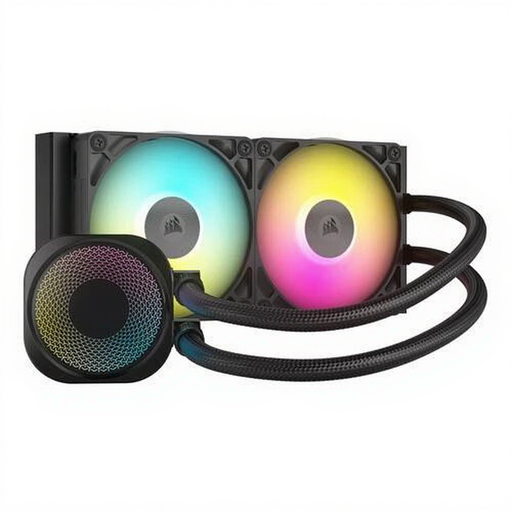
Why it suits this profile: This AiO water cooler is designed for users who value socket support, integrated RGB and tidy cable management.
The stated compatibility includes LGA 1700, LGA 1851, AM4 and AM5. Nevertheless, check that your case has enough room for the 240mm radiator.
Two 120mm RGB fans, a stated range of 300 to 2100 rpm, an aluminium radiator and support for the listed Intel and AMD sockets.
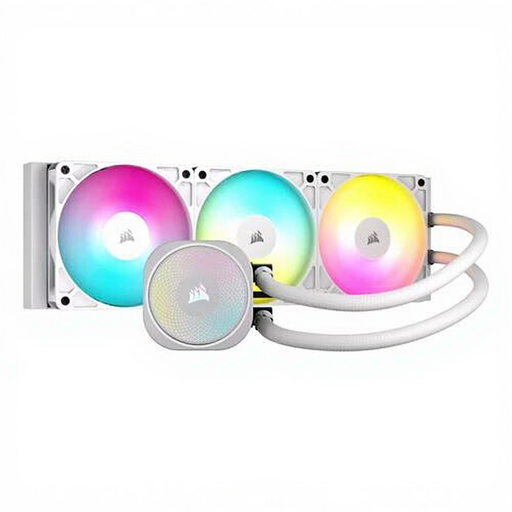
Why it suits this profile: This 360mm CPU water cooler is suitable for a powerful desktop that is under sustained load, provided the case offers enough space.
The product information explicitly specifies a 360mm mounting position and installation at the top or front. This makes measuring in advance essential and helps prevent a costly mistake caused by choosing a case that is too small.
Three 120mm fans, stated airflow of 94.87 CFM, PWM control, ARGB lighting and support for LGA 1700, AM4 and AM5.
We’ve put together a complete, up-to-date list of products that fully meet these strict selection criteria and the applicable European safety regulations.
Dust on fan blades, filters and radiators reduces airflow and can cause additional noise. Switch off the PC, unplug it and use compressed air or a soft brush. Keep cables away from moving blades and check after installation that every fan starts correctly.
The power consumption of a single case fan is usually limited. However, multiple fans, a pump, RGB lighting and a controller will increase consumption. If keeping noise to a minimum is your priority, you can set a moderate fan curve in the BIOS or software. Let the fans run quietly under light loads and reserve higher speeds for demanding tasks.
That depends on the case and hardware. A practical setup often consists of one or more intake fans at the front and an exhaust fan at the rear or top. Check the airflow direction using the arrows on the frame and avoid having all the fans blow in the same direction.
No. An air cooler is sufficient for many systems. AiO water cooling becomes particularly appealing when your processor is under sustained heavy load or when you want a specific radiator layout and appearance. Always check the socket, radiator size, pump connection and available space.
Lifespan varies depending on the fan, pump, usage time and amount of dust. A case fan is generally easy to replace. With AiO water cooling, the pump, tubes and radiator form one sealed system, so pay attention to the warranty, installation instructions and warning signs such as rattling noises, leaks or unexpected temperature increases.
