
Detail-focused photographer
You want to show fine traces, solder joints or small components up close. Compare the magnification of the exact lens, as Nikon Netherlands, Sony Netherlands and Canon Netherlands publish lens specifications for this.


For overview shots, a camera with a suitable close-up mode or kit lens may be enough. For tiny solder joints and components, a compatible macro lens with sufficient magnification is often the better choice. Choose based on the exact lens, and also consider a stable set-up, soft lighting and enough room to position your lights.
You want to show fine traces, solder joints or small components up close. Compare the magnification of the exact lens, as Nikon Netherlands, Sony Netherlands and Canon Netherlands publish lens specifications for this.
You photograph several circuit boards and want consistent framing, colour and lighting. A fixed camera set-up and soft, even lighting can help reduce shadows. This is in line with PCB photography tips from Omzlo and Martijn Braam.
You want to try both overview and detail shots first, and check whether the supplied lens focuses closely enough before upgrading. Check the manufacturer’s exact kit contents and lens specifications.
Best for: anyone who wants to try photographing both the whole circuit board and its details without changing lenses.
Consider: the fixed lens cannot be changed, so check that the close-up framing suits your circuit board.
Best for: anyone mainly taking overview shots and larger close-ups, with the option to upgrade later.
Consider: a kit lens doesn’t guarantee high magnification, so check the specifications of the supplied lens.
Best for: anyone who wants to make small components appear much larger in the frame.
Consider: if it isn’t included in the kit, the macro lens is a separate purchase. Also check that you’ll have room for lighting when shooting close up.
Magnification isn’t the only thing to consider: reflections, consistency and exactly what’s in the box also matter.
| What to consider | What to look for | Who should pay particular attention? |
|---|---|---|
| Magnifying small details | Compare the maximum magnification of the lens you’ll actually receive with the close-up you want to take. Nikon Netherlands and Sony Netherlands specify 1:1 for the macro lenses mentioned; Canon Netherlands specifies 0.5× for the RF 35mm F1.8 MACRO IS STM. | If I want to show solder joints or small components up close, I’d prioritise magnification. Around 33% of consumers put capturing small details at the top of their list. |
| Reflections and shadows | Check whether you can position soft lighting beside the circuit board at your chosen shooting distance. For very close-up work with the Z MC 50mm f/2.8, Nikon Netherlands gives a distance of around 5 cm between the front of the lens and the subject. | If I’m photographing shiny surfaces, I want to assess solder joints and components without distracting reflections or harsh shadows. Around 27% of consumers make lighting their top priority. |
| A consistent series of shots | Check whether you can repeat your camera settings and set-up, and look for features such as manual focus and white balance. The OM Digital Solutions manual describes focus stacking for the TG-7. | If I’m presenting several circuit boards in one portfolio, I want consistent framing, colour and sharpness. Around 20% of consumers prioritise consistency. |
| Complete camera kit | Check the exact camera body, lens and other items included. For the RF-S 18–45mm at 45 mm, Canon Netherlands specifies a maximum of 0.16× with autofocus or 0.26× with manual focus. | If I want to get started with one purchase, I want to know in advance whether the supplied lens will do the job. Around 20% of consumers prioritise a complete starter kit. |
Magnification varies by lens and setting. For example, Canon Netherlands specifies a maximum of 0.5× for the RF 35mm F1.8 MACRO IS STM, and a maximum of 0.26× with manual focus at 45 mm for the RF-S 18–45mm.
Compare the specification of the lens you’ll actually receive with the size of the detail you want to photograph.
If the supplied lens doesn’t magnify enough, you may need to buy a separate macro lens.
A zoom kit and a separate macro lens are not the same thing. The lens helps determine how large a detail appears in the frame, while a circuit board set-up may also need room for soft, even lighting.
Check exactly what’s included in the kit and whether the supplied lens can achieve the close-up you want.
A suitable macro lens or equipment for a stable, diffused lighting set-up may need to be purchased separately.
When focusing very close, the distance between the lens and the subject can become very small. Nikon Netherlands gives around 5 cm for the Z MC 50mm f/2.8; this isn’t a general working distance for all macro lenses.
Test your chosen magnification with the circuit board and lighting set-up you plan to use before assuming a short shooting distance is an advantage.
The EOS R50 can be paired with RF and RF-S lenses. The kit lens and a separate macro lens offer different levels of magnification.
The Z50II can be paired with a separate Z MC macro lens for photographing small subjects.
The α6400 is an E-mount camera; the FE 50mm F2.8 Macro is a separate lens option for close-up photography.
The TG-7 offers a compact option with a fixed lens and built-in close-up features.
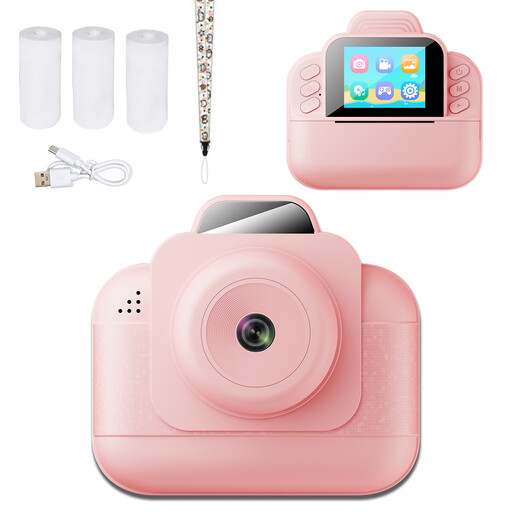
The Joybuy options below are instant print or instant cameras. Before buying, check whether the digital images and close-up framing will capture enough detail for a circuit board portfolio; the product names alone don’t indicate macro magnification.
 No image available
This instant print camera also lists photo storage on a TF card; the card is not included. Check whether the saved images will capture the details and framing you need for your circuit board portfolio.
The product name specifies thermal black-and-white printing.
 No image available
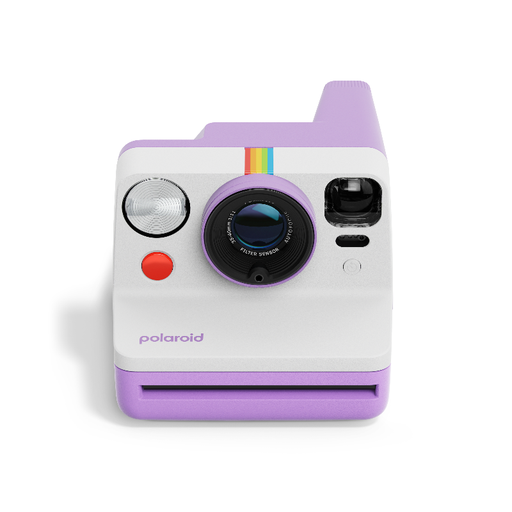
If you want to shoot from a fixed position, the product information lists a tripod socket and self-timer. Check whether instant photos suit the way you want to store and present your circuit board portfolio.
This camera requires Polaroid i-Type film.
 No image available
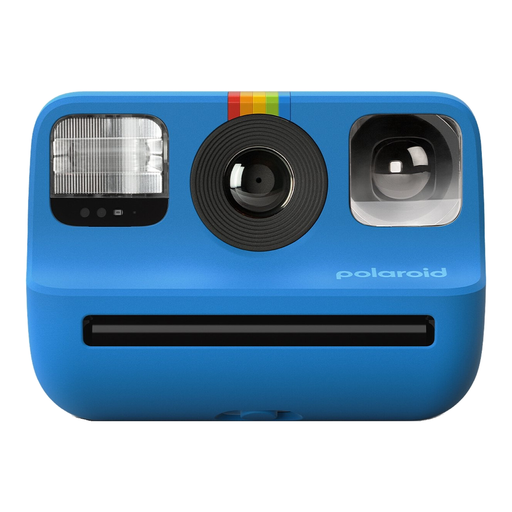
This instant camera may suit anyone who wants to keep a circuit board as a physical photograph. Check in advance that the print size and visible details meet your portfolio needs.
This camera requires Polaroid Go film.
No, not if you mainly want to photograph the whole board or larger components. For very small details, compare the magnification of the individual lens. A 1:1 specification applies to that lens and doesn’t mean the whole circuit board will fit in the frame at once.
Keep the camera and circuit board in fixed positions, and try soft, even lighting to reduce harsh shadows. Check the sharpness around the edges and change the direction of the light if solder or other shiny parts reflect too much. This is in line with tips from Omzlo and Martijn Braam.
Look up the maximum magnification of the exact lens included in the kit and compare it with the close-up you want to take. For example, Canon Netherlands specifies a maximum of 0.26× with manual focus for the RF-S 18–45mm at 45 mm. That is a specification for that lens, not every kit lens.
If a product is faulty, the Dutch government says you can hold the retailer responsible under your statutory rights. The Netherlands has no fixed statutory warranty period of exactly two years; what you can expect depends, among other things, on the product, its price and how it is used.
When you buy from a business remotely, you generally have a 14-day cooling-off period. The Dutch government lists some exceptions and, among other things, distinguishes between online purchases from a business and purchases from a private individual. So check the details of your particular sale.