
Reading beside a bright window
You want to read tables and charts without distracting reflections. Arboportaal recommends positioning your line of sight parallel to the window.


Start with screen readability and desk position, not extra processing power. Arboportaal recommends positioning your line of sight parallel to the window and tackling distracting reflections. An all-in-one combines the computer and screen, making it a good choice if you don’t already have a suitable monitor. With a mini PC or another standalone desktop, you can keep your existing monitor or choose one yourself. Bear in mind that Rijkswaterstaat’s astronomical tide calculations don’t account for weather conditions.
You want to read tables and charts without distracting reflections. Arboportaal recommends positioning your line of sight parallel to the window.
You compare locations or periods and want to view the data clearly in tables or charts. Rijkswaterstaat provides tide data in these formats.
You want to check whether a compact standalone PC will work with your monitor, rather than choosing another integrated screen. Lenovo states that the monitor for the ThinkCentre neo 50q Gen 5 reviewed here is sold separately.
First decide how you’ll manage reflections and screen positioning. Then choose whether an integrated screen or a standalone computer with a separately selected monitor is right for your workspace.
Choose this if: you don’t already have a suitable screen and want to combine the computer and monitor in one desk setup.
Bear in mind: you choose the screen and computer together, so check that the screen’s adjustability suits your workspace.
Choose this if: you want to reuse an existing monitor or select a screen that suits your viewing position.
Bear in mind: you’ll need to consider the monitor, connections, cables and peripherals alongside the PC.
Choose this if: you want to select the computer and screen separately and have a specific desktop configuration in mind.
Bear in mind: the screen isn’t included with the Dell Pro Micro configuration reviewed here, so you’ll need to choose one separately.
| Consideration | What should you look for? | Who is this important for? |
|---|---|---|
| Readability in daylight | Check the screen’s finish and adjustability. Arboportaal recommends positioning your line of sight parallel to the window; you may still need blinds or a different position to deal with reflections. | If your workspace gets a lot of light, you’ll want to read tables and charts without reflections obstructing your view. Around 36% of consumers put daylight readability first. |
| Plotting tide data | Check that the display is easy to read for your chosen location and period. When checking the data source, also look at the time zone, reference level and the difference between calculated and live data. | When comparing locations or periods, you’ll want to assess the right data side by side, clearly presented. Around 29% of consumers give careful tide plotting their highest priority. |
| Using an existing monitor | Compare the video output on the exact PC configuration with your monitor’s input, and check which cables and peripherals are included. | If you already have a monitor, you’ll want to know whether you can keep using it in your new setup. Around 21% of consumers make keeping their existing screen their first consideration. |
| Complete desk setup | Check what’s included with the exact configuration and whether the screen position and input devices suit your desk. | If you’d rather combine the computer and screen in one purchase, you’ll want to know in advance which components you’ll get. Around 14% of consumers prioritise an integrated, all-in-one setup. |
An anti-glare finish won’t necessarily prevent discomfort from direct sunlight. Arboportaal also recommends considering the screen’s position in relation to the window and using blinds to tackle reflections.
Assess the screen and the light in the spot where you actually plan to use it.
You may still need to rearrange your desk or add blinds.
For the Lenovo mini PC reviewed here, Lenovo says the screen and input devices are optional and sold separately. HP lists a screen, keyboard and mouse for the all-in-one reviewed here.
Compare complete setups and check what’s included with the exact configuration.
With a standalone PC, you may also need a suitable monitor, cables or input devices.
ASUS distinguishes between complete mini PCs and kits that don’t come with a pre-installed operating system.
Check the full model number and which components are included with the configuration you choose.
Depending on the configuration, you may still need additional components or an operating system.
Rijkswaterstaat states that the calculated astronomical tide data doesn’t include the effects of weather. Actual conditions may therefore affect the real water level.
Check the location, time zone and reference level, and consult current water-level data where necessary.
The OmniStudio 24cu0612nd is an all-in-one reviewed here for anyone who doesn’t already have a screen.
The ThinkCentre neo 50q Gen 5 is a compact standalone PC; Lenovo also offers separate ThinkVision monitors.
The Dell Pro Micro QCM1250 is a configurable compact desktop for anyone who wants to choose the PC and screen separately.
The NUC 15 Pro series includes mini PCs and kits for which you choose the screen separately.
These PCs are designed for use with a separately chosen monitor or one you already own.
 No image available
An option if you want to use an existing monitor or choose one separately.
Intel Core i5 8250U/8350U, Windows 11, 8 GB DDR4, 256 GB SATA SSD, Wi-Fi 5 and BT5.2.
 No image available
An option if you want to choose the computer separately from the screen.
AMD Ryzen 5 7430U, 16 GB RAM, 512 GB SSD, Wi-Fi 6 and Bluetooth 5.2. The product title states that it supports three 4K screens.
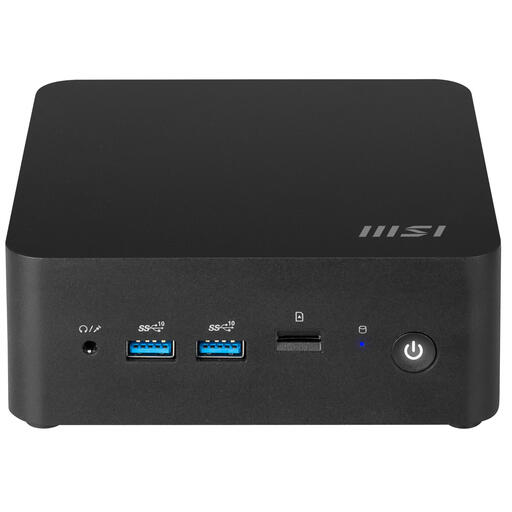 No image available
An option if you want to choose your own monitor and put together a compact setup.
The product information lists an Intel Core 3 100U and a 0.84-litre casing. This is a barebones PC without a pre-installed operating system.
The use described here doesn’t require a dedicated graphics card: the Rijkswaterstaat application reviewed here displays data as tables and charts. First choose a screen and setup that make these easy to read. Check separately for any higher requirements if you plan to use other software.
For screen-based work, Arboportaal recommends positioning your line of sight parallel to the window. If you get reflections, it suggests moving further away or using suitable blinds. Also check that your chosen screen is adjustable enough for your workspace.
Not without allowing for the difference: Rijkswaterstaat states that the calculated astronomical tide data doesn’t account for weather conditions, so actual levels may vary. If your decision depends on the water level, also consult relevant current data and forecasts.
According to Arboportaal, screen-work regulations apply to employees. For more than 2 hours of screen work a day, Arboportaal lists requirements covering the screen, keyboard and workplace setup, among other things. These rules for employees don’t automatically apply to every private buyer.