
Vandaag of morgen in huis

Kwaliteit gegarandeerd

Welkomstaanbiedingen ontgrendelen: GRATIS bezorging | Tot 80% korting | Gratis 30 dagen JoyPlus-proefperiode
Download de app
A PC power supply often receives less attention than a processor or graphics card. However, the wrong choice can limit your upgrade options, create unnecessary cable clutter or mean that the PSU does not fit inside your case. If you focus only on wattage or a prominent certification, you could end up paying for features that do not suit your particular configuration.
In this buying guide, we explain what to look for in a power supply for a PC. We then share some practical recommendations for different types of user.
Higher wattage does not automatically mean that a power supply is suitable. A PC with an energy-efficient processor and mid-range graphics card can often run comfortably with a 650W power supply, while a system with a powerful graphics card, multiple storage drives or a demanding workstation may need more headroom.
So check the recommended power rating for your graphics card and processor. Also factor in the consumption of storage drives, fans, USB devices and any future upgrades. A little extra capacity is useful, but a PSU that is far more powerful than necessary can increase the purchase price and size without offering any clear benefit.
An 80 Plus Bronze, 80 Plus Gold or 80 Plus Platinum power supply says something about efficiency under certain test conditions. The certification is not a general guarantee of noise levels, lifespan, connectors or suitability for every PC.
An efficient PC power supply can help reduce heat loss and energy consumption, but you should also check the protections, available connectors and dimensions. Where specified by the manufacturer, the product details for the models below include protection against overload, short circuits and voltage issues, among other features.
A modular power supply uses detachable cables. You only connect the cables you need, which can make cable routing easier in a large or glass-sided case. With a non-modular power supply, the cables are permanently attached. This can be more affordable, but any unused cables still need to be tucked away inside the case.
You should also check the size. A standard ATX power supply will not automatically fit in a compact PC case. SFX power supplies are designed for smaller systems. Check your case manual for the permitted length, height and width. For example, a PSU that is 160 mm deep may leave less room for cables than a 140 or 150 mm model.
Use the total system power consumption as your starting point, rather than looking only at the graphics card specification. This rule of thumb can help you get your bearings:
Always check the current recommendation from your graphics card manufacturer. Also pay attention to continuous power and capacity on the 12V rail, as the processor and graphics card typically draw a large proportion of their power from it.
The motherboard connection is usually a 24-pin ATX connector. For the processor, you need one or more EPS connectors, often 4+4-pin. For the graphics card, PCIe 6+2-pin connectors or a newer 12V-2x6 connection may be relevant.
A PCIe 5.0 power supply or ATX 3.x model may be better suited to modern graphics cards and their temporary power spikes, provided the correct cable is included. So do not look only for the name “PCIe 5”; check the product specifications to see which type of connector is included. With modular power supplies, use only the cables supplied for that specific model. Cables from another PSU may have a different pin layout.
80 Plus classifications range from Bronze through Gold, Platinum and Titanium. A higher certification level indicates greater tested efficiency, but actual efficiency varies depending on the load and mains voltage.
You should also consider the fan and cooling mode. Some models use active cooling, while others have a semi-passive mode in which the fan spins more slowly or not at all under lower loads. This does not automatically mean that a power supply will be silent in every PC: the case, ambient temperature and load all play a part.
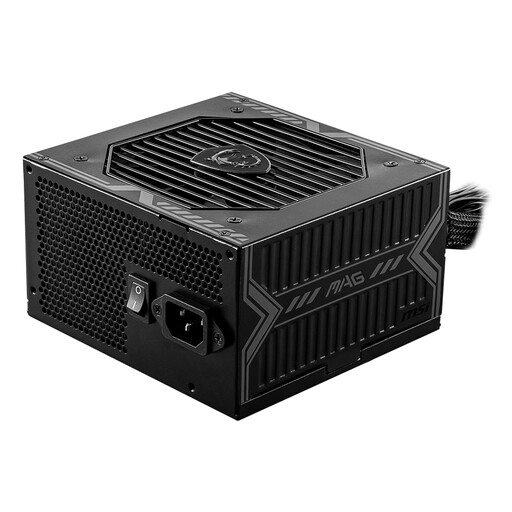
Why it suits this profile: This ATX power supply is designed for a straightforward PC build with 650W of power. The fixed cables keep the choice of connections simple, but they do require extra attention when routing cables.
The stated power rating and 54A 12V capacity make it easier to compare this PSU than relying on marketing terms alone. However, check that the two PCIe 6+2-pin connectors are suitable for your graphics card.
650W, 80 Plus Bronze, five SATA connectors and protection against short circuits and overloads, according to the product information.
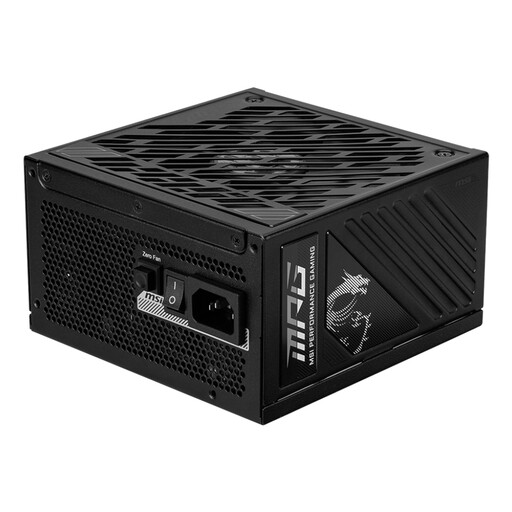
Why it suits this profile: This 850W gaming power supply features ATX 3.1 specifications and a PCIe Gen 5.1 connection, making it a good match for a modern configuration with a powerful graphics card.
The product specifications list three PCIe 6+2-pin connectors as well as a 12V-2x6 connection. This allows you to check in advance whether your chosen graphics card can be connected directly.
80 Plus Gold, fully modular, two EPS connectors and semi-passive cooling, according to the listed specifications.
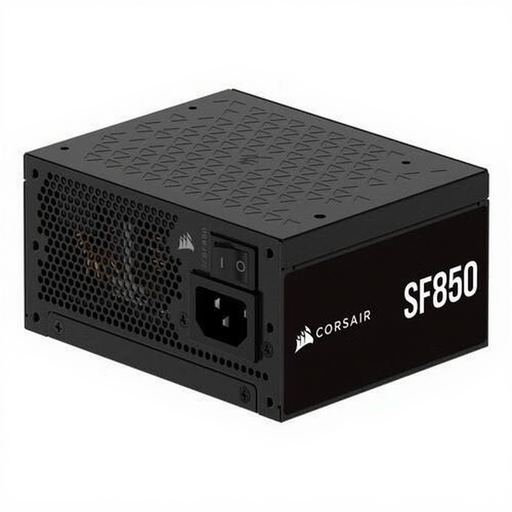
Why it suits this profile: This fully modular SFX power supply is designed for compact PC cases. Its dimensions are more important than those of a standard ATX model, so check compatibility with your case in advance.
The SFX form factor prevents you from choosing an ATX model that is too large for a small case. Depending on the case, an adapter bracket may be required.
850W, 80 Plus Platinum, ATX 3.1 support and fully modular cables, according to the product description.
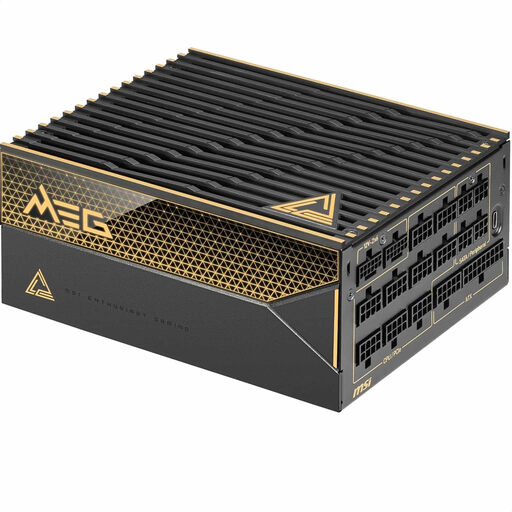
Why it suits this profile: With 1600W and a fully modular ATX design, this model is aimed at extremely powerful gaming PCs and workstations. This level of power is usually unnecessary for an average PC.
The ample power capacity prevents you from selecting an underpowered 650W or 750W PSU for a demanding system. However, check that your case has enough room for the unit and its cables.
80 Plus Titanium, 1600W total power, eight SATA connectors and fully modular cables, according to the product specifications.
We have compiled a complete, up-to-date list of products that fully meet these strict selection criteria and the applicable European safety regulations.
Switch off the PC and unplug it from the mains before installing or removing the power supply. Pay attention to the following points:
A statutory warranty of at least two years applies to the products mentioned, according to the product information provided. Additional rights may arise under Dutch law.
This depends on the processor, graphics card and other components. Use the graphics card manufacturer’s recommendation as a starting point and add a sensible margin for peak loads and future upgrades. For many basic gaming PCs, 650W may be sufficient; more powerful systems are more likely to need 750W, 850W or 1000W.
A modular power supply can be useful if you only want to use the cables you need. This helps with cable management and can be particularly practical in a compact or glass-sided case. A non-modular power supply can still be a suitable choice when its price and fixed connectors fit your build.
Its lifespan depends on the load, temperature, dust, power quality and usage time. Position the power supply where it has sufficient ventilation, keep the filter and fan free from dust, and replace the unit if you notice unusual smells, noises or instability. After an upgrade, also check that the power rating and connectors are still suitable for your PC.
