
Vandaag of morgen in huis

Kwaliteit gegarandeerd

Welkomstaanbiedingen ontgrendelen: GRATIS bezorging | Tot 80% korting | Gratis 30 dagen JoyPlus-proefperiode
Download de app
A PC power supply determines whether your desktop, gaming PC or workstation gets enough power. Yet when shopping, people often look only at the wattage. This can lead to a power supply that doesn’t fit, lacks the connections you need or costs more than necessary.
The main pitfalls:
First, check the estimated power consumption of your processor, graphics card and other components. Then allow some headroom for peak loads, extra storage and future upgrades. A 750W power supply may suit many modern gaming PCs, while a system with several powerful components may need an 850W power supply or 1000W power supply.
A 1300W power supply or 1600W power supply is mainly relevant for high-performance workstations, systems with several powerful expansion cards, or setups where you deliberately want plenty of power headroom. More power doesn’t automatically improve your PC’s performance. The components determine how much capacity makes sense.
Also check whether the stated wattage is delivered continuously. For several of the models mentioned, this is listed as continuous power. That’s more useful than relying only on a brief peak rating.
An ATX power supply is standard for a desktop PC. For modern systems, the ATX 3.1 and PCIe 5.0 or PCIe 5.1 standards are also relevant. These refer to electrical requirements and support for modern hardware, including new graphics cards.
Be aware of the difference between:
Count the connections you actually need. A power supply with lots of SATA connectors won’t necessarily be suitable if your graphics card needs a different connection.
An 80 PLUS Gold power supply can be a practical choice for a powerful everyday PC. Platinum and Titanium are higher efficiency ratings, but the price difference should make sense for how you use your PC and how many hours it runs. Certification is determined under specific conditions, so check the rest of the product specifications as well.
With a modular PC power supply, you only connect the cables you need. This can make cable management and airflow inside the case easier to manage. A non-modular power supply has fixed cables. It may cost less, but you’ll need to tuck away any cables you’re not using.
An SFX power supply is designed for small systems. The Corsair SF series below uses this compact format. For a small case, check whether you need an adapter bracket and whether the supplied cables are long enough.
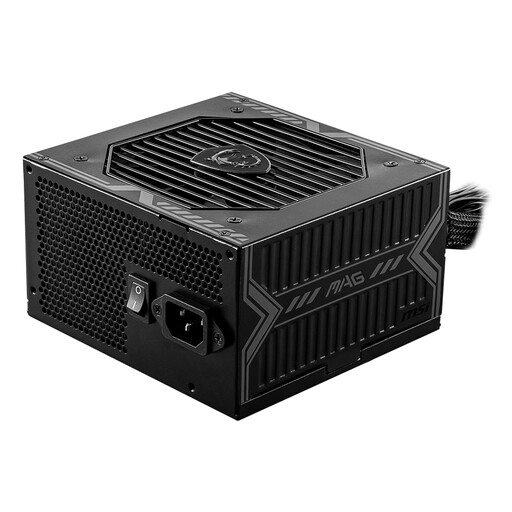
Why it suits this type of user: With 650W, an ATX form factor and a non-modular design, this is a straightforward option for an entry-level PC or a mid-range gaming PC.
You don’t pay for an exceptionally high wattage that your system may not use. Just check the available PCIe and CPU connections before you buy.
650W continuous power, 80 PLUS Bronze certification according to the product specifications, five SATA connections, and protection against short circuits and overloads.
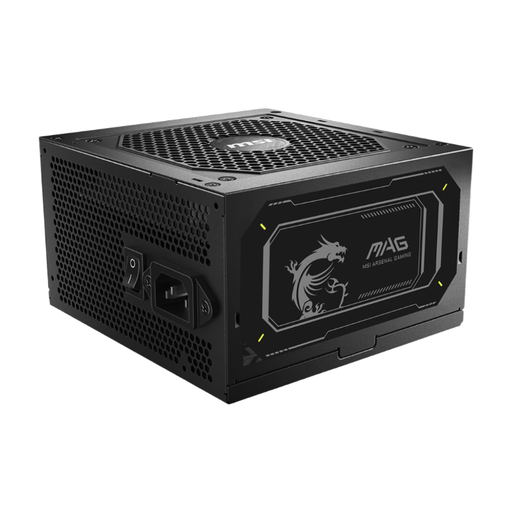
Why it suits this type of user: This ATX 3.1 power supply is designed for builders who want to combine support for modern hardware with tidy cable management.
The product specifications list support for ATX 3.1 and PCIe 5.1. That means you don’t have to rely solely on older adapter solutions.
750W continuous power, 80 PLUS Gold, fully modular cables, two EPS connections and eight SATA connections.
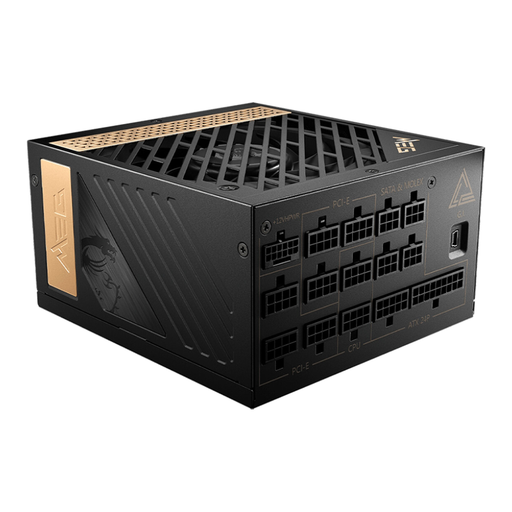
Why it suits this type of user: Suited to a powerful setup with plenty of power headroom, multiple expansion cards or demanding workloads.
The high wattage is only useful if your system actually needs it. Before you buy, check the power consumption of all your components and make sure there’s enough room in your case.
1300W, 80 PLUS Platinum certification according to the product specifications, fully modular design, one 12+4-pin PCIe connection and two EPS connections.
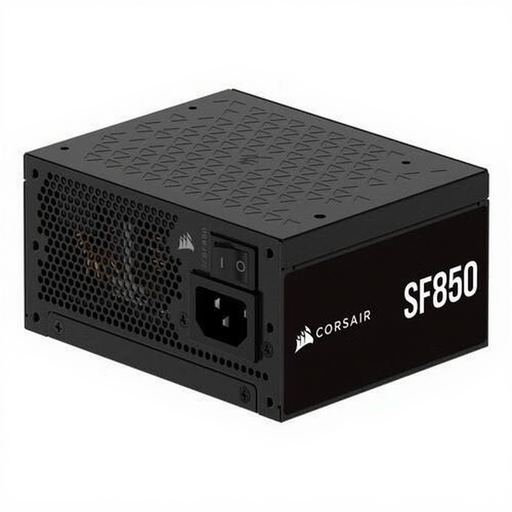
Why it suits this type of user: This SFX power supply is designed for compact PC cases that can’t accommodate a standard ATX model.
You won’t focus on wattage alone and forget about size. Check whether your case supports SFX or needs an adapter bracket.
850W, 80 PLUS Platinum, SFX form factor, fully modular design and support for ATX 3.1 according to the product information.
We’ve put together a complete, up-to-date list of products that meet these strict selection criteria and the current European safety requirements.
Before installation, check the following:
It isn’t safe to open a power supply: internal components may still hold an electrical charge even after it has been switched off. Leave repairs or diagnosis to the manufacturer or an authorised service provider.
It depends on the processor, graphics card and any expansion cards. 650W to 750W may suit a mid-range setup. For more powerful graphics cards, 850W or 1000W may be more practical. Calculate your system’s power consumption first and leave a reasonable margin.
No. The wattage indicates the maximum capacity, not its constant power consumption. Your PC draws power according to its workload. An efficiency rating such as 80 PLUS Gold or Platinum indicates how much of the power drawn is converted into usable power under certain test conditions.
Its lifespan depends on the load, temperature, dust, component quality and how long it’s used for. Make sure there’s enough ventilation, and replace the power supply if you notice unexplained shutdowns, a burning smell, rattling fans or instability. Also check the statutory warranty and any additional manufacturer’s warranty.
