
Vandaag of morgen in huis

Kwaliteit gegarandeerd

Welkomstaanbiedingen ontgrendelen: GRATIS bezorging | Tot 80% korting | Gratis 30 dagen JoyPlus-proefperiode
Download de app
Building a new PC or upgrading an existing system is an exciting project. You carefully select a processor and graphics card, but the PC power supply (also known as a PSU or Power Supply Unit) is often overlooked. However, the wrong choice can lead to instability, damaged components, or an unnecessarily high energy bill.
Before you buy a PC power supply, it's important to recognise a few common pitfalls. Many builders fall for the "wattage myth," thinking that the highest possible wattage is always better. This often leads to unnecessary costs. Another mistake is ignoring efficiency, causing your PC to consume more power and produce more heat than necessary. Finally, neglecting cable management and form factor can result in a frustrating building experience and poor airflow in your case.
To avoid these problems, it's wise to focus on the specifications that truly matter. By checking the following three key points, you'll ensure a stable, efficient, and suitable power supply for your system.
The required wattage depends entirely on your components. A high-end gaming PC with a powerful graphics card logically needs more power than a simple office computer. A common mistake is buying a 1000W power supply for a system that only consumes 400W. This is not only more expensive to purchase, but power supplies are often most efficient at around 50% load.
How do you determine the right wattage?
An efficient power supply converts a larger portion of the electricity from the wall outlet into usable energy for your PC. The difference is converted into heat. The 80 Plus certificate is a standard that indicates how efficient a power supply is at different load levels.
The levels are, from least to most efficient:
An 80 Plus Gold power supply is often seen as the ideal sweet spot. It offers noticeably higher efficiency than Bronze models without the premium price of Platinum or Titanium. This results in a lower energy bill and less heat generation inside your PC case.
The form factor and cables of a PSU are crucial for compatibility and ease of building.
Modularity: This determines how the cables are attached to the power supply.
Form Factor: The physical dimensions of the power supply.
Also, think about the future. New graphics cards use the PCIe 5.0 power supply standard (12VHPWR connector). If you're building a high-end system, a power supply with this connection can prepare you for the future.
Based on these criteria, we have selected a number of power supplies that suit different user profiles.
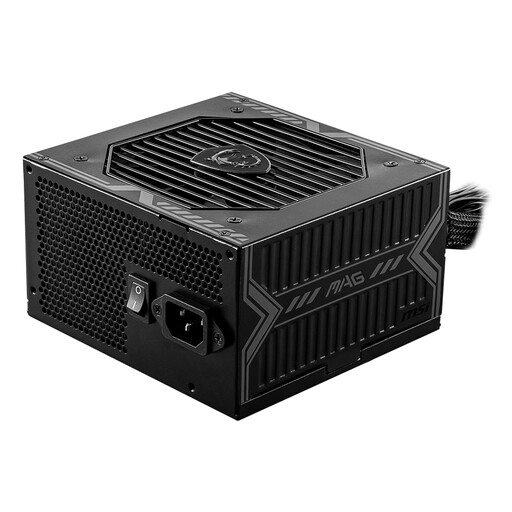
Why This Fits Their Persona: Ideal for those building their first gaming PC with a mid-range graphics card. This power supply delivers reliable power without the premium price tag.
Prevents instability by providing sufficient and stable power (650W). The 80 Plus Bronze certification is a clear step up in efficiency compared to non-certified budget models.
Offers a solid foundation with an 80 Plus Bronze certification and various protection mechanisms. The 120mm fan is designed for quiet operation.
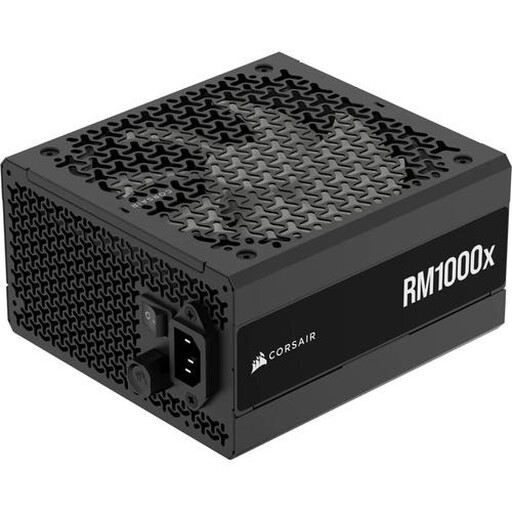
Why This Fits Their Persona: For the enthusiast with a high-end graphics card and processor who values a clean build, efficiency, and quiet operation.
The 1000W power supply provides ample headroom for overclocking and upgrades. The fully modular design eliminates cable clutter, which benefits airflow and aesthetics.
A popular choice thanks to its 80 Plus Gold efficiency and quiet operation. The fan only spins when needed, ensuring a virtually silent system under low load.
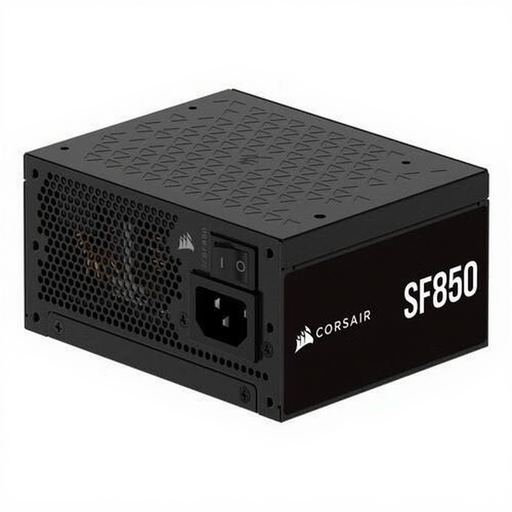
Why This Fits Their Persona: For the builder who wants to fit a powerful PC into a compact (Small Form Factor) case. Here, every inch and every degree of heat matters.
Delivers high power (850W) in a compact SFX power supply form factor, where a standard ATX power supply would not fit. Its high efficiency minimises heat, a critical point in small cases.
The 80 Plus Platinum certification ensures exceptional efficiency and less heat. Fully modular, which is essential for cable management in a tight case.
We have compiled a complete, up-to-date list of products that fully meet these strict selection criteria and EU regulations.
A good rule of thumb is to add up the maximum power consumption (TDP in watts) of your processor and graphics card and then add 150-200 watts as a buffer. For a mid-range system, 650W-750W is often sufficient. For high-end systems with the latest graphics cards, 850W to 1000W is a safe choice.
For builders on a tight budget, a non-modular power supply is a fine choice. However, if you value a tidy PC case, better airflow, and a simpler building experience, a (semi-)modular power supply is definitely worth the investment. You only use the cables you need, resulting in a much cleaner final build.
The main difference is the size. An ATX power supply is the standard size for most PC cases. An SFX power supply is significantly smaller and is specifically designed for compact Mini-ITX or Small Form Factor (SFF) systems. Always check which size fits in your case before making a purchase.
