
Vandaag of morgen in huis

Kwaliteit gegarandeerd

Welkomstaanbiedingen ontgrendelen: GRATIS bezorging | Tot 80% korting | Gratis 30 dagen JoyPlus-proefperiode
Download de app
When buying PC hardware, it is easy to focus on impressive figures, RGB lighting and phrases such as “gaming ready”. However, a high clock speed or striking case does not automatically mean that a component will work with your computer. The connector, dimensions and motherboard support often determine whether a purchase is suitable.
This guide helps you compare computer components, a gaming PC or accessories using verifiable specifications.
DDR3, DDR4 RAM and DDR5 RAM are not interchangeable. The notch in the module differs between generations, as do the electrical characteristics. A DDR5 module therefore will not fit a DDR4 motherboard.
Check the following before buying:
For example, a single 16 GB G.Skill AEGIS DDR4-3200 module is different from a 32 GB Kingston FURY Beast DDR5-5600 kit consisting of two 16 GB modules.
An NVMe SSD works through an M.2 slot, but not every M.2 slot supports the same PCIe generation. Check whether your motherboard supports PCIe 3.0 or PCIe 4.0 and whether the slot is suitable for the 2280 form factor.
The Lexar NM620 has a capacity of 512 GB and uses PCIe 3.0 x4 with NVMe 1.4. The product information states sequential read speeds of up to 3,300 MB/s and write speeds of up to 2,400 MB/s. These are stated product specifications; actual performance depends, among other things, on the system, temperature and amount of available storage.
Also consider the storage capacity. A 480 or 512 GB drive can fill up quickly when you install several large games.
A PC case needs to offer more than just a suitable appearance. Check the maximum graphics card length, CPU cooler height, power supply dimensions and supported motherboard form factor.
The MSI MAG PANO M100R PZ supports micro-ATX and Mini-ITX motherboards and graphics cards up to 350 mm. The Corsair 3500X ARGB offers more space: this midi tower supports ATX and EATX configurations, among others, and graphics cards up to 410 mm. A large graphics card or radiator therefore cannot simply be installed in every compact case.
For everyday use, multitasking and many games, 16 GB is often a practical starting point. Users who stream, edit video or run many programmes at the same time may want to consider 32 GB.
As well as capacity, pay attention to:
The G.Skill Flare X5 32GB uses DDR5-6000, CL36 and consists of two 16 GB modules. The manufacturer states support for AMD EXPO; however, always check your motherboard’s compatibility list.
An AM5 motherboard is designed for compatible AMD Ryzen processors, such as models from the Ryzen 7000, 8000 and 9000 series, depending on the specific board and BIOS version. The COLORFUL B650M Frost WIFI V15 has four DDR5 slots, two M.2 connections and Wi-Fi 6 support.
An Intel processor uses a different socket platform. The Intel Core Ultra 250KF Plus listed in the product information uses LGA1851 and Intel 800 Series chipsets. According to the stated specifications, DDR5 memory is required. Always check the socket, chipset, BIOS support and required CPU cooler before buying.
Good airflow starts with sufficient ventilation openings and sensible fan placement. Look at:
A glass side panel is primarily a design choice. It makes the internal hardware visible, but it does not replace good airflow. Place the computer on a stable, well-ventilated surface and keep the ventilation openings clear.
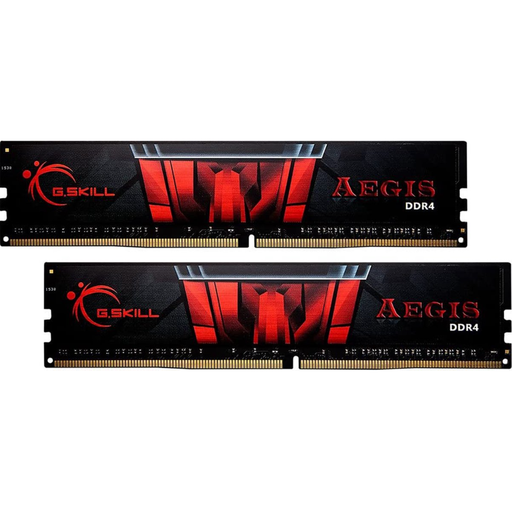
Why it suits this profile: A single 16 GB module is a straightforward choice for a desktop that still uses DDR4 and needs additional memory.
The specifications clearly state DDR4, 16 GB, 3200 MT/s and 1.35 V. Before buying, check that your motherboard supports these values.
16 GB capacity, DDR4 format, CL16 and support for an XMP profile according to the product information.
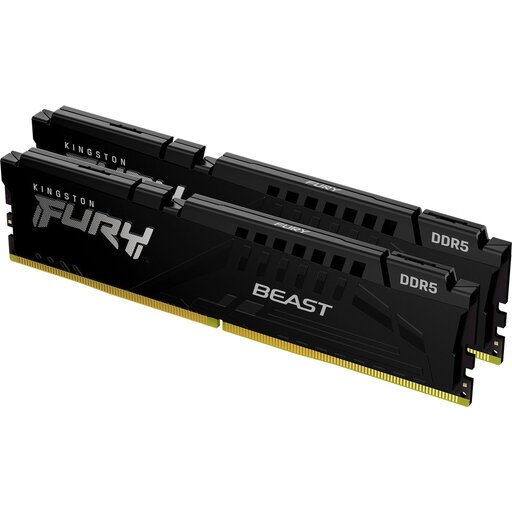
Why it suits this profile: This kit is designed for a new DDR5 platform where two modules and a higher memory capacity are preferred.
It is a 2 x 16 GB DDR5 kit. This makes the configuration clear, but DDR5 support from the motherboard and processor is still essential.
32 GB total, 5600 MT/s, CL36 and support for AMD EXPO and Intel XMP according to the stated specifications.
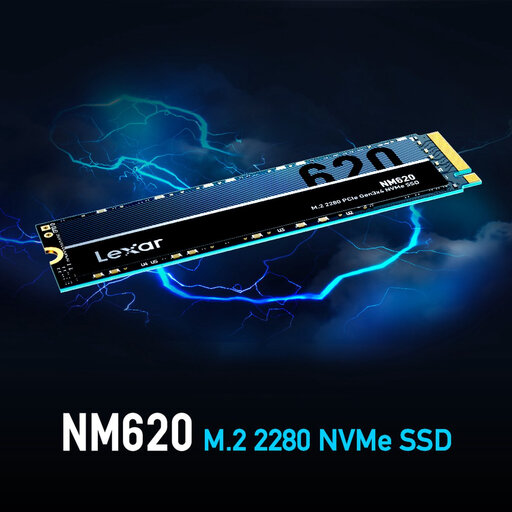
Why it suits this profile: Suitable for anyone looking to upgrade a desktop with an M.2 storage drive for the operating system, programmes or a modest game library.
The interface, form factor and capacity are specified. However, check that your motherboard has a free M.2 PCIe 3.0 x4 slot.
512 GB, M.2 2280, PCIe 3.0 x4, NVMe 1.4 and a stated read speed of up to 3,300 MB/s.
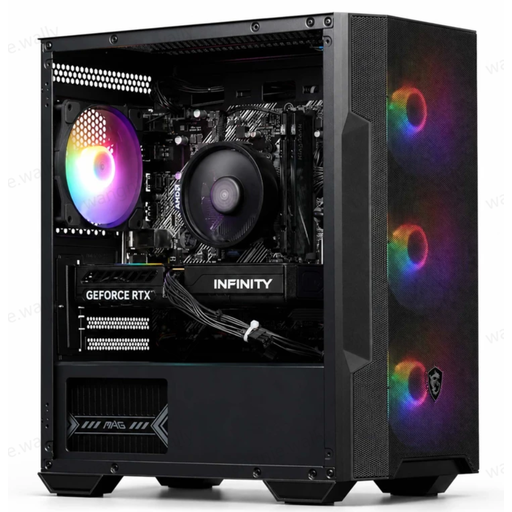
Why it suits this profile: A complete configuration can be convenient if you do not want to build a PC yourself and want to start gaming straight away.
The key components are listed: Ryzen 5 5500, RTX 5060 with 8 GB GDDR7, 16 GB DDR4, 480 GB SSD and a 550 W power supply.
Complete PC with four ARGB fans, an M.2 PCIe 4.0 SSD, Windows and a USB Wi-Fi adapter according to the product description.
We have put together a complete, up-to-date list of products that fully meet these strict selection criteria and the applicable European safety regulations.
An upgrade makes sense when your current motherboard, power supply and case are still suitable. Additional RAM memory or an NVMe SSD can make a noticeable difference in everyday use. A completely new system is more practical when the processor, motherboard and memory have all become outdated.
Always check the following when upgrading:
For a new system, first compare the platform: AMD AM5 with DDR5, or an Intel platform with the corresponding socket and chipset. Then choose the storage, cooling, power supply and case. You can choose a gaming keyboard, mouse and monitor separately to suit your playing style; with compact models, also pay attention to the layout, such as a 60% or 65% keyboard.
Check the type, pin layout, maximum capacity and supported speed of the motherboard. DDR3, DDR4 and DDR5 do not fit in the same memory slots. Consult the manufacturer’s manual or compatibility list.
An NVMe SSD uses PCIe and can offer higher transfer speeds than SATA. The difference depends on the task and the motherboard. For everyday use, start-up time, storage capacity and available space are at least as important as the maximum speed printed on the packaging.
Power consumption depends on the processor, graphics card, power supply, monitor and how long you play. Check the stated wattage of the power supply, but remember that this does not equal constant electricity consumption. An energy-efficient setting, good ventilation and switching off the PC when it is not in use can help reduce consumption.
