
Vandaag of morgen in huis

Kwaliteit gegarandeerd

Welkomstaanbiedingen ontgrendelen: GRATIS bezorging | Tot 80% korting | Gratis 30 dagen JoyPlus-proefperiode
Download de app
Buying a new gaming PC, desktop PC or individual component seems straightforward until you discover that the graphics card won’t fit in the case, the motherboard doesn’t have the right connection or the included storage fills up quickly. You can also end up with the wrong accessories: a US QWERTY keyboard may be awkward if you’re expecting a Dutch layout, while a wireless keyboard and mouse won’t always support Bluetooth.
As Joybuy’s Product Recommendation Officer, I check product information for practical details. Not flashy marketing terms, but connections, dimensions, capacity and intended use.
A powerful AMD Ryzen processor or RTX graphics card doesn’t automatically mean the whole system is right for your needs. Check the motherboard, power supply, cooling, RAM and available storage too.
If you’re buying a processor separately, you’ll also need to check the socket. The AMD Ryzen 5 7600X3D Boxed uses Socket AM5 and supports DDR5 memory. The product information also states that no heatsink or other cooling solution is included.
DDR5 RAM and an NVMe SSD have different functions. RAM helps run programmes temporarily; the SSD provides permanent storage for Windows, games and files. A complete gaming PC with 16 GB RAM and 500 GB storage may be suitable for a starter setup, but a large game library can quickly call for more storage.
A graphics card can take up several slots and may be too long to fit in some cases. According to the product specifications, the Gigabyte GeForce RTX 5080 Gaming OC is 340 mm long, 140 mm wide and four slots tall. The product description also recommends a power supply of at least 850 W with an 80+ Gold rating.
For accessories, the layout is just as important. A mechanical gaming keyboard with a US QWERTY layout doesn’t have the same key arrangement as a Dutch ISO keyboard. So check the layout before you order.
When choosing PC components, the processor and motherboard must use the same socket. AM5 processors work with AM5 motherboards, but you should also check BIOS support. Check the memory type too. An AM5 system is generally designed for DDR5, while some affordable complete systems still use DDR4.
The G.Skill Flare X5 kit contains 32 GB DDR5, split across 2 × 16 GB modules, with a stated speed of 6000 MHz and support for AMD EXPO. EXPO is a memory profile that you can enable through the BIOS on compatible systems. The product information also states that the modules are just 33 mm tall, which can be useful if you have a large CPU cooler.
When it comes to gaming, the graphics card model isn’t the only thing that matters. Check:
An RTX gaming PC with an RTX 5060 is aimed at a different price range and resolution from a system with an RTX 5070 or RTX 5080. So start by considering your monitor and preferred picture settings, then choose your GPU.
A 144 Hz gaming monitor may be a good choice for fast-paced games, while a 27-inch QHD monitor with USB-C and 90 W Power Delivery is particularly useful for working from home with a laptop. According to its specifications, the Dell Pro Plus P2725DE has a resolution of 2560 × 1440, a 100 Hz refresh rate and an adjustable stand.
For keyboards and mice, the connection, layout and power supply are key. A wired model doesn’t need batteries. A wireless keyboard and mouse give you more freedom to move around, but check whether the set uses a USB receiver, Bluetooth or both.
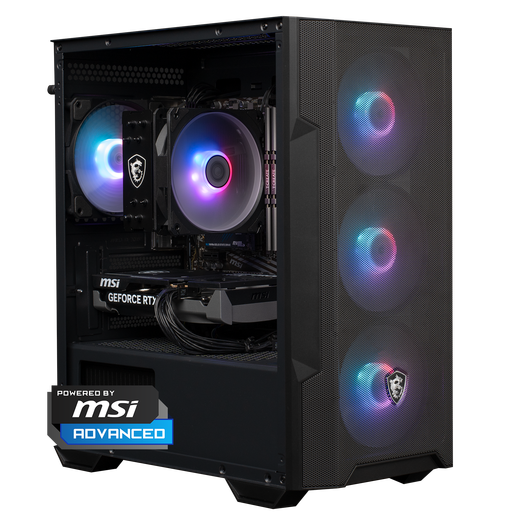
Why it suits this profile: This ready-to-use desktop PC combines a Ryzen 5 5500, RTX 5060, 16 GB DDR4 and 1 TB NVMe storage. That means you don’t need to choose individual PC components.
The key processor, GPU, memory and storage details are all listed together. Before buying, check that the stated performance is right for your games and monitor.
1 TB NVMe storage, Windows 11 Home, dimensions of 388 × 200 × 423 mm and a 650W power supply, according to the product information.
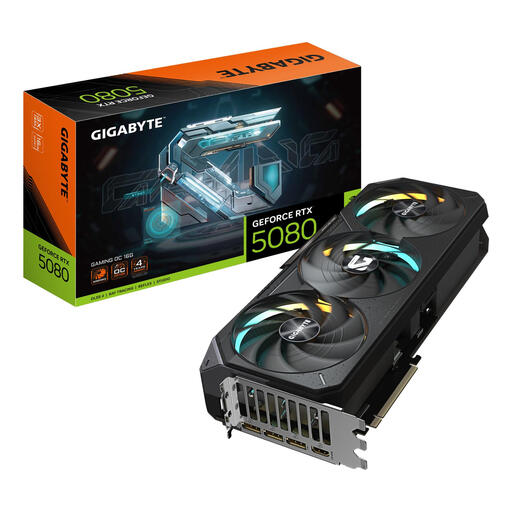
Why it suits this profile: For gamers and content creators looking for a powerful standalone GPU for high resolutions and demanding graphics applications.
The card has clearly stated dimensions, connections and recommended power supply requirements. Before buying, check your case width, available slots and power supply.
16 GB GDDR7, PCIe 5.0 x16, three DisplayPort connections and one HDMI connection, according to the product specifications.
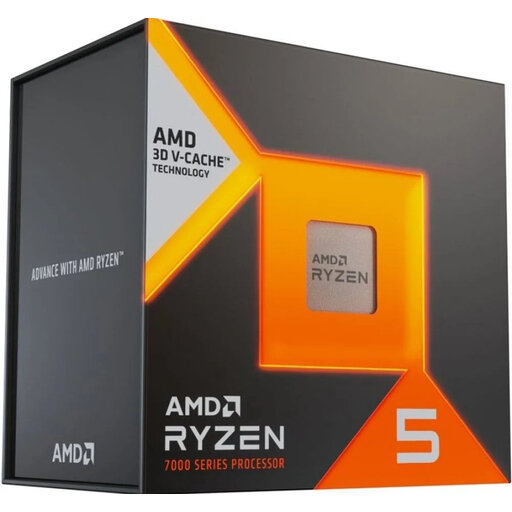
Why it suits this profile: For PC builders who want to put together their own AM5 platform and choose their cooling solution carefully.
The listing clearly states that it uses Socket AM5, supports DDR5-5200 and does not include a cooling solution. This means you can choose a compatible CPU cooler in advance.
6 cores and 12 threads, AM5 socket, integrated AMD Radeon Graphics and support for up to 128 GB of memory, according to the product specifications.
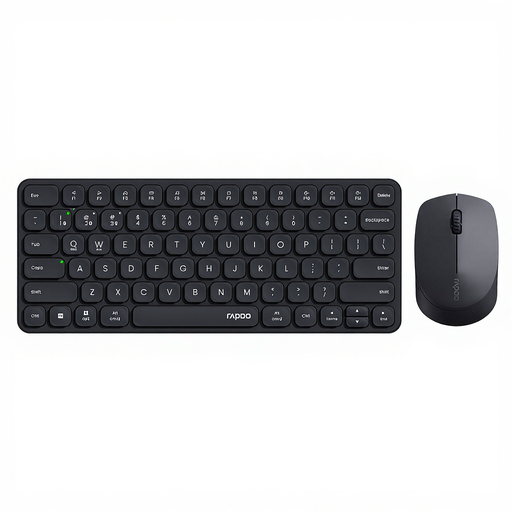
Why it suits this profile: For home workers and business users who want to switch between a laptop, tablet, phone and desktop.
The connection options are clearly listed: 2.4 GHz and Bluetooth 4.0/5.0. Check that the US QWERTY layout suits the way you type.
Supports up to four paired devices, has an adjustable mouse resolution of up to 2400 dpi and quiet scissor keys, according to the product information.
We’ve put together a complete, up-to-date list of products that meet these strict selection criteria and current European safety regulations.
At a minimum, you’ll need a processor, motherboard, RAM, SSD, power supply, case and graphics card. Add a CPU cooler if the processor doesn’t come with one. Before buying, check the socket, memory type, GPU dimensions and power supply connections.
16 GB is a common starting point for gaming and everyday multitasking. For streaming, video editing, virtual machines or demanding multitasking, 32 GB may be more practical. Always check that the motherboard supports the type and maximum capacity you want.
Power consumption depends on the CPU, graphics card, power supply, monitor and how long you use the system. A powerful GPU uses more energy when gaming than it does for office work. So check the stated GPU power consumption, recommended power supply and the monitor’s energy label. Turn off your PC if you won’t be using it for a while.
