
Vandaag of morgen in huis

Kwaliteit gegarandeerd

Welkomstaanbiedingen ontgrendelen: GRATIS bezorging | Tot 80% korting | Gratis 30 dagen JoyPlus-proefperiode
Download de app
An overheating PC is the enemy of every gamer and professional. It leads to throttled performance, unexpected crashes, and can even damage your expensive components in the long run. However, the PC cooling market is a maze of marketing terms and specifications. Many users fall into common pitfalls that not only cost money but also fail to deliver the desired results. Let's expose the most common mistakes so you can make an informed decision.
Pitfall 1: Fixating on Maximum Airflow (CFM/m?/h) Manufacturers love to advertise high CFM (Cubic Feet per Minute) values to indicate the power of a PC fan. But high airflow is useless if the fan can't push air through an obstacle, like a dense water cooling radiator or a dust filter. This is where static pressure becomes the crucial factor, yet it's often overlooked.
Pitfall 2: Paying the "RGB Tax" with No Performance Gain An RGB fan can visually transform a PC build, but aesthetics should never come at the expense of the core function: cooling. Some models entice with spectacular light shows but use subpar bearings or an inefficient blade design. The result is a noisy fan that wears out faster and fails to keep your components adequately cool.
To avoid these traps, you need to understand a few technical specifications. This will empower you to distinguish marketing hype from actual performance.
These are the two most important performance indicators for any PC fan.
A good balance is often desirable, but the application determines which of the two is more important.
Nobody wants a PC that sounds like a jet engine. For silent PC cooling, two things are key:
The most common sizes are the 120mm fan and the 140mm fan.
We've filtered some popular choices and matched them to specific user profiles based on their objective specifications.
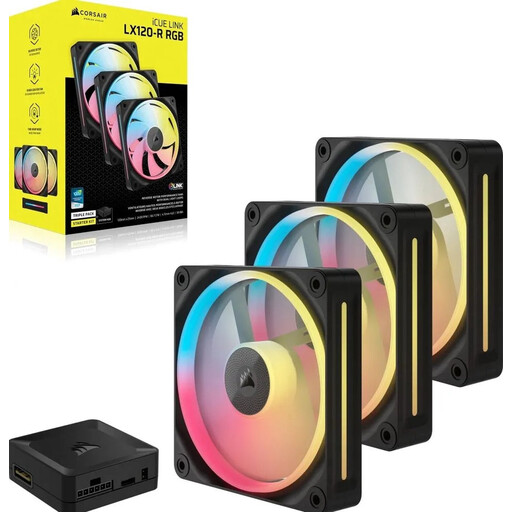
Why This Fits Their Persona: For those who want a visually clean build without cable clutter. Corsair's iCUE LINK system lets you daisy-chain multiple fans with a single cable, significantly simplifying cable management. The 18 RGB LEDs per fan offer extensive customisation.
This product bypasses the "RGB tax" pitfall. Beyond aesthetics, it delivers solid performance with a maximum speed of 2400 RPM and a static pressure of 3.8 mmH2O, making it suitable for radiators as well.
Simplified cable management via the Corsair iCUE LINK ecosystem. A good balance between airflow and static pressure.
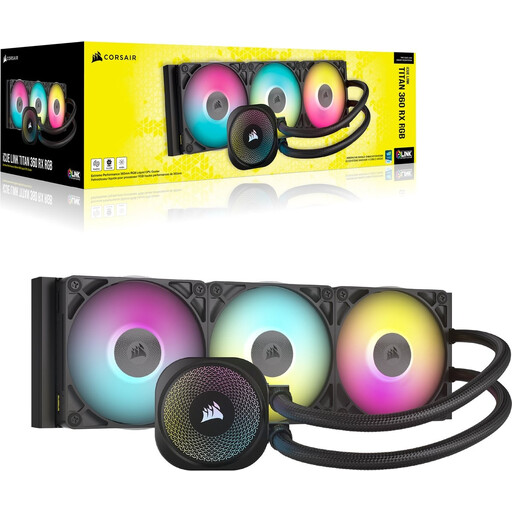
Why This Fits Their Persona: This user has a high-end CPU and wants maximum performance without thermal throttling. A 360mm AIO cooler like this is designed to handle the high thermal loads of the latest Intel and AMD processors (LGA 1700/1851, AM5).
This isn't a 'one-size-fits-all' solution. It's a specific, high-performance water cooling system for demanding builds. The combination of a powerful pump, a large radiator surface area, and pre-applied XTM70 thermal paste is geared for pure performance.
High cooling capacity for overclocking and heavy workloads. It also uses the iCUE LINK system for a clean installation and integrated control.
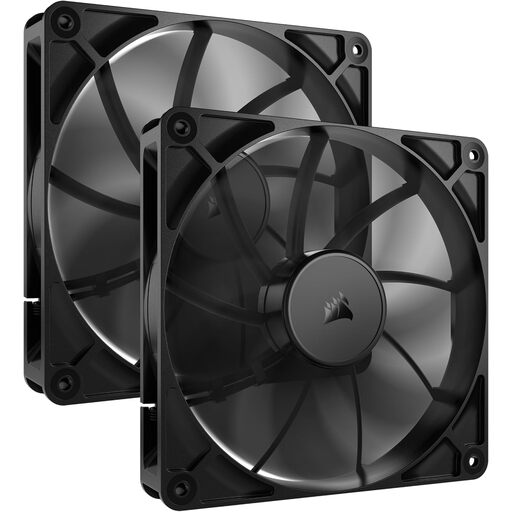
Why This Fits Their Persona: For professionals or gamers who prioritise a quiet environment. This 140mm fan is designed for high airflow at low RPMs, resulting in minimal noise output. The lack of RGB lighting underscores its focus on pure functionality.
This product completely avoids the "RGB tax." It's a no-nonsense PC fan that focuses on an efficient blade design and a quiet motor, not lighting. The specs (10 dB at low speed) are geared for silent operation.
Excellent airflow-to-noise ratio thanks to its 140mm size. Ideal for a build focused on silent PC cooling.
We have compiled a complete, up-to-date list of products that meet these strict selection criteria.
This depends on your case and components. A good baseline configuration for most systems is two intake fans at the front (pulling cool air in) and one exhaust fan at the rear (pushing hot air out). For high-end systems with a powerful graphics card and CPU, adding extra fans at the top (as exhaust) can further reduce temperatures.
Not necessarily. A high-end air cooler can often outperform a budget AIO water cooler. Water cooling, particularly an All-in-One (AIO) system, generally offers a cleaner look and can handle sudden, high temperature spikes more effectively. Air coolers, on the other hand, are known for their reliability (no pump that can fail, no liquid that can leak) and are often quieter in the low to mid-range. The choice depends on your budget, the CPU you need to cool, and your personal preference for aesthetics and maintenance.
PWM stands for Pulse Width Modulation. It's a technology that allows your motherboard or a dedicated fan controller to regulate the fan's speed with high precision. Instead of just lowering the voltage (which is less accurate), PWM sends digital pulses to control the motor. This means your fans can run whisper-quiet when your PC is idle and automatically ramp up to maximum cooling performance during gaming or rendering. Virtually every modern, high-quality CPU cooler or case fan features a 4-pin PWM connector.
