
Vandaag of morgen in huis

Kwaliteit gegarandeerd

Welkomstaanbiedingen ontgrendelen: GRATIS bezorging | Tot 80% korting | Gratis 30 dagen JoyPlus-proefperiode
Download de app
Choosing the right PC cooling can be the difference between a stable, high-speed system and an overheating, noisy machine. However, the market is flooded with options, from flashy RGB fan kits to complex water cooling systems. Much of the marketing focuses on aesthetics, often pushing the primary function—efficient cooling—into the background. Let's walk through the most common pitfalls to help you make an informed decision.
To avoid a bad purchase, it's crucial to understand a few key technical specifications. These determine the actual performance of your PC cooling solution.
These are two of the most important metrics for any PC fan.
The dimensions and speed control method directly impact performance and noise.
Modern systems, especially those with RGB, require careful attention to connectors. Ecosystems like Corsair iCUE offer a solution to the cable chaos. They often use a central hub and a proprietary connection standard to link multiple fans with fewer cables, managing lighting and speed through a single software suite. This can significantly simplify the build process, but it does lock you into products within that specific ecosystem.
Below are some popular choices tailored to different user profiles.

Why it's a match for this profile: For those who want a visually spectacular build without compromising on performance. The focus is on vibrant, customisable lighting that is easy to manage.
This kit tackles "cable spaghetti." Thanks to the iCUE LINK system, the fans can be daisy-chained with a single cable, drastically simplifying installation and cable management.
High performance: With a maximum speed of 2400 RPM and strong static pressure (3.8 mmH2O), this fan is suitable for both cases and radiators. The 18 RGB LEDs per fan offer extensive lighting effects.
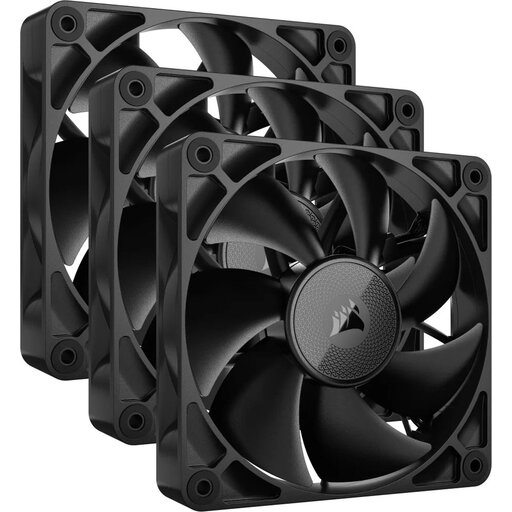
Why it's a match for this profile: Ideal for users who demand maximum cooling performance with minimal noise output. The focus is on efficiency and a discreet, clean design.
This model tackles the "noisy fan" pitfall. With a minimum noise level of just 10 dB and PWM control, the fans run whisper-quiet at low loads and only ramp up when absolutely necessary.
Efficient airflow: Despite its quiet operation, this fan delivers a powerful airflow of up to 74.2 CFM. The sleek, black design without RGB lighting fits into any professional or minimalist build.
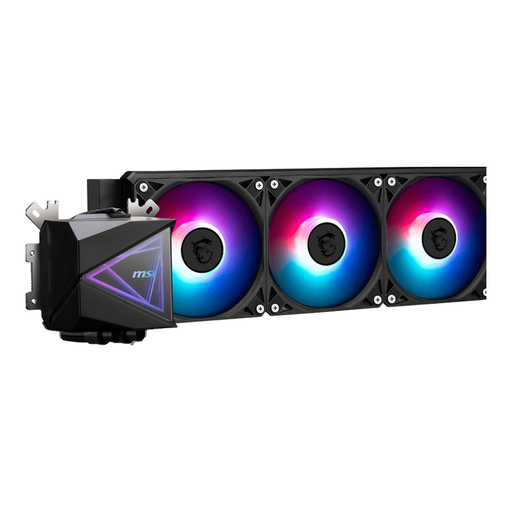
Why it's a match for this profile: For builders seeking a powerful and reliable cooling solution for their CPU without the complexity of a custom water-cooling loop. This is a complete, ready-to-use kit.
This product avoids the compatibility pitfall. The product information clearly lists support for modern sockets like AMD AM5 and Intel Socket 1700, ensuring it will fit your motherboard.
Powerful CPU cooling: A 360mm radiator with three fans provides excellent cooling capacity, ideal for high-end processors and overclocking. The installation is relatively straightforward compared to custom loops.
Good airflow is essential, and the right case provides the foundation for it. We've compiled a complete, up-to-date list of products that meet our strict selection criteria.
This depends on your case and components. A solid baseline for most systems is two intake fans at the front (pulling cool air in) and one exhaust fan at the rear (pushing hot air out). For more powerful systems with a hot graphics card and CPU, adding extra exhaust fans at the top can further reduce temperatures.
Not necessarily. A high-end air-based CPU cooler can often match or even outperform an entry-level All-in-One (AIO) water cooling solution. Water cooling typically has an advantage when cooling heavily overclocked, high-end CPUs and can provide a cleaner aesthetic inside the case. Air cooling, on the other hand, is often more reliable in the long run (no pump that can fail, no risk of leaks) and is usually easier to install.
A 140mm fan has larger blades than a 120mm fan. This allows it to move the same amount of air at a lower rotational speed (RPM). This generally results in quieter operation. If your case has space for 140mm fans, they are often an excellent choice for a quieter system. Always check your case's specifications before making a purchase.
